✦ Features ✦

Explore DNotifier features

DNotifier is AI infrastructure for AI-native applications. One SDK gives you model access, agents and multi-agent workflows, a knowledge base, realtime messaging and run tracing, so you don't stitch together and host a stack of separate tools.

Tap a platform layer to jump to that feature section.

Models

One API, every model

DNotifier connects your app to 8 model providers through one API, so you can switch models without changing application code.

Choose the provider and model per request, per agent or as a project default. Use your own API keys from AI Studio.

  • OpenAI, Anthropic, Google Gemini, Hugging Face, Perplexity, Azure AI, AWS Bedrock and Ollama (local models)
  • Set defaults on an agent and override them on a single call
  • Swap providers with environment variables between dev and production

Docs: Multi-model providers · Switch providers on one client
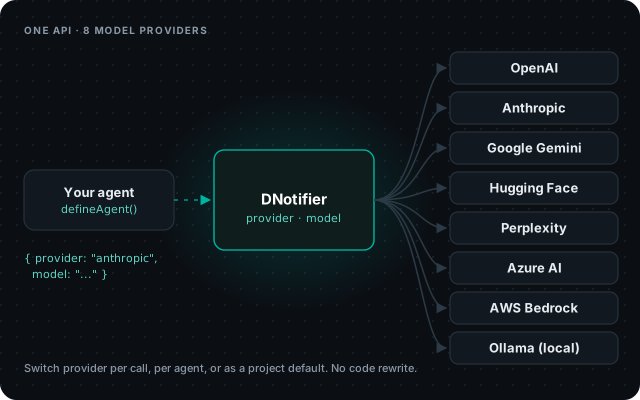
One API, every model

Models

Prompt Testing Studio

Prompt Testing Studio runs the same prompt on several models side by side so you can compare responses, latency and cost before you choose one.

Docs: Prompt Testing Studio

Prompt Testing Studio

Agents & workflows

Multi-agent workflows

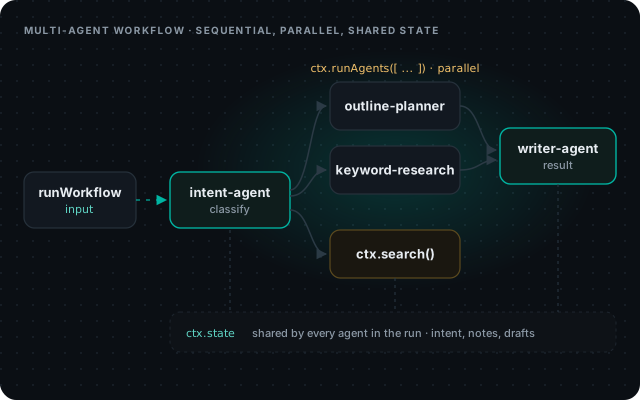
A DNotifier workflow runs named agents in order, in parallel or by routing, and every agent in the run shares the same state.

Define each agent once, register it on a workflow, and run the whole thing with one call. Every step is traced.

  • Sequential with ctx.runAgent, parallel with ctx.runAgents
  • Shared ctx.state so agents pass results to each other
  • Branch on an agent's output, for example route by intent

Docs: Workflow orchestration · Parallel agents & shared state

Multi-agent workflows

Agents & workflows

Tools and MCP servers

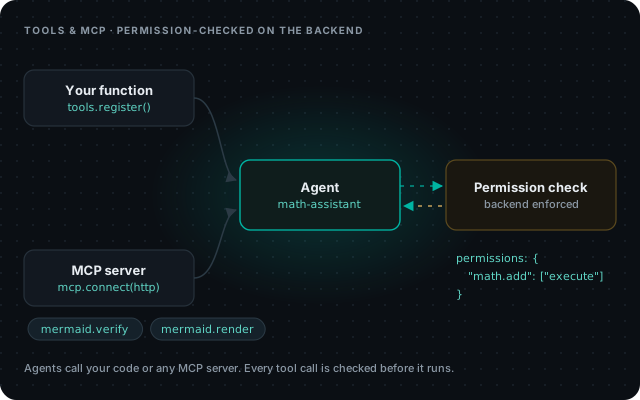
DNotifier agents can call your own functions and any MCP server's tools, and each tool call is permission-checked on the backend before it runs.

Register a function as a tool with a JSON schema, or connect an MCP server over HTTP in one call. Give the tools to an agent and list who may run them.

  • tools.register() for your own code, notifier.mcp.connect() for MCP servers
  • Per-tool permissions, enforced on the backend
  • Stream tool calls to your app with onAgentEvent

Docs: Tools & MCP agents · Example: MCP agent

Tools and MCP servers

Agents & workflows

Human approval steps

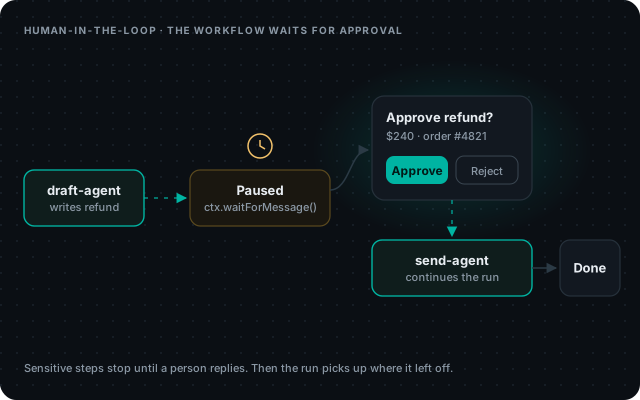
A DNotifier workflow can pause at any step and wait for a person to reply before it continues.

Put an approval in front of anything sensitive, like a refund, an email to a customer or a database write. The run resumes with the person's answer.

  • ctx.waitForMessage() pauses the step until a reply arrives
  • Set a timeout for approvals that never come
  • Use it before refunds, customer emails or database writes

Docs: WorkflowContext reference

Human approval steps

Agents & workflows

Remote agents

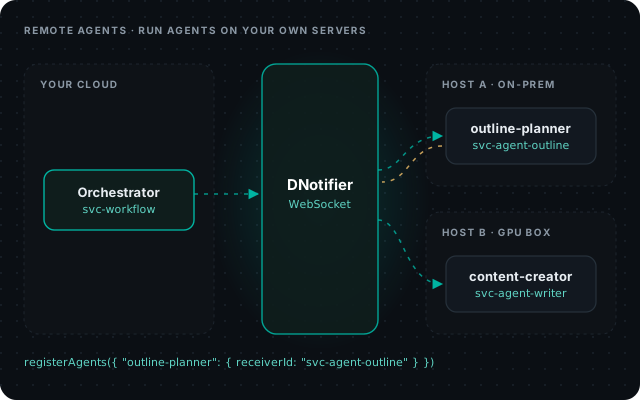
Remote agents let one workflow call agents that run on other servers, such as an on-prem machine or a GPU box, over a WebSocket connection.

Keep sensitive agents inside your network and still orchestrate them from one workflow.

  • Register an agent by receiverId instead of code
  • The host runs workflow.listen(notifier)
  • Works in JavaScript, Python and Dart

Docs: Remote agents

Remote agents

Agents & workflows

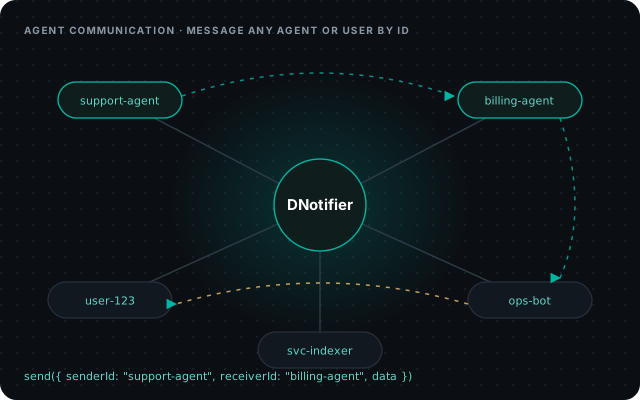
Agent communication layer

Every agent, user and service in DNotifier has an ID, and you can send a message straight to any of them.

Agents exchange context and trigger each other's work without a message broker in between.

  • Direct messages by receiverId, or to many receivers at once
  • Structured JSON, files and binary payloads
  • Same channel for agent-to-agent and agent-to-user

Docs: Send & receive

Agent communication layer

Agents & workflows

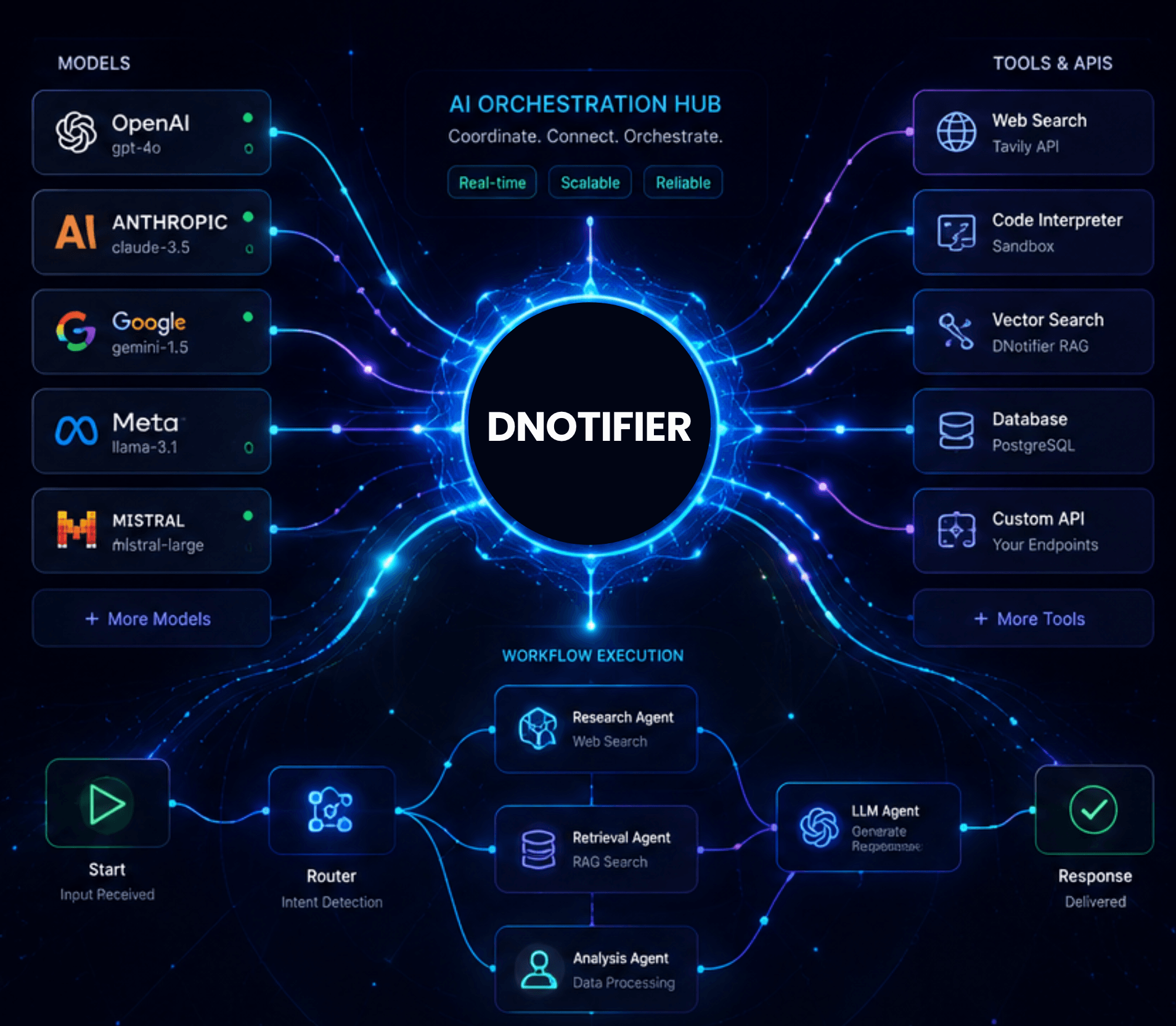
AI orchestration

DNotifier coordinates prompts, tools, agents and workflows from one platform, so you don't write and host the orchestration layer yourself.

Docs: Build a workflow

AI orchestration

Knowledge & memory

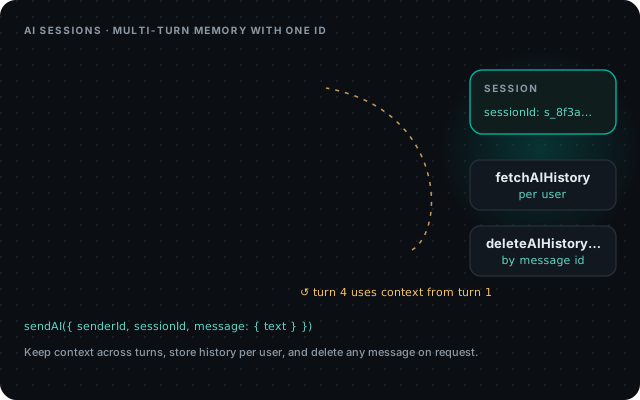
AI sessions and memory

AI sessions keep context across a multi-turn conversation with one session ID, and AI history stores each user's messages so you can fetch or delete them.

Save the session ID with a ticket or chat and the next request picks up where the last one ended.

  • sessionId for multi-turn context
  • fetchAIHistory and deleteAIHistoryMessage per user
  • Turn history off for internal calls with saveHistory: false

Docs: AI sessions · AI history

AI sessions and memory

Realtime

Realtime messaging

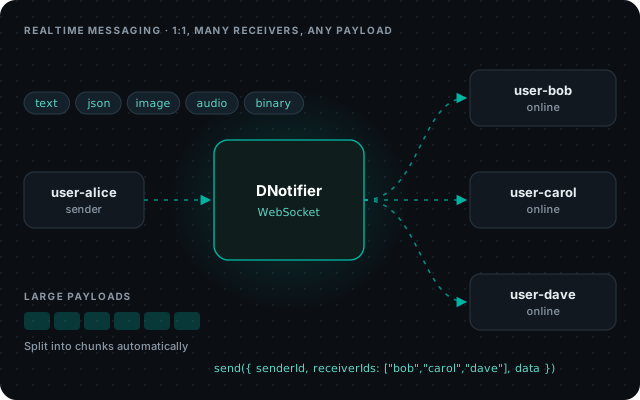
DNotifier delivers messages in realtime over WebSocket to one user or many, with text, JSON, images, audio or raw binary data.

Use the same SDK for live updates, notifications and agent output as you use for AI.

  • 1:1 with receiverId, groups with receiverIds
  • Structured payloads and binary frames with sendBinary
  • Large payloads are split into chunks automatically, based on your plan's message size limi

Docs: Realtime overview · Multiple receivers · Large messages & chunking

Realtime messaging

Realtime

Chat with history

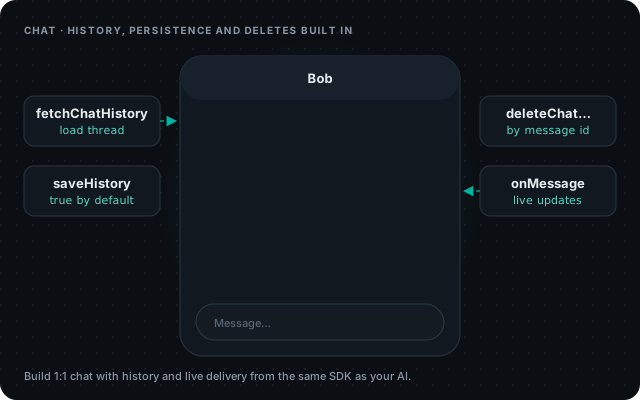
DNotifier gives you 1:1 chat with saved history, live delivery and message deletion from the same SDK as your AI features.

Load a thread when it opens, show new messages as they arrive, and remove a message when a user asks.

  • fetchChatHistory to load a conversation
  • History is saved by default; skip it per message
  • deleteChatHistoryMessage by message ID

Docs: Chat overview · Chat history · Example: minimal chat app

Chat with history

Observability

Workflow graph

The workflow graph shows every step of a run: inputs, outputs, AI calls, searches, tool calls and the path agents took.

Turn it on with observability: true, name steps with label, add your own steps with ctx.recordStep().

Docs: Workflow observability

Workflow graph

Observability

User journey graph

The user journey graph follows one user's interactions across workflows so you can see what happened in a session.

Docs: project documentation

User journey graph

Observability

Session logs and usage

Turn on session logging and every AI session appears in the dashboard, next to usage and plan limits for your app.

Check what a model was asked and what it answered, and see message, AI and storage use for your plan.

  • logs: true on the client sends AI sessions to Dashboard → Logs
  • Dashboard → Usage and Plan & limits
  • getPlanLimits() returns your quotas in code

Docs: Enable session logs · Plan limits & quotas

Session logs and usage

Developers & security

SDKs and transports

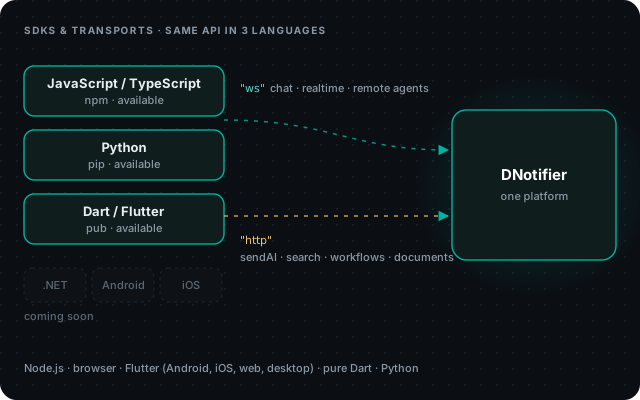
DNotifier has SDKs for JavaScript/TypeScript, Python and Dart/Flutter, with WebSocket for realtime work and HTTP for AI, search and workflows.

Use it from Node.js, the browser, Flutter on Android, iOS, web and desktop, pure Dart or Python. .NET, Android and iOS SDKs are coming.

  • npm install @dnotifier-realtime/dnotifier · pip install dnotifier · flutter pub add dnotifier
  • Same method names in every language (snake_case in Python)
  • Pick ws or http per client; run both in one app

Docs: Install an SDK · Transport method matrix

SDKs and transports

Developers & security

Security built in

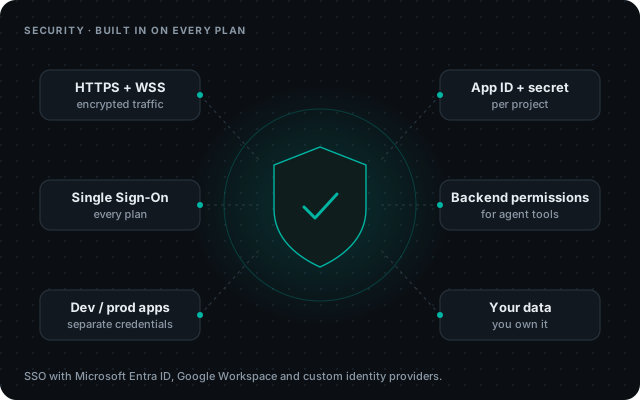
DNotifier encrypts all traffic over HTTPS and WSS, gives each app its own credentials, and includes single sign-on on every plan.

Agent tools are permission-checked on the backend, and you own the data you upload and send.

  • SSO with Microsoft Entra ID, Google Workspace and custom identity providers
  • Separate apps and secrets for dev and production
  • Enterprise: dedicated deployment options

Docs: Security best practices

Security built in

One SDK instead of a stack of tools

What teams usually assemble to ship an AI agent product, and what DNotifier gives you in its place.

You needUsuallyWith DNotifier
Agent developmentHand-written agent loops, retries and stateAgents defined in a few lines with instructions, provider, model and tools
AI agent frameworkAn open-source framework you host, patch and upgradeWe host and run your agents for you. Several agents can work together, a person can approve a step before it runs, and agents can also run on your own servers
Agent SDKs and AI SDKsA different SDK for each model provider and each serviceOne SDK for models, agents, knowledge and realtime. See the docs for all supported languages
Model access across providersAn LLM gateway or several provider SDKsOne API, 8 providers
Tool callingCustom glue code per toolYour own functions and MCP servers as tools, with backend permissions
Workflow automationA separate automation tool or a custom job runnerWorkflows you write in code (not drag-and-drop): steps run one after another, at the same time, or based on a result, with shared data and approval steps
Retrieval (RAG)A vector database plus an indexing pipelineBuilt-in knowledge base and semantic search
Realtime delivery to usersA WebSocket server or a realtime messaging serviceRealtime messaging, chat and history
Tracing and logsA separate tracing toolWorkflow graph, user journeys, session logs
FAQs

Frequently Asked Questions

How secure is DNotifier?

DNotifier is built with enterprise security in mind. All traffic uses encrypted connections (HTTPS and WSS), each project has its own app ID and secret, and every plan supports Single Sign-On (SSO) with Microsoft Entra ID, Google Workspace and custom identity providers.

Yes. Connect an MCP server over HTTP with notifier.mcp.connect(), and its tools become available to your agents. Each tool call is permission-checked on the backend before it runs.

Yes. Inside a workflow step, ctx.waitForMessage() pauses the run until a person replies, with an optional timeout. The workflow then continues with their answer.

Yes. Remote agents run on your own hosts and join a workflow over WebSockets. You register them by receiverId and the host calls workflow.listen().

Yes. Pass the sessionId from the first response to keep context across turns. AI history is stored per user and can be fetched or deleted through the SDK.

Yes. Send messages to one user or many over WebSocket, load chat history, delete messages, and send images, audio or binary data from the same SDK you use for AI.

JavaScript/TypeScript, Python and Dart/Flutter, plus an HTTP API. SDKs for .NET, Android and iOS are coming soon.

Each app has a message size limit that the SDK reads when it connects (notifier.messageSizeLimit). Larger payloads are split into chunks automatically.

DNotifier runs as a managed cloud service, and on-premises deployment isn't part of the standard plans. If you need a dedicated endpoint or a custom deployment, contact our team to talk about Enterprise options.

Because you get model access, a knowledge base with semantic search, multi-agent workflows, realtime messaging and run tracing from one SDK and one bill. Combining separate tools means choosing, connecting, paying for and maintaining each one yourself.

Open-source frameworks such as LangGraph and CrewAI are a good fit if you want to assemble, host and patch the stack yourself. DNotifier is proprietary and fully managed: one accountable team builds, secures, updates and supports the whole platform, from model access and the knowledge base to workflows, realtime messaging and run tracing. You don't track and patch a long list of open-source dependencies, Single Sign-On is included on every plan, you own your data, and you can switch between 8 model providers at any time, so you're never tied to one model. Start on the Free plan and test it on your own use case before you commit.

No. DNotifier connects to 8 model providers through one API: OpenAI, Anthropic, Google Gemini, Hugging Face, Perplexity, Azure AI, AWS Bedrock and Ollama. You choose the provider and model per request, per agent or as a project default, and you can use your own API keys or DNotifier's model subscription.

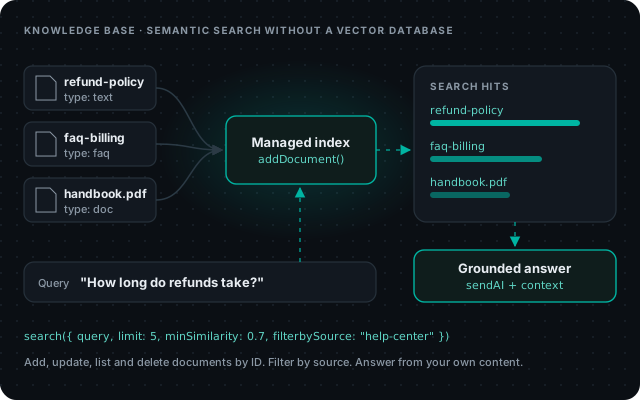
Yes. Upload your documents to the DNotifier knowledge base and your AI can answer from them using semantic search, without running a vector database. Size depends on your plan: up to 5,000 words on Starter, 100,000 words on Pro and unlimited on Enterprise. On Pro and Enterprise you can also update it through the API.

Yes. You define agents and register them in a workflow. The workflow can run agents one after another, in parallel, or route between them in code, and they share state. Workflows can also include human approval steps, and agents running on your own servers can join as remote agents over WebSockets.

Yes. DNotifier has SDKs for JavaScript/TypeScript, Python and Dart/Flutter, plus an HTTP API, so you can call it from your existing backend or app. Agents can also use tools from MCP servers you connect. SDKs for .NET, Android and iOS are coming soon.

No. The knowledge base and semantic search are managed by DNotifier, and the platform runs as a hosted service, so there's no vector database, message queue or AI infrastructure for you to run.

Yes. Start on the Free plan for realtime messaging or on Starter at $49 a month for AI features, then move to Pro or Enterprise as you grow. Every plan includes Single Sign-On, and Enterprise adds custom capacity, custom model deployment, an unlimited knowledge base, dedicated support and a tailored SLA.

Any team building AI features into a product. Common examples are fintech and banking, healthcare, education, e-commerce and retail, SaaS and developer tools, and logistics.

You need a project, an app ID and secret, and a few lines of SDK code to send your first AI request. To answer from your own content, upload it to the knowledge base and turn it on for your requests. The docs at dnotifier.gitbook.io/product-docs walk through each step.

Yes. Start on the Free plan and upgrade to Starter, Pro or Enterprise when you need more messages, AI usage or knowledge base space.

Yes. You own your data: the content you upload, your knowledge base and the messages your app sends belong to you. See our Privacy Policy (https://www.dnotifier.com/privacy-policy/) for how data is stored and processed.

DNotifier is an agent development platform: one SDK and a hosted runtime to build AI agents, multi-agent systems and code-first workflows, with 8 model providers, a knowledge base with semantic search, realtime messaging and run tracing built in. You write the logic in your own code and DNotifier runs it, so you don't have to stitch together and operate separate tools.