Short answer: an AI agent has no memory of its own. Every model call starts from what’s in the prompt. Persistent memory means your app saves things outside the model and puts the right ones back in: recent turns for the current conversation, a stored history of past conversations, and a searchable store of durable facts about the user. The agent reads relevant memories before it answers and saves new facts after, and your code decides what’s allowed to be remembered.
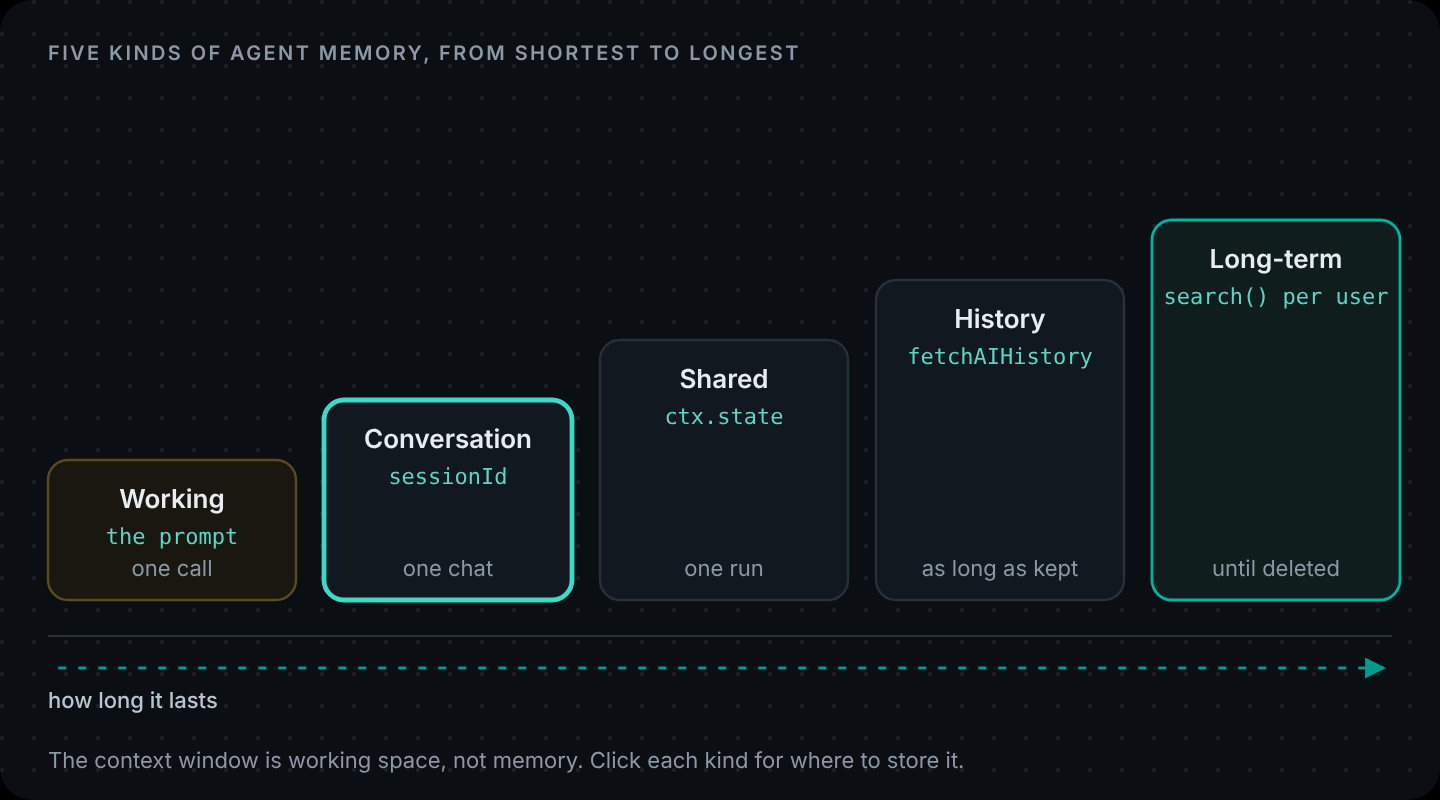
The context window is not memory. It’s working space. When a conversation ends, or gets long enough that early turns are trimmed, everything in it is gone unless your application kept a copy somewhere else.
Once you see it that way, “give my agent memory” turns into three clear engineering questions: what do we keep, where do we keep it, and when do we put it back into the prompt?
The kinds of AI agent memory
People use “memory” for several different things. It helps to name them separately, because each one is stored and used differently.
| Kind | What it holds | How long | Where it lives |
|---|---|---|---|
| Working memory | The current prompt: instructions, recent turns, tool results | One model call | The context window |
| Conversation (short-term) | The turns of the current chat | One session | A session ID, or recent turns your app sends back |
| History (episodic) | Past conversations, message by message | As long as you keep it | A history store you can fetch and show |
| Long-term facts (semantic) | Durable facts: “prefers email”, “wears size 42”, “runs on AWS” | Until changed or deleted | A searchable store, filtered per user |
| Shared memory | What several agents in one task need to know | One run | Workflow state |
Most “my agent forgot” bugs are a mix-up between these. Someone expects working memory to behave like long-term facts, or saves everything into history and expects the agent to find one fact in it.
How persistent memory works in practice
Every persistent memory design does two things around each conversation:
- Read before answering. Fetch what’s relevant (recent turns, matching long-term facts) and put it into the prompt.
- Write after answering. Decide whether anything new is worth keeping, and save it.
The interesting decisions are all in step 2. Save too little and the agent forgets things users expect it to know. Save everything and you fill the store with noise, cost and personal data you didn’t need to keep.
Short-term: keep the current conversation
For a single chat, you need the agent to see what was said a few turns ago. There are two simple ways.
Use a session ID for chat-style AI calls. DNotifier returns a session ID with the first AI response. Pass it back on the next message and the follow-up keeps the earlier context:
const first = await notifier.sendAI({
  senderId: userId,
  message: { text: "I need help with billing for order #4821." },
});
const sessionId = first?.metadata?.packet?.id ?? first?.metadata?.id;
await db.tickets.update(ticketId, { aiSessionId: sessionId }); // keep it with the ticket

const next = await notifier.sendAI({
  senderId: userId,
  sessionId, // same conversation
  message: { text: "What documents do I need to send?" },
});
Or send the last few turns yourself with each agent run. This is the approach our order-help agent uses, because it keeps the window small and under your control:
function buildInput(message, history = []) {
  const turns = history
    .slice(-6) // the last six turns are plenty for most support chats
    .map((t) => `${t.role === "user" ? "Customer" : "Assistant"}: ${String(t.text).slice(0, 500)}`)
    .join("\n");
  return turns ? `Earlier in this chat:\n${turns}\n\nNew message: ${message}` : message;
}
History: persistent chat history you can show and fetch
If users expect to come back tomorrow and see yesterday’s conversation, you need persistent chat history. AI calls save the exchange by default (saveHistory is true unless you turn it off), and you can load a user’s history later:
const history = await notifier.fetchAIHistory({ senderId: userId });History is great for showing a user their past conversations and for audits. It’s a poor long-term memory on its own, though: hundreds of messages are too much to put back into a prompt, and the useful fact (“I moved to Berlin”) is buried somewhere in the middle. That’s what the next layer is for. (It uses the same search as a RAG agent, filtered to one user.)
Long-term memory: facts the agent can look up
Long-term AI memory works best as small, separate facts in a searchable store, filtered to one user, that the agent can search when it needs them. With DNotifier you can build this on the knowledge base: each memory is a document whose source is tied to the user, and search is filtered to that source.
The safest way to give an agent memory is as two tools, scoped to the signed-in user in code, so the model can never read or write another user’s memories:
// memory-tools.js
import crypto from "node:crypto";
import { notifier, requestContext } from "./notifier.js";

const MEMORY_SENDER = "memory-service";
const sourceFor = (userId) => `memory:${userId}`;

function currentUser() {
  const ctx = requestContext.getStore();
  if (!ctx?.userId) throw new Error("No signed-in user for this request");
  return ctx;
}

export const recallMemory = notifier.tools.register({
  name: "memory.recall",
  description:
    "Search facts this customer told us in earlier conversations (preferences, sizes, setup). " +
    "Use it when the answer could depend on something they said before.",
  inputSchema: {
    type: "object",
    properties: { query: { type: "string", description: "What you want to know, in plain words" } },
    required: ["query"],
  },
  async execute({ query }) {
    const { userId } = currentUser();
    const hits = await notifier.search({
      senderId: MEMORY_SENDER,
      query,
      limit: 5,
      minSimilarity: 0.6,
      filterbySource: sourceFor(userId), // only this user's memories
    });
    return { memories: hits?.data ?? hits };
  },
});

export const saveMemory = notifier.tools.register({
  name: "memory.save",
  description:
    "Save one durable fact the customer stated about themselves, in one short sentence. " +
    "Only save things they would expect us to remember. Never save payment details, passwords or health data.",
  inputSchema: {
    type: "object",
    properties: { fact: { type: "string" } },
    required: ["fact"],
  },
  async execute({ fact }) {
    const { userId } = currentUser();
    const clean = String(fact).trim().slice(0, 300);
    if (/\b\d{12,19}\b|password|cvv/i.test(clean)) {
      return { saved: false, note: "Not saved: that looks like sensitive data." };
    }
    // A stable id per fact makes duplicates easy to spot (use updateDocument to change a fact).
    const hash = crypto.createHash("sha1").update(clean.toLowerCase()).digest("hex").slice(0, 12);
    const recordId = `mem-${userId}-${hash}`;
    await notifier.addDocument({
      senderId: MEMORY_SENDER,
      recordId,
      content: clean,
      type: "memory",
      metadata: { source: sourceFor(userId), savedAt: new Date().toISOString() },
    });
    await db.memories.add({ userId, recordId }); // your DB: lets you list and delete a user's memories
    return { saved: true };
  },
});
Then give both tools to the agent and tell it when to use them:
export const assistant = DNotifier.defineAgent({
  name: "assistant-with-memory",
  instructions:
    "You are a support assistant. Before answering, use memory.recall if the customer's earlier " +
    "preferences could matter. When the customer states a lasting fact about themselves and asks " +
    "you to remember it, or clearly expects you to, save it with memory.save. Don't save anything else.",
  provider: "open_ai",
  model: "gpt-4o",
  observability: true,
  tools: [recallMemory, saveMemory, lookupOrder],
  permissions: {
    "memory.recall": ["execute"],
    "memory.save": ["execute"],
    "orders.lookup": ["execute"],
  },
});
Four details in that code do most of the work:
- The user comes from the session, through
requestContext, never from the model. The model can’t ask for someone else’s memories because the tool has no user parameter. - The filter is set in code.
filterbySourceis alwaysmemory:<the signed-in user>. - Saving is narrow and checked. One short sentence, and an obvious sensitive-data check before anything is stored.
- You keep the record IDs in your own database, so “delete my data” is a loop over
deleteDocument()calls, not a search.
Test the isolation once with two test users before you ship: save a fact as user A, then make sure user B’s recall can’t find it.
One more thing to check: memories live in the same knowledge base as your other documents. Any AI call that searches the whole knowledge base without a filter (for example useKnowledgeBase: true, or a search() with no filterbySource) could pull in another user’s memories. Keep those calls filtered to your help-center source, or keep memories in a separate DNotifier app.
Saving memories automatically, without saving everything
Letting the agent call memory.save mid-conversation works for explicit requests (“remember that I’m vegetarian”). For facts users mention in passing, a common pattern is a short extraction step after the conversation, in a workflow:
const textOf = (res) => res?.data?.content ?? res?.content ?? "";

const extract = await ctx.sendAI({
  message: {
    useKnowledgeBase: false,
    messages: [
      {
        role: "system",
        content:
          "From this conversation, list at most 3 lasting facts the customer stated about themselves " +
          '(preferences, sizes, setup). Ignore one-off requests. Reply with JSON only: {"facts":["..."]}',
      },
      { role: "user", content: transcript },
    ],
  },
  saveHistory: false,
  label: "Extract memories",
});
let facts = [];
try { facts = JSON.parse(textOf(extract)).facts ?? []; } catch { facts = []; }
// Code decides what to keep: length checks, a sensitive-data filter, then addDocument() for each.
The model suggests; your code decides. That keeps the memory store small and predictable.
Shared memory in multi-agent systems
When several agents work on one task, they need a shared scratchpad: the customer ID from the session, the plan, intermediate results. In a DNotifier workflow that’s ctx.state. It lives outside every agent’s prompt, so nothing important depends on one model remembering it, and it shows up in the run trace:
async entry(ctx) {
  const { intent } = await ctx.runAgent("intent-agent", { input: ctx.input });
  ctx.state.intent = intent; // every later step can read it
  // ...the rest of the workflow
}
Keep shared memory for the run, and long-term memory per user. Mixing the two (“save the whole run state forever”) is how memory stores turn into junk drawers. The multi-agent workflow tutorial shows ctx.state in a full example.
How other frameworks handle it
If you’re comparing approaches: LangGraph separates short-term memory (a checkpointer that saves the conversation per thread) from long-term memory (a store you write to and search). Mem0 is a dedicated memory layer that extracts and retrieves memories, and it integrates with LangGraph and other frameworks; “mem0 + LangGraph” is a popular combination for long-term memory.
To be clear about DNotifier: it gives you sessions, AI history and a knowledge base you can use as a memory store, as shown above. It doesn’t automatically decide what to remember for you. You write that rule, which we think is the right default for anything that stores personal data.
A memory checklist
- Decide which kinds of memory you need before choosing tools.
- Scope every memory read and write to the signed-in user in code.
- Save small facts, not whole conversations, to long-term memory.
- Let users see and delete what’s remembered about them.
- Don’t store payment data, passwords or sensitive categories unless you have a clear reason and consent.
- Put a limit on how many memories you send back into the prompt (five is a good start).
Sessions, history and a searchable knowledge base in one SDK.
Explore DNotifier features · Sessions docs · Knowledge base docs · Create your app
FAQ
How do I give my AI agent persistent memory?
Store information outside the model and put the relevant parts back into the prompt. Keep recent turns or a session ID for the current conversation, save chat history if users need to see past conversations, and store durable facts in a searchable store filtered per user, which the agent reads with a recall tool before answering.
What is persistent memory in AI agents and how does it work?
It’s anything an agent can use from earlier interactions after the context window has been cleared. It works by reading relevant memories into the prompt before the model answers and saving new facts after, with your code controlling what gets saved and for which user.
How do AI agents remember previous conversations?
Either by reloading the conversation’s recent turns (with a session ID or by sending them again), or by searching a store of facts saved from earlier conversations. The model itself doesn’t remember anything between calls.
Is a bigger context window the same as memory?
No. A context window is working space for one call. It’s cleared when the conversation ends and fills up during long ones. Long context helps a single session; persistent memory is about what survives between sessions. We compared the two in long context vs agent memory.
What is shared memory in a multi-agent system?
State that several agents in one task can read and write, such as the plan, intermediate results and the user ID from the session. In a DNotifier workflow that’s ctx.state, which lives outside every agent’s prompt and appears in the run trace.
Does DNotifier have long-term memory?
DNotifier has sessions, AI history and a knowledge base with semantic search, which you can use as a per-user long-term memory store as shown in this guide. It doesn’t automatically extract and store memories; your code decides what to keep.