Part of the Build it with DNotifier series: Part 1 · Part 2 · Part 3 · Part 4 · Part 5 · Part 6.
Short answer: define each agent separately with
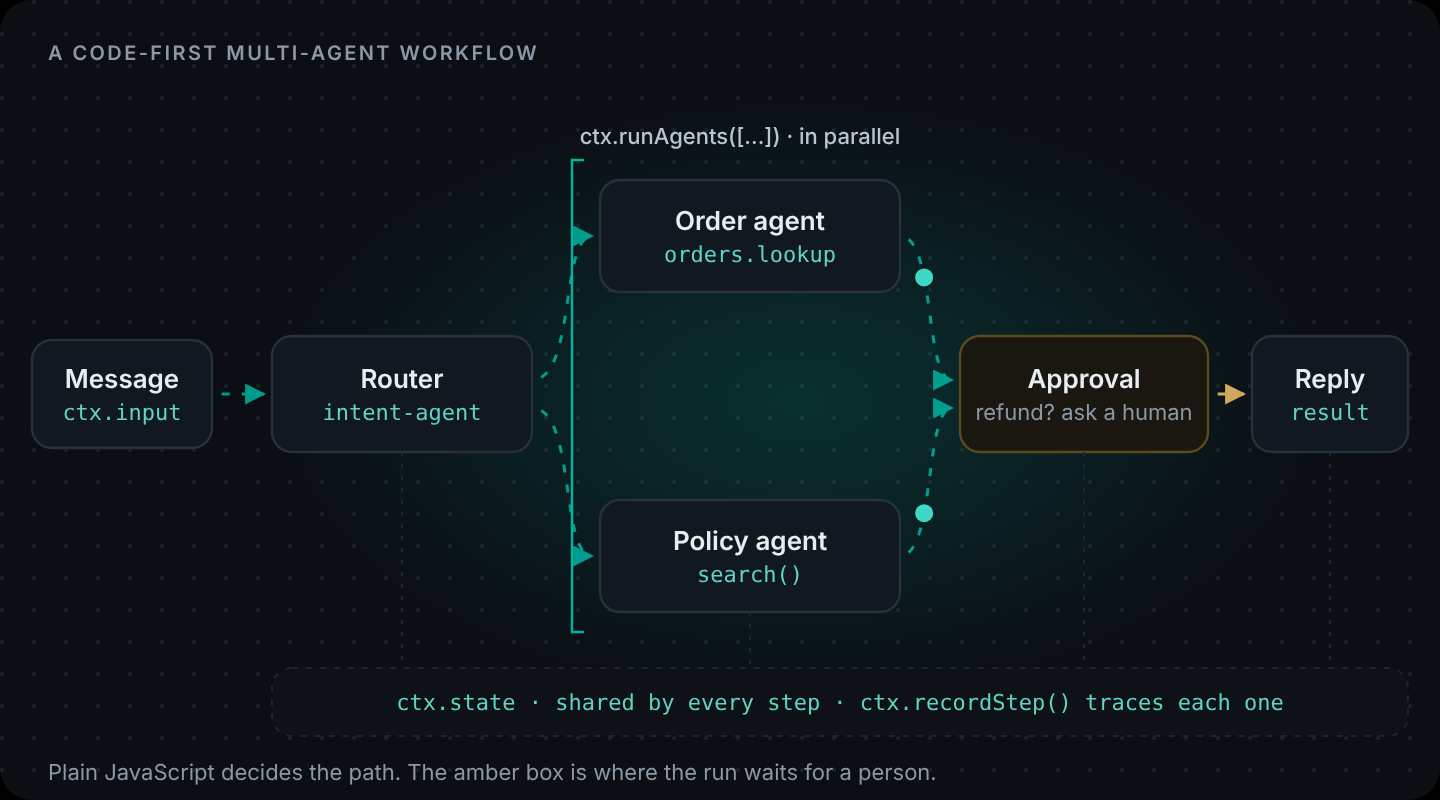
DNotifier.defineAgent(), register them on aDNotifier.Workflowwith.registerAgents(), and write the orchestration in the workflow'sentry(ctx)function. A router agent classifies the request,ctx.runAgent()calls one specialist,ctx.runAgents()calls several in parallel, and a finalctx.sendAI()step merges their answers. Your app calls it withnotifier.runWorkflow().
"Multi-agent" gets described as a team of AIs talking to each other. In practice, the version that works in production is plainer: a few small agents, each good at one thing, and ordinary code deciding which ones run. That's what we'll build.
For the vocabulary and architecture behind this tutorial, read what a multi-agent system is first.
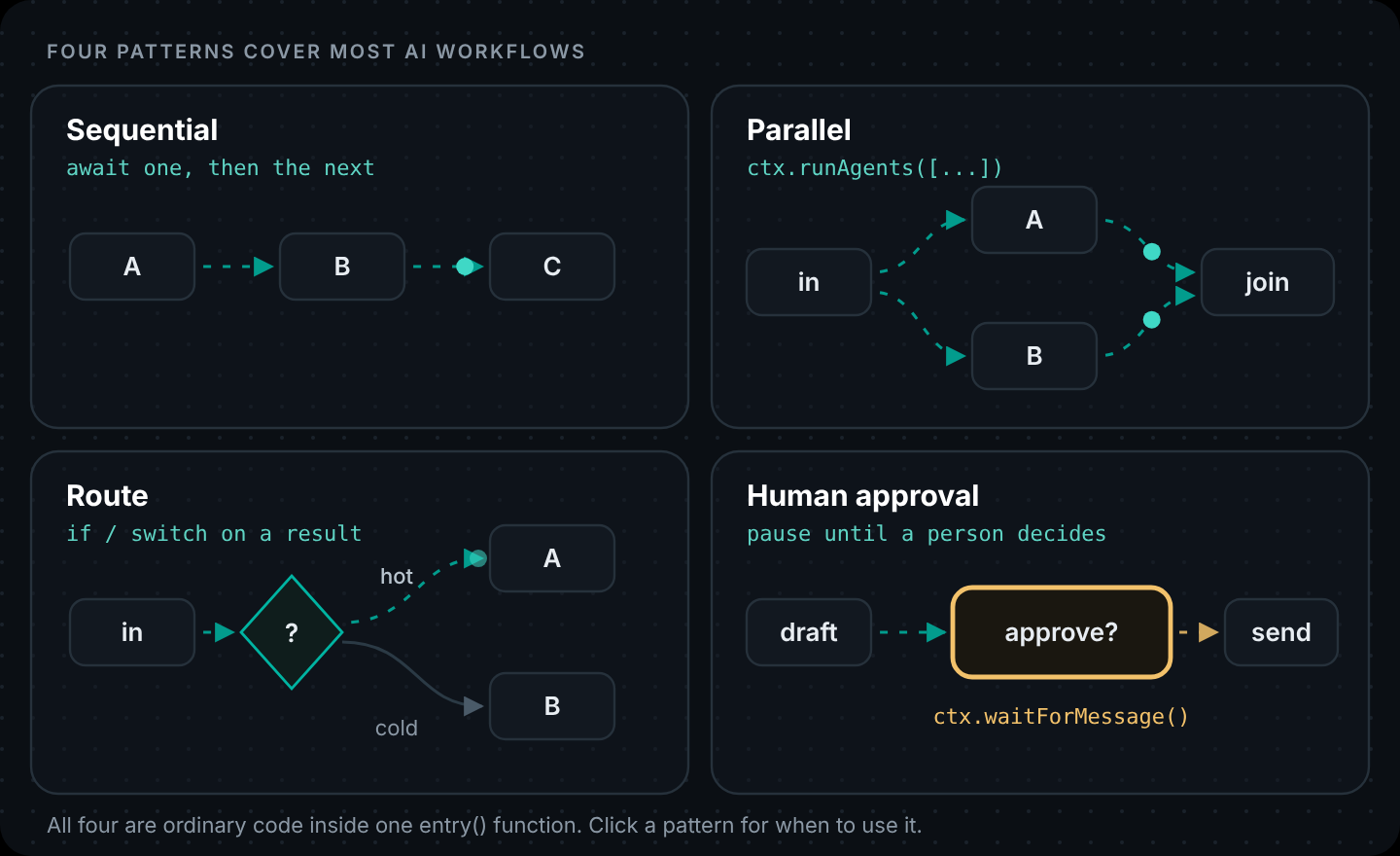
We'll extend the order-help agent from part 1. If you haven't used ctx.runAgents before, the four basic patterns are in How to Build an AI Workflow in Code. It already looks up orders, searches policies and opens refund requests. It's good, but every message, even "what are your opening hours?", goes through an agent with three tools and a long prompt. A router fixes that.
When multiple agents are worth it (and when they aren't)
More agents means more model calls, more latency and more places to debug. Split an agent when at least one of these is true:
- Different jobs need different tools. A policy question doesn't need order access. Fewer tools means fewer wrong tool choices, and a smaller blast radius.
- Different jobs suit different models. Classification can use a small, fast model; the customer-facing answer can use a stronger one.
- Parts of the work are independent. Two specialists in parallel are faster than one agent doing both in sequence.
If none of these apply, keep one agent. Seriously. A single well-scoped agent beats three vague ones.
The three agents
1. The router
Classifies the message. No tools, one short model call, JSON out.
const textOf = (res) => res?.data?.content ?? res?.content ?? "";

const intentAgent = DNotifier.defineAgent({
  name: "intent-agent",
  async run(ctx) {
    const res = await ctx.sendAI({
      message: {
        useKnowledgeBase: false,
        messages: [
          {
            role: "system",
            content:
              'Classify the customer message. Reply with JSON only: {"intent":"order"} if it is about ' +
              'a specific order, delivery or refund; {"intent":"policy"} for general rules; {"intent":"other"} otherwise.',
          },
          { role: "user", content: String(ctx.input) },
        ],
      },
      saveHistory: false,
      label: "Classify intent",
    });
    let intent = "other";
    try {
      intent = JSON.parse(textOf(res)).intent ?? "other";
    } catch {
      /* the model ignored the JSON instruction; treat as "other" */
    }
    ctx.state.intent = intent;
    return { intent };
  },
});
2. The policy agent
Searches the help center and answers only from what it finds. It has no tools at all, so it can't touch customer data even if a message tries to make it.
const policyAgent = DNotifier.defineAgent({
  name: "policy-agent",
  async run(ctx) {
    const hits = await ctx.search({ query: String(ctx.input), limit: 3, minSimilarity: 0.5, label: "Search help center" });
    const res = await ctx.sendAI({
      message: {
        useKnowledgeBase: false,
        messages: [
          {
            role: "system",
            content:
              "Answer using only these help articles. If they don't cover it, say so.\n\n" + JSON.stringify(hits),
          },
          { role: "user", content: String(ctx.input) },
        ],
      },
      saveHistory: false,
      label: "Answer from policy",
    });
    return { answer: textOf(res) };
  },
});
3. The order agent
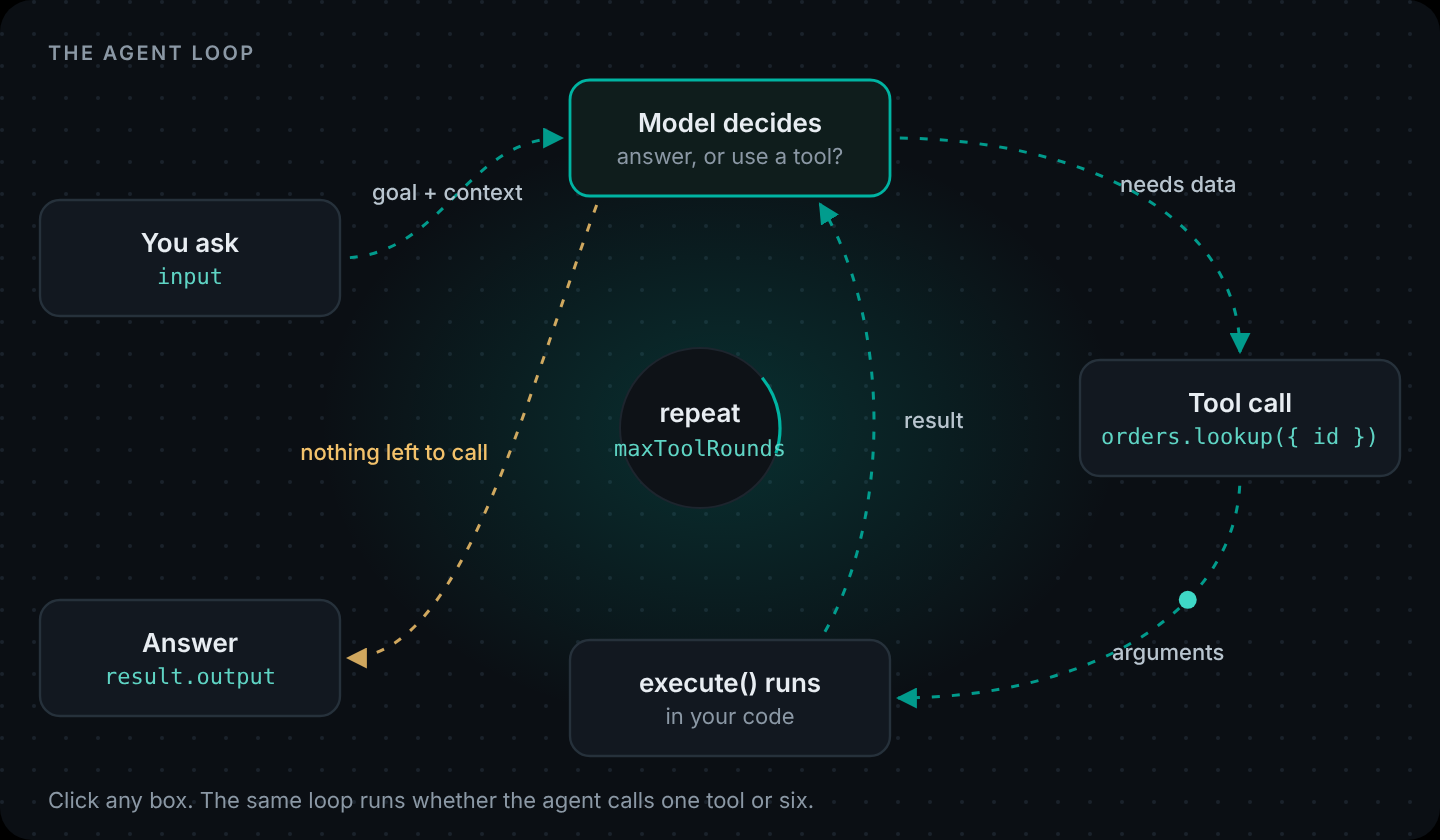
The tool agent from part 1, imported unchanged. That's the nice part of keeping agents as plain values: you reuse them.
The workflow
// workflow.js — register agents, then orchestrate in entry(ctx).
import { DNotifier } from "@dnotifier-realtime/dnotifier";
import { orderAgent } from "./agent.js";
// intentAgent and policyAgent from above ...

export const supportWorkflow = new DNotifier.Workflow({
  name: "support-router",
  description: "Routes customer messages to the order agent, the policy agent, or both",
  observability: true,
  async entry(ctx) {
    const { intent } = await ctx.runAgent("intent-agent", { input: ctx.input });

    if (intent === "policy") {
      return ctx.runAgent("policy-agent", { input: ctx.input });
    }

    if (intent === "order") {
      const { results } = await ctx.runAgents([
        { name: "order-help", input: ctx.input },
        { name: "policy-agent", input: ctx.input },
      ]);
      const [orderPart, policyPart] = results;
      const merged = await ctx.sendAI({
        message: {
          useKnowledgeBase: false,
          messages: [
            {
              role: "system",
              content:
                "Merge these two drafts into one reply under 80 words. Facts about the order win over general policy.",
            },
            {
              role: "user",
              content: `Order draft: ${orderPart?.output ?? JSON.stringify(orderPart)}\nPolicy draft: ${policyPart?.answer ?? ""}`,
            },
          ],
        },
        saveHistory: false,
        label: "Merge drafts",
      });
      return { answer: textOf(merged) };
    }

    return { answer: "I can help with orders, deliveries and refunds. What would you like to check?" };
  },
}).registerAgents({
  "intent-agent": intentAgent,
  "order-help": orderAgent,
  "policy-agent": policyAgent,
});
Three paths, all visible in about thirty lines:
- Policy questions skip the order agent entirely. One classification call, one search, one answer.
- Order questions run the order agent and the policy agent in parallel. "My parcel arrived broken, can I get my money back?" needs both the order facts and the damaged-items policy.
- Everything else gets a fixed reply, with no further model calls. Cheap, and it can't go off-script.
The merge rule ("facts about the order win over general policy") is the kind of decision that's easy to state in code and hard to get reliably from one big prompt.
Serve it to your app
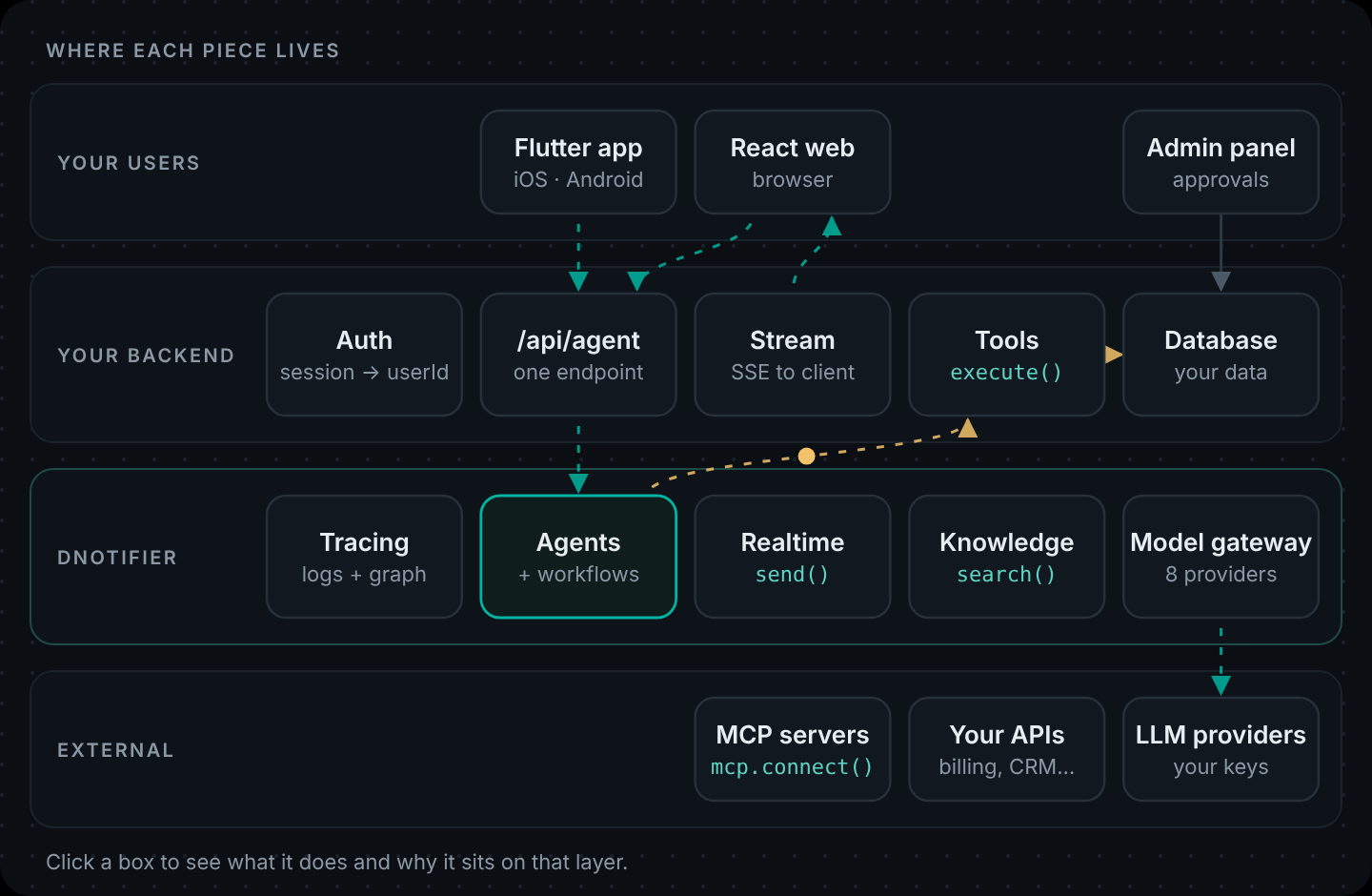
Add a route next to the single-agent one. The request context from part 1 still applies, so the order agent's tools still see only the signed-in customer (why that matters is in AI Agent Architecture):
// server/index.js (excerpt)
app.post("/api/agent/workflow", requireUser, async (req, res) => {
  const message = readMessage(req, res);
  if (!message) return;
  try {
    const run = await requestContext.run({ userId: req.user.id }, () =>
      notifier.runWorkflow({ workflow: supportWorkflow, input: message, senderId: req.user.id })
    );
    res.json({ answer: run.result?.answer, executionId: run.executionId });
  } catch (err) {
    console.error(err);
    res.status(502).json({ error: "The assistant could not answer right now." });
  }
});
React: change one URL.
const res = await fetch("/api/agent/workflow", {
  method: "POST",
  headers: { "Content-Type": "application/json", "x-demo-user": userId },
  body: JSON.stringify({ message: text }),
});
const { answer } = await res.json();
Flutter: same change.
final res = await http.post(
  Uri.parse('$apiBase/api/agent/workflow'),
  headers: {'Content-Type': 'application/json', 'x-demo-user': widget.userId},
  body: jsonEncode({'message': text}),
);
final answer = (jsonDecode(res.body) as Map<String, dynamic>)['answer'] as String? ?? '';
The clients don't know or care how many agents answered. That's how it should be.
Agents on other servers
Sometimes a specialist should live somewhere else: on the team that owns the data, behind a different firewall, or written in Python while the rest is Node. DNotifier calls these remote agents. In the workflow you register a reference instead of an agent:
.registerAgents({
  "intent-agent": intentAgent,
  "order-help": orderAgent,
  "policy-agent": { receiverId: "svc-policy-agent" }, // runs on another service
});
The service that hosts the real policy agent connects with that ID and calls workflow.listen(notifier). The entry function doesn't change: ctx.runAgent("policy-agent", ...) works the same whether the agent is local or remote. The remote agents page in the docs has the full setup for JavaScript, Python and Dart.
Deploying it
There's nothing new to deploy: the workflow runs inside the same API container as the single agent, so the setup below is the one from part 1. If you move a specialist out as a remote agent, it becomes a second small service with exactly the same shape.
Deploy to AWS
| Piece | AWS service | Why |
|---|---|---|
| React build | S3 bucket behind CloudFront | Static files on a CDN. Add a second CloudFront behavior for /api/* pointing at the load balancer, so the browser calls the same domain. |
| Node container | Amazon ECS on Fargate, behind an Application Load Balancer | Long-lived containers handle server-sent events and WebSockets without timeouts. |
| App ID + secret | AWS Secrets Manager | Injected into the task as environment variables. Never baked into the image. |
| Your data | Amazon RDS or DynamoDB | Only your tool code talks to it, from inside the VPC. |
| Logs | CloudWatch Logs | Log the DNotifier executionId next to each request. |
# See part 1 for full push steps — same container image, same port 3001.Watch out: Set the load balancer's idle timeout above your longest agent run if you use the streaming endpoint.
Deploy to Azure
Same Container Apps pattern as part 1 — one API hosts both /api/agent and /api/agent/workflow.
Deploy to Google Cloud
Same Cloud Run pattern as part 1.
# Dockerfile (same on every cloud)
FROM node:22-slim
WORKDIR /app
COPY package*.json ./
RUN npm install --omit=dev
COPY . .
ENV NODE_ENV=production
EXPOSE 3001
CMD ["node", "index.js"]
Debugging a multi-agent run
With observability: true, each run is traced: the router's classification, which agents ran, what each returned, and the merge. When an answer is wrong, the trace usually tells you which of three things happened:
- The router picked the wrong intent. Tighten its categories or add examples to its prompt.
- A specialist was wrong. Fix that agent alone and test it alone with
runAgent. - The merge lost something. Shorten the drafts or make the merge rule more explicit.
That's the real payoff of splitting agents: problems stop being "the AI is weird" and become a specific step you can fix.
What it costs in calls and time
An order question now makes more model calls than the single agent did: one to classify, the order agent's own calls, one for the policy answer and one to merge. Two things offset that. Policy and off-topic questions get cheaper, because they skip the tool agent. And the parallel step means wall-clock time is closer to the slowest specialist than to the sum of all of them. Measure both on your real traffic before you decide.
Agents, multi-agent workflows and remote agents in one SDK. Create your app · Multi-agent example in the docs · Workflows
Back to the start of the series: Part 1: How to Build an AI Agent
Get the code. Every example in this series, as runnable projects: dnotifier-agent-workflow-examples.zip. Run each one with your own app ID, secret and model key.
FAQ
What is a multi-agent workflow?
A process where several AI agents, each with its own job and tools, are coordinated by code or by another agent. A common shape is a router that picks a specialist, or several specialists running in parallel with a merge step.
How do AI agents communicate with each other?
In this design they don't talk directly. The workflow passes inputs to each agent and collects their outputs, and agents can share values through ctx.state. Agents on other servers are reached as remote agents through DNotifier's messaging.
Is multi-agent better than a single agent?
Only when jobs need different tools or models, or when work can run in parallel. Otherwise one well-scoped agent is simpler, cheaper and easier to debug.
Can I mix different models in one multi-agent workflow?
Yes. Each agent and each ctx.sendAI() call can set its own provider and model, so you can classify with a small model and answer with a larger one.
How do I run agents in parallel?
Register them on the workflow and call ctx.runAgents([{ name, input }, ...]). It returns { results } in the same order as the list.