How to Build Enterprise Systems with an AI Agent Workflow Platform

Moving an AI agent workflow from a local script into a reliable production system is where engineering teams hit a wall. In local environments, scripts run smoothly with single prompts. In live production environments, agents hang on API calls, loop infinitely, hallucinate responses, or lose context across complex operations.
Building production-ready software requires an infrastructure stack designed specifically for state management, continuous observability, real-time messaging, and multi-agent coordination.
That is where an enterprise AI agent workflow platform like DNotifier comes in.
What Is an AI Agent Workflow Platform?
An AI agent workflow platform is a specialized backend infrastructure system designed to orchestrate, execute, observe, and scale multi-step AI agents in production environments.
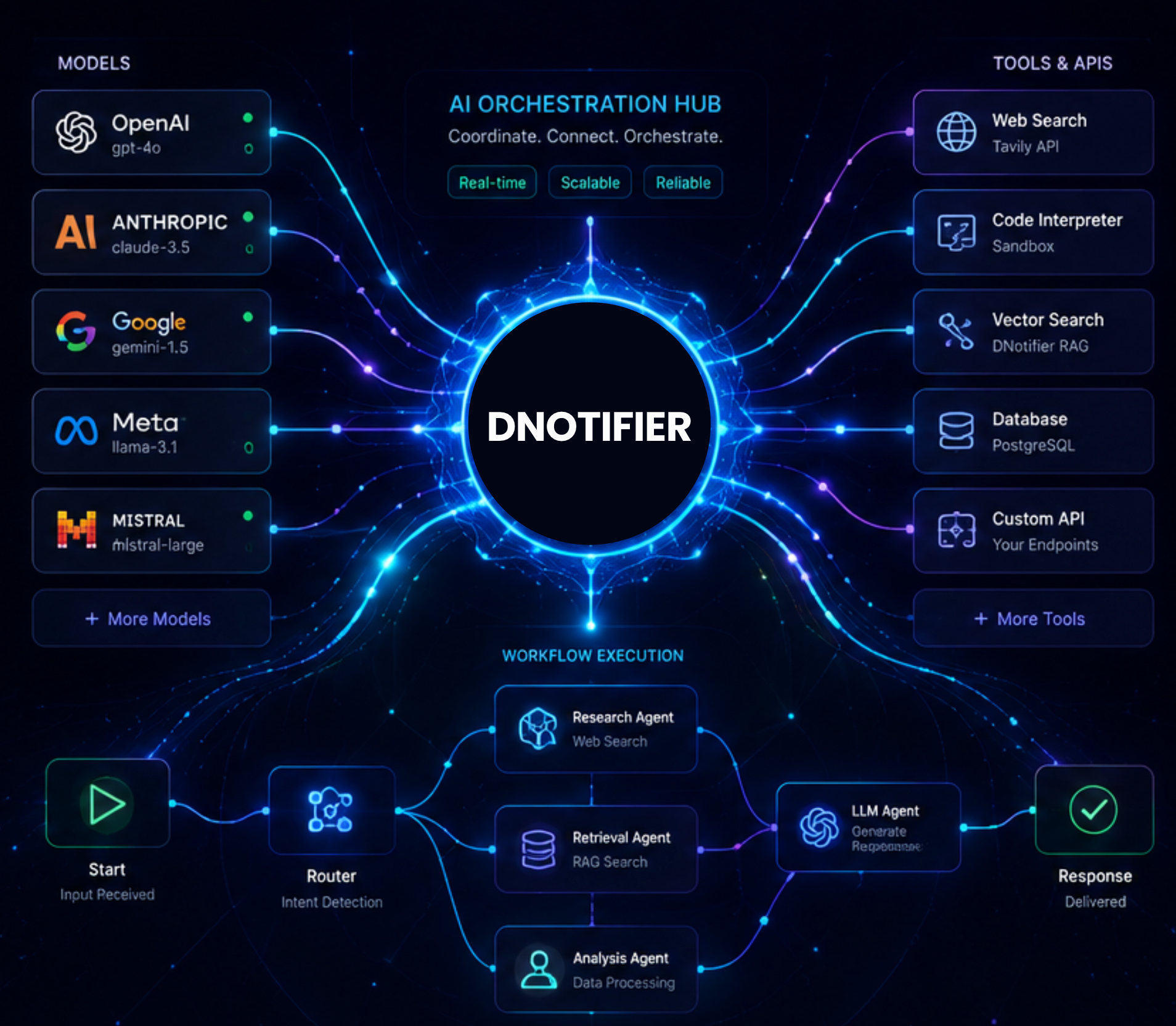
Unlike basic API wrappers, DNotifier acts as an AI agent platform that manages the full runtime lifecycle of autonomous AI agents. It connects large language models directly to external APIs, vector databases, persistent storage, and automated tool networks.
Instead of writing custom boilerplate code to handle retries, token streaming, and state tracking, engineers rely on DNotifier as an AI middleware tier for complex agent architectures.
+-----------------------------------------------------------------------+
|                     DNotifier Agent Middleware                        |
+---------------------+-------------------------+-----------------------+
|   AI Orchestrator   |   State & Memory Tier   |  Observability Logs   |
| (Workflow Engines)  | (Pub/Sub + Vector DBs)  | (Tracing & Analytics) |
+---------------------+-------------------------+-----------------------+
          |                       |                         |
          v                       v                         v
+-----------------------+ +---------------------+ +---------------------+
| External Tooling APIs | | Vector Database RAG | | Multi-Agent Systems |
+-----------------------+ +---------------------+ +---------------------+
Production Bottlenecks in Custom Agent Systems
When developers start building AI agents using raw scripts or basic libraries, initial prototypes come together quickly. However, systemic bottlenecks surface when scaling up to enterprise workloads.
Local Script Execution:
[User Request] ---> [Raw Script / In-Memory State] ---> [LLM API] ---> (Timeout Failure)
DNotifier Agent Infrastructure:
[User Request] ---> [DNotifier SDK / Persistent State] ---> [Multi-Agent Router]
                                                              |
                                    +-------------------+-------------------+
                                    |                                       |
                              [Research Agent]                      [Execution Agent]
                                    |                                       |
                                    +-------------------+-------------------+
                                                        |
                                              [Observability Log] <----------------------------+
Here are the primary failure points DNotifier solves:
Brittle State Management: Storing intermediate agent state in memory causes entire workflows to collapse during server crashes or network timeouts.
Lack of Observability: Debugging why an autonomous agent selected a specific tool requires deep step-by-step trace logging.
High Latency and API Bottlenecks: Synchronous agent calls slow down UI interactions, creating laggy experiences for end users.
Vendor Lock-in: Hardcoding pipelines around a single LLM provider makes switching to alternative models difficult when pricing or performance changes.
Solving these problems requires moving from loose scripts to a managed AI agent workflow platform that separates model execution from core application state.
Core Capabilities of the DNotifier Framework
DNotifier provides a unified AI agent SDK and API tier that eliminates setup friction while delivering high reliability for enterprise applications.
1. Unified Multi-Model AI Orchestration Platform
DNotifier AI acts as a flexible AI orchestrator. Developers can switch seamlessly between different LLM providers using a single standardized API. If one vendor experiences an outage or latency spike, your AI agent workflow dynamically fails over without breaking runtime execution.
2. Native Multi-Agent Systems
Complex tasks require specialized software agents working in sync. With the dnotifier agent framework, you can build coordinated multi-agent architectures where a primary router delegates tasks to focused worker agents—such as AI research agents, AI coding agents, or AI sales agents—with shared state persistence.
+--------------------------+
|   Primary Router Agent   |
+------------+-------------+
             |
     +-------+-------+
     |               |
     v               v
+-----------------------+  +-----------------------+
| AI Researcher Agent   |  | AI Writer Agent       |
| (Gathers Source       |  | (Drafts Final Output) |
|  Context)             |  |                       |
+-----------------------+  +-----------------------+
3. Real-Time AI Observability and Traceability
Debugging production AI agents requires full visibility into token usage, prompt versions, tool calls, and model latency. DNotifier logs every agent turn in real-time through its AI session logs, allowing software engineers to isolate failing nodes and continuously test new prompts without guessing.
4. Real-Time Pub/Sub Infrastructure
Instead of relying on slow polling, DNotifier offers real-time Pub/Sub communication channels over WebSocket and HTTP. Your application streams intermediate agent responses, status updates, and tool call outputs directly to end users as they execute.
How to Build a RAG Application with DNotifier
Beyond agent orchestration, DNotifier simplifies Retrieval Augmented Generation (RAG) pipelines. Integrating enterprise documents into your AI agent memory takes three straightforward steps:
1. Ingest Documents: Use the DNotifier document loader (addDocument) to upload internal policies, documentation, or databases into the DNotifier vector database.
2. Execute Semantic Search: Perform direct vector queries using the search method to inspect relevant content.
3. Run a RAG Agent: Pass grounded context to your RAG agent by setting useKnowledgeBase: true inside sendAI calls to eliminate model hallucinations.
FAQ
What is DNotifier used for?
DNotifier provides the core execution layer, persistent memory, tool access, and trace logs needed to run enterprise AI agents reliably in live production environments.
How do I build AI agent with DNotifier?
You install the DNotifier SDK for Python, JavaScript, or Dart, initialize your credentials, and define agent prompts or multi-step workflows using standard platform methods like sendAI or defineAgent.
Is DNotifier an AI agent framework or an AI agent infrastructure platform?
It is a complete AI infrastructure platform that combines a lightweight AI agent framework with managed runtime services, observability dashboards, vector storage, and real-time messaging.
Is DNotifier good for production?
Yes, DNotifier is built specifically to address production bottlenecks like API failures, unhandled exceptions, hidden latencies, and state loss during long-running tasks.
The Bottom Line
Building production-ready autonomous agents doesn't require stitching together unmaintained micro-libraries. It requires a workflow platform that handles state, orchestration, observability, RAG, and real-time messaging as first-class concerns.
DNotifier gives enterprise teams that infrastructure in one SDK—so agents survive production traffic instead of collapsing the moment a script leaves your laptop.
Explore DNotifier's SDK at dnotifier.com and see how orchestration, pub/sub, RAG, and multi-agent systems fit into a single production-ready platform.
Related articles
AI Agent Scalability: What It Actually Takes
When real users arrive, agents slow down or break—not because of the model, but queues, concurrency, and coordination. Learn what AI agent scalability means and how to scale workers, messaging, and observability before load exposes the gaps.
How to Build AI Agent Infrastructure With DNotifier
One agent works until you add memory, a second agent, or production monitoring. Learn what AI agent infrastructure actually includes and how DNotifier delivers orchestration, events, search, and traceability in one SDK.
AI Agent Infrastructure Architecture: A Practical Breakdown
Demo agents break when real users arrive. Learn the core components, architecture patterns, orchestration, and backend design that keep AI agent infrastructure reliable at scale.