Part of the Build it with DNotifier series: Part 1 · Part 2 · Part 3 · Part 4 · Part 5 · Part 6.
Short answer: write the workflow as one async
entry(ctx)function. Run independent steps at the same time withctx.runAgents(), do anything deterministic (scoring, thresholds, formatting) in plain code, branch withif, and pause for a person withctx.waitForMessage(). Start it withnotifier.runWorkflow()from a webhook or API route, and turn on observability so every run is traced.
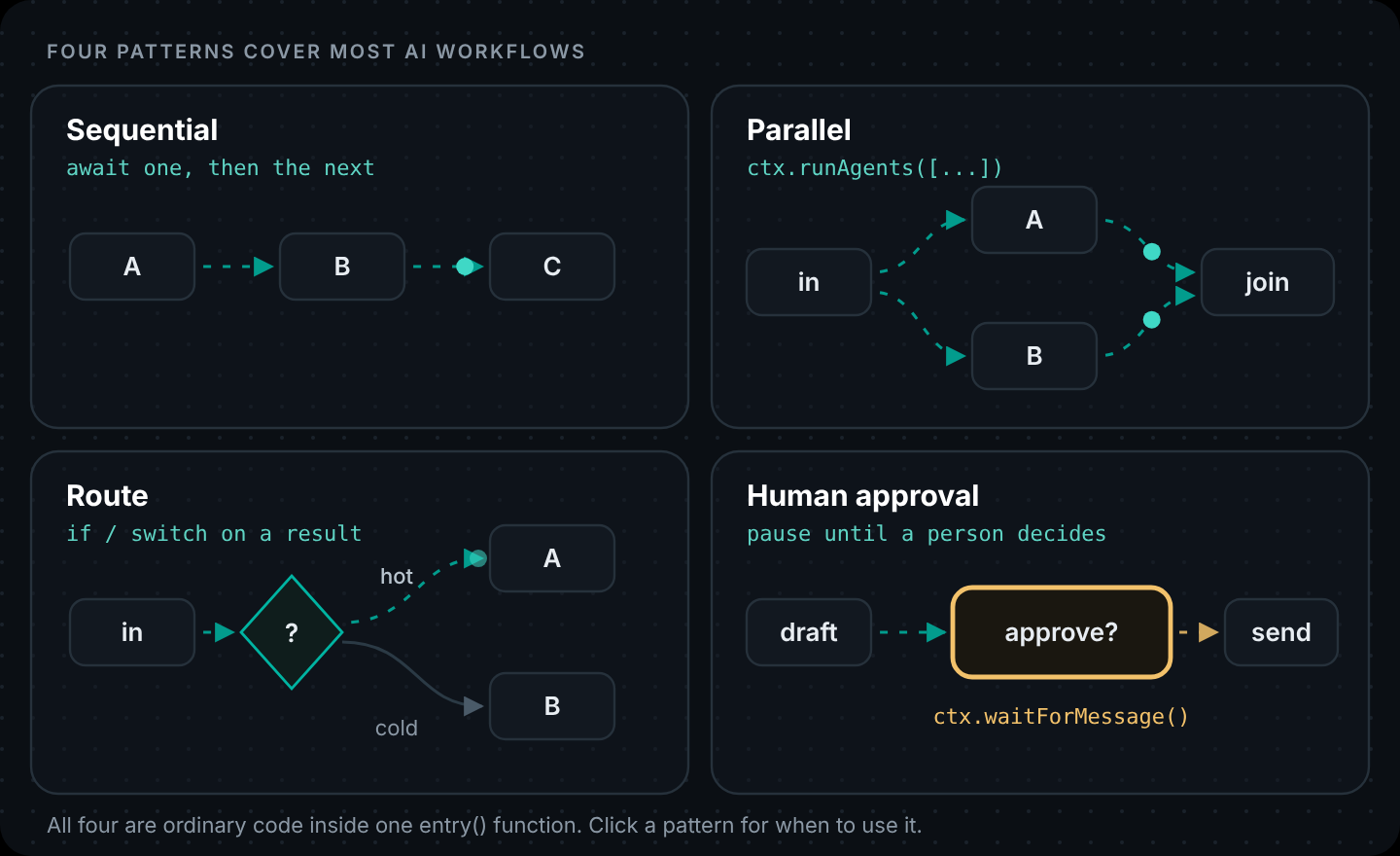
The 5-minute workflow had two steps in a row. That covers more use cases than you'd think, but sooner or later you'll need the other three patterns: steps that run at the same time, branches, and a pause for a human.
Most agent workflows in real products are one of those four shapes, or a mix. All four are ordinary code. There's no special graph language to learn: an await is a step, Promise-style fan-out is parallelism, an if is a branch.
Why code instead of a visual builder?
Visual tools like n8n are good, and for connecting SaaS apps with light logic they're often the fastest option. Code starts to win when:
- the logic has real conditions and calculations in it,
- you want the workflow reviewed, versioned and tested like the rest of your product,
- the workflow needs to live inside your app, next to your data and auth,
- or you want AI steps and agents to share state with the code around them.
DNotifier workflows are built for that second group. You write JavaScript, Python or Dart, and the platform handles the workflow orchestration: running the AI steps and the agents, the waiting, and the trace.
If your team already uses n8n's AI Agent node and you're wondering when to keep the canvas versus move logic into your repo, n8n's LangChain integration vs code walks through the handoff pattern (n8n triggers, HTTP into your workflow).
What we're building: an inbound lead workflow
This is an AI lead qualification workflow, and it's a good example of AI workflow automation that needs all four patterns at once. Someone signs up for your product. Within a minute, you want:
- Research on their company (what they do, whether they build with AI, team size).
- A fit check against your ideal-customer notes.
- A score, calculated by rules you can read and change.
- A route: low scores go to a nurture list; high scores get a personal first email.
- A human sign-off before that email goes out. AI drafts, people send.
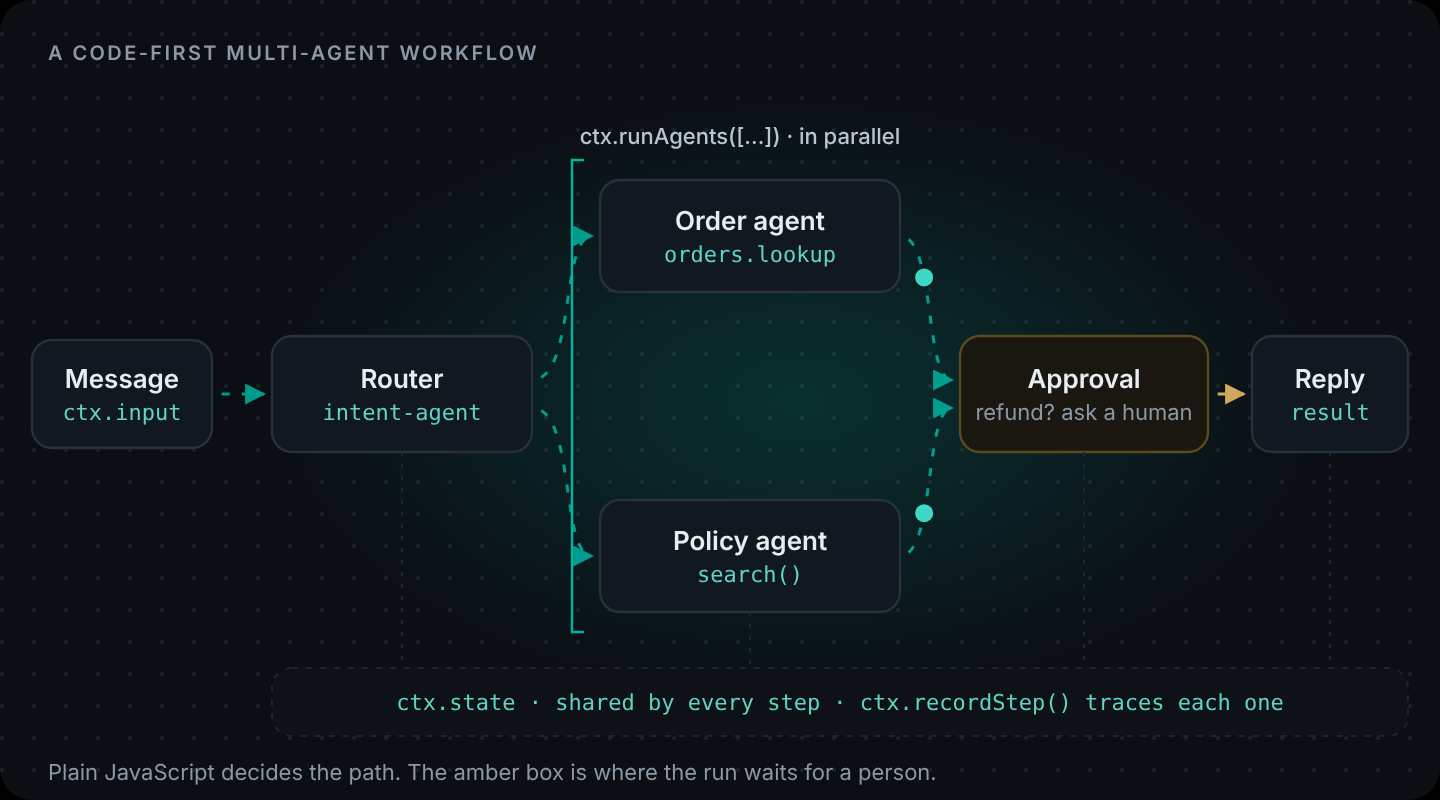
Steps 1 and 2 don't depend on each other, so they run as parallel AI agents. Step 3 is plain JavaScript on purpose. Step 5 makes it a human in the loop workflow: it pauses the run, sometimes for hours.
Step 1: Two small agents
Each parallel branch is an agent with a custom run function. The research agent uses Perplexity, which searches the web, through the same ctx.sendAI() call; you only change provider and model:
const textOf = (res) => res?.data?.content ?? res?.content ?? "";
const parseJSON = (s, fallback) => {
  try {
    return JSON.parse(s);
  } catch {
    return fallback;
  }
};

const researchAgent = DNotifier.defineAgent({
  name: "research-agent",
  async run(ctx) {
    const { company, website } = ctx.input;
    const res = await ctx.sendAI({
      provider: "perplexity",
      model: "sonar",
      message: {
        useKnowledgeBase: false,
        messages: [
          {
            role: "system",
            content:
              'Research the company. Reply with JSON only: {"summary":"two sentences","buildsWithAI":true|false,"teamSize":"1-10|11-50|51-200|200+|unknown"}',
          },
          { role: "user", content: `${company} (${website})` },
        ],
      },
      saveHistory: false,
      label: "Research company",
    });
    return parseJSON(textOf(res), { summary: "", buildsWithAI: false, teamSize: "unknown" });
  },
});
textOf and parseJSON are three-line helpers at the top of the file: one pulls the text out of a model response, the other parses JSON with a fallback.
The fit agent searches your knowledge base. Load a few short notes about who your best customers are, tagged with a source so they stay separate from everything else in the knowledge base (run once during setup):
await notifier.addDocument({
  senderId: "lead-workflow",
  recordId: "icp-agent-builders",
  content:
    "Best fit: software teams of 5 to 200 people building AI agents or multi-agent features " +
    "into their own product, who need tools, a knowledge base and realtime messaging in one SDK.",
  type: "text",
  metadata: { source: "icp" },
});
Then the agent searches only those notes with filterbySource:
const fitAgent = DNotifier.defineAgent({
  name: "fit-agent",
  async run(ctx) {
    const hits = await ctx.search({
      query: ctx.input.useCase,
      limit: 3,
      minSimilarity: 0.4,
      filterbySource: "icp",
      label: "Match against ICP notes",
    });
    const res = await ctx.sendAI({
      message: {
        useKnowledgeBase: false,
        messages: [
          {
            role: "system",
            content:
              'Score how well this use case fits our ideal customer notes, 0 to 10. Reply JSON only: {"fit":0-10,"why":"one sentence"}\n\nNotes: ' +
              JSON.stringify(hits),
          },
          { role: "user", content: ctx.input.useCase },
        ],
      },
      saveHistory: false,
      label: "Score fit",
    });
    return parseJSON(textOf(res), { fit: 0, why: "Could not score" });
  },
});
Both agents return a safe default when the model's JSON doesn't parse. In a workflow that runs unattended, a bad response should become a low-confidence result, not a crashed run at 3 a.m.
Step 2: The workflow
Create lead-workflow/workflow.js. Read it top to bottom, because that's exactly how it runs.
- Parallel.
ctx.runAgents([...])starts both agents at once and gives you their results in the same order. Total time is the slower of the two, not the sum. - Scoring in code. It's tempting to ask the model for "a lead score from 0 to 100". Don't. You get numbers that drift from week to week and can't be explained to your sales team. Let the model answer narrow questions (does this company build with AI? how well does the use case fit, 0 to 10?) and let code do the arithmetic. Then
ctx.recordStep()puts the scoring step in the run trace even though no model was involved. - Routing. An
if. Below 60, the run ends and returnsroute: "nurture". - The pause. For hot leads, the workflow drafts an email and then calls
ctx.waitForMessage(). The run stops there until a message arrives, or the 24-hour deadline passes. We check that the message is an approval for this lead and ignore anything else.
// workflow.js: inbound lead workflow. Sequential, parallel, routed, and a human sign-off.
import { DNotifier } from "@dnotifier-realtime/dnotifier";

const textOf = (res) => res?.data?.content ?? res?.content ?? "";
const parseJSON = (s, fallback) => {
  try {
    return JSON.parse(s);
  } catch {
    return fallback;
  }
};

// ... researchAgent and fitAgent from above ...

export const leadWorkflow = new DNotifier.Workflow({
  name: "inbound-lead",
  description: "Research, score and route a new signup; a person approves every outbound email",
  observability: true,
  async entry(ctx) {
    const lead = ctx.input; // { id, name, email, company, website, useCase }

  // 1. Parallel: research and fit check don't depend on each other.
    const { results } = await ctx.runAgents([
      { name: "research-agent", input: lead },
      { name: "fit-agent", input: lead },
    ]);
    const [research, fit] = results;

  // 2. Plain code decides the score. Easy to read, easy to change, no tokens spent.
    let score = fit.fit * 6;
    if (research.buildsWithAI) score += 25;
    if (["11-50", "51-200"].includes(research.teamSize)) score += 15;
    score = Math.min(100, Math.round(score));
    ctx.state.score = score;
    ctx.recordStep({ label: "Score lead", input: { fit: fit.fit, research }, output: { score } });

  // 3. Route.
    if (score < 60) {
      return { leadId: lead.id, route: "nurture", score };
    }

  // 4. Hot lead: draft a personal first email.
    const draft = await ctx.sendAI({
      message: {
        useKnowledgeBase: false,
        messages: [
          {
            role: "system",
            content:
              "Write a short first email (under 110 words) from a founder to a new signup. " +
              "Mention one specific thing about their company. No buzzwords. Plain text.",
          },
          {
            role: "user",
            content: JSON.stringify({ name: lead.name, company: lead.company, useCase: lead.useCase, research }),
          },
        ],
      },
      saveHistory: false,
      label: "Draft first email",
    });

  // 5. Human sign-off. The run pauses here until someone approves or edits the email.
    ctx.recordStep({ label: "Waiting for approval", output: { leadId: lead.id } });
    const deadline = Date.now() + 24 * 60 * 60 * 1000;
    let decision = null;
    while (!decision && Date.now() < deadline) {
      const msg = await ctx.waitForMessage({ timeoutMs: deadline - Date.now() });
      const data = msg?.payload?.toJSON?.() ?? msg?.data ?? msg;
      if (data?.type === "lead-approval" && data.leadId === lead.id) decision = data;
    }

    if (!decision?.approved) {
      return { leadId: lead.id, route: "sales-review", score, reason: decision ? "rejected" : "timed out" };
    }
    return {
      leadId: lead.id,
      route: "send-email",
      score,
      email: decision.editedEmail || textOf(draft),
    };
  },
}).registerAgents({
  "research-agent": researchAgent,
  "fit-agent": fitAgent,
});
The download at the end includes the complete file with both agents wired in.
Step 3: Start it from a webhook, resume it from a button
lead-workflow/server.js:
// server.js: a signup webhook starts the workflow; a sales approval endpoint resumes it.
import { randomUUID } from "node:crypto";
import express from "express";
import WebSocket from "ws";
import { DNotifier } from "@dnotifier-realtime/dnotifier";
import { leadWorkflow } from "./workflow.js";

const base = {
  appId: process.env.DNOTIFIER_APP_ID,
  secret: process.env.DNOTIFIER_SECRET,
  transport: "ws", // waitForMessage needs a live socket
  WebSocketImpl: WebSocket,
};

// The workflow host: the ID approvals are sent to.
const host = new DNotifier({ ...base, userId: "lead-workflow" });
// The approval desk: sends decisions to the host.
const desk = new DNotifier({ ...base, userId: "approval-desk" });
await Promise.all([host.connect(), desk.connect()]);

const app = express();
app.use(express.json());

// Called by your signup flow (or Stripe, HubSpot, a form tool...). Answers right away,
// because a hot lead can wait hours for a person to approve the email.
app.post("/webhooks/signup", (req, res) => {
  const lead = { ...req.body, id: randomUUID() };
  res.status(202).json({ leadId: lead.id });

  host
    .runWorkflow({ workflow: leadWorkflow, input: lead, senderId: "lead-workflow" })
    .then(({ result, executionId }) => {
      console.log("lead done", executionId, result);
      // route === "send-email" → hand result.email to your mailer
      // route === "nurture"    → add to your newsletter list
    })
    .catch((err) => console.error("lead workflow failed", lead.id, err));
});

// Your sales team's tool calls this. Protect it with your own auth.
app.post("/leads/:leadId/decision", async (req, res) => {
  await desk.send({
    senderId: "approval-desk",
    receiverId: "lead-workflow",
    data: {
      type: "lead-approval",
      leadId: req.params.leadId,
      approved: req.body.approved === true,
      editedEmail: req.body.editedEmail ?? null,
    },
  });
  res.json({ ok: true });
});

const port = Number(process.env.PORT ?? 3002);
app.listen(port, () => console.log(`lead workflow on http://localhost:${port}`));
Three details here.
- The webhook returns 202 immediately. A workflow that may wait a day for approval can't hold an HTTP request open. We start the run, reply right away, and handle the result in
.then(). - WebSocket transport.
waitForMessageneeds a live connection, so this service usestransport: "ws"with thewspackage. (The 5-minute workflow used HTTP because nothing waited.) - Two clients. The workflow runs as
lead-workflow. The approval endpoint sends asapproval-desk, withsend()addressed tolead-workflow. Your sales team's tool (an internal page, a Slack button, whatever you have) callsPOST /leads/:leadId/decisionwithapprovedand an optional edited email.
Install and run:
npm install @dnotifier-realtime/dnotifier express ws
node --env-file=.env server.js

# simulate a signup
curl -s localhost:3002/webhooks/signup -H "content-type: application/json" \
  -d '{"name":"Sara","email":"sara@example.com","company":"Acme Robotics","website":"acme.example","useCase":"multi-agent support for our field technicians"}'
A limit to know about
In this version, one host ID (lead-workflow) receives approvals for every waiting run, and each run ignores messages that aren't for its lead. That's fine for a handful of hot leads a day. If you expect many runs waiting at once, don't make them compete for messages. Two simple options:
- give each run its own host client and user ID (for example
lead-${lead.id}), or - end the run when the draft is ready (
route: "awaiting-approval"), store the draft in your database, and start a short second workflow when someone approves.
The second option is less clever and easier to operate. We'd pick it for high volume.
Deploy the worker
This workflow waits for people, so it needs a process that stays up with an open WebSocket. That rules out scale-to-zero serverless. Here's the same always-on worker on each cloud:
Deploy to AWS
| Piece | AWS service | Why |
|---|---|---|
| Webhook + approval page | ALB in front of the worker; approval page on CloudFront + S3 | The signup webhook and the sales team's decision button both reach the worker over HTTPS. Protect the decision endpoint with your own auth. |
| Worker container | Amazon ECS on Fargate, behind an Application Load Balancer | Must stay running: the paused workflow and its WebSocket live in this process. |
| App ID + secret | AWS Secrets Manager | Injected into the task as environment variables through the task definition's secrets block. Never baked into the image. |
| Your data | Amazon RDS or DynamoDB | Only your tool code talks to it, from inside the VPC. |
| Logs | CloudWatch Logs | Log the DNotifier executionId next to each request, so you can jump from a CloudWatch line to the run trace. |
| Models (optional) | Amazon Bedrock via the aws_bedrock provider | Add Bedrock in AI Studio → Providers if you want inference billed to your AWS account. Any other provider works too. |
# 1. Store the credentials (once)
aws secretsmanager create-secret --name dnotifier/prod \
  --secret-string '{"DNOTIFIER_APP_ID":"<app-id>","DNOTIFIER_SECRET":"<secret>"}'

# 2. Build and push the image
aws ecr create-repository --repository-name lead-workflow
aws ecr get-login-password | docker login --username AWS --password-stdin <account>.dkr.ecr.<region>.amazonaws.com
docker build -t <account>.dkr.ecr.<region>.amazonaws.com/lead-workflow:1 .
docker push <account>.dkr.ecr.<region>.amazonaws.com/lead-workflow:1

# 3. In the ECS task definition, pull the values from Secrets Manager:
#   "secrets": [
#     { "name": "DNOTIFIER_APP_ID", "valueFrom": "<secret-arn>:DNOTIFIER_APP_ID::" },
#     { "name": "DNOTIFIER_SECRET", "valueFrom": "<secret-arn>:DNOTIFIER_SECRET::" }
#   ],
#   "portMappings": [{ "containerPort": 3002 }]
# 4. Create the ECS service with a desired count of at least 1 and no scale-to-zero.
Watch out: A paused workflow lives in the worker's memory and on its WebSocket. Deploys restart the task, so drain or finish waiting runs first, or use the end-the-run-and-resume pattern from the article for long waits.
Deploy to Azure
| Piece | Azure service | Why |
|---|---|---|
| Webhook + approval page | Container Apps ingress; approval page on Static Web Apps | The signup webhook and the decision button both reach the worker over HTTPS. Protect the decision endpoint with your own auth. |
| Worker container | Azure Container Apps | Must stay running: the paused workflow and its WebSocket live in this process. |
| App ID + secret | Container Apps secrets, backed by Key Vault | Store the secret in Key Vault and reference it from the app with a managed identity; expose it as an env var with secretref:. |
| Your data | Azure Database for PostgreSQL or Cosmos DB | Reachable only from your app's environment. |
| Logs | Azure Monitor / Application Insights | Log the DNotifier executionId with each request. |
| Models (optional) | Azure OpenAI via the azure_ai provider | Keeps model usage on your Azure bill and in your chosen region. Any other provider works too. |
# 1. Build from source and deploy (creates the environment if needed)
az containerapp up --name lead-workflow --resource-group dnotifier-rg \
  --location westeurope --source . --ingress external --target-port 3002

# 2. Add the secret and point env vars at it
az containerapp secret set -n lead-workflow -g dnotifier-rg \
  --secrets dnotifier-secret=<secret>
az containerapp update -n lead-workflow -g dnotifier-rg \
  --set-env-vars DNOTIFIER_APP_ID=<app-id> DNOTIFIER_SECRET=secretref:dnotifier-secret NODE_ENV=production

# 3. Keep one replica running so the WebSocket stays connected
az containerapp update -n lead-workflow -g dnotifier-rg --min-replicas 1
Watch out: Scale rules that drop to zero replicas will drop the WebSocket and any waiting run. Keep --min-replicas 1.
Deploy to Google Cloud
| Piece | Google Cloud service | Why |
|---|---|---|
| Webhook + approval page | Cloud Run URL; approval page on Firebase Hosting | The signup webhook and the decision button call the worker's Cloud Run URL directly. Protect the decision endpoint with your own auth. |
| Worker container | Cloud Run | Must stay running: the paused workflow and its WebSocket live in this process. |
| App ID + secret | Secret Manager | Mounted as env vars with --set-secrets. Never in the image or in the repo. |
| Your data | Cloud SQL or Firestore | Only your tool code reads it. |
| Logs | Cloud Logging | Log the DNotifier executionId with each request. |
| Models (optional) | Gemini via the google_gemini provider | Add your Gemini key in AI Studio → Providers. Any other provider works too. |
# 1. Store the secret (once)
printf '%s' '<secret>' | gcloud secrets create dnotifier-secret --data-file=-

# 2. Build from source and deploy
gcloud run deploy lead-workflow --source . --region europe-west1 \
  --set-env-vars DNOTIFIER_APP_ID=<app-id>,NODE_ENV=production \
  --set-secrets DNOTIFIER_SECRET=dnotifier-secret:latest \
  --min-instances 1 --no-cpu-throttling \
  --allow-unauthenticated   # protect the decision endpoint with your own auth
Watch out: --no-cpu-throttling (instance-based billing) keeps CPU available between requests, which the WebSocket needs. Without it the connection can stall.
# Dockerfile (same on every cloud)
FROM node:22-slim
WORKDIR /app
COPY package*.json ./
RUN npm install --omit=dev
COPY . .
ENV NODE_ENV=production
EXPOSE 3002
CMD ["node", "server.js"]
Agent or workflow?
You'll keep running into this question, so here's how we decide:
| Use a workflow when… | Use an agent when… | |
|---|---|---|
| Steps | You can list the steps in advance | The steps depend on the conversation |
| Consistency | You need the same result every time | Some variation is acceptable |
| Cost | Cost and latency must be predictable | Flexibility matters more |
| Compliance | Compliance needs a clear audit path | The user is exploring |
And often the answer is both: a workflow whose steps are agents. That's the next article, How to Build a Multi-Agent Workflow. For a simpler kind of human approval inside a single agent (a tool that only requests a refund), see AI Agent Architecture.
Get the code
The complete project (workflow, server, package.json) is in the download at the end of this article. You'll need a DNotifier app on the Starter plan or above, an OpenAI key for drafting, and a Perplexity key for research (or change the research agent's provider to any model you have).
Code-first workflows with parallel agents, shared state and approval steps. Create your app · Workflows · Pricing · WorkflowContext reference
Next in the series: Part 6: How to Build a Multi-Agent Workflow
Get the code. Every example in this series, as runnable projects: dnotifier-agent-workflow-examples.zip. Run each one with your own app ID, secret and model key.
FAQ
How do I build an AI workflow?
Write it as an async function: each step is an await, parallel steps use ctx.runAgents(), branches are if statements, and model calls use ctx.sendAI(). Run it with notifier.runWorkflow() and enable observability so each run is traced.
How do I add human approval to an AI workflow?
Pause the run with ctx.waitForMessage() (WebSocket transport), and have your approval UI send a message to the workflow's user ID with send(). Check that the message belongs to the run, and set a timeout so runs don't wait forever.
Can AI workflow steps run in parallel?
Yes. ctx.runAgents([{ name, input }, ...]) starts several registered agents at once and returns their results in order.
Should the AI model calculate scores in a workflow?
Usually not. Ask the model narrow questions and do the calculation in code. It's cheaper, repeatable and easy to explain.
How do I trigger an AI workflow from my app?
From any backend code: an API route, a webhook handler, a queue consumer or a cron job. If the workflow might wait for a person, respond to the caller immediately and handle the result asynchronously.