Short answer: "MCP error -32000: Connection closed" means your MCP client lost its connection to the server while it was waiting for a reply. With local (stdio) servers, that almost always means the server process failed to start or crashed: a wrong command or path, a missing environment variable, a missing dependency, or npx launched without
cmd /con Windows. Run the exact command from your config in a terminal, fix whatever error it prints, and use absolute paths.
You add an MCP server to Claude Desktop, Cursor, Claude Code or your own agent, restart, and get this:
MCP error -32000: Connection closedIt's one of the least helpful error messages in the AI tooling world, because it describes the symptom (the connection went away) and says nothing about the cause. The cause is almost always on the server side, and it's almost always visible if you know where to look.
What error -32000 actually means
MCP uses JSON-RPC 2.0. JSON-RPC reserves codes from -32000 to -32099 for implementation-defined server errors, and the official MCP SDKs use -32000 for "connection closed". In the TypeScript SDK it's ErrorCode.ConnectionClosed = -32000 (next to RequestTimeout = -32001). The Python SDK has the same constant, CONNECTION_CLOSED = -32000.
So the client is telling you one thing: I was waiting for a response, and the other end of the connection disappeared. It doesn't tell you why.
Where MCP error -32000 comes from
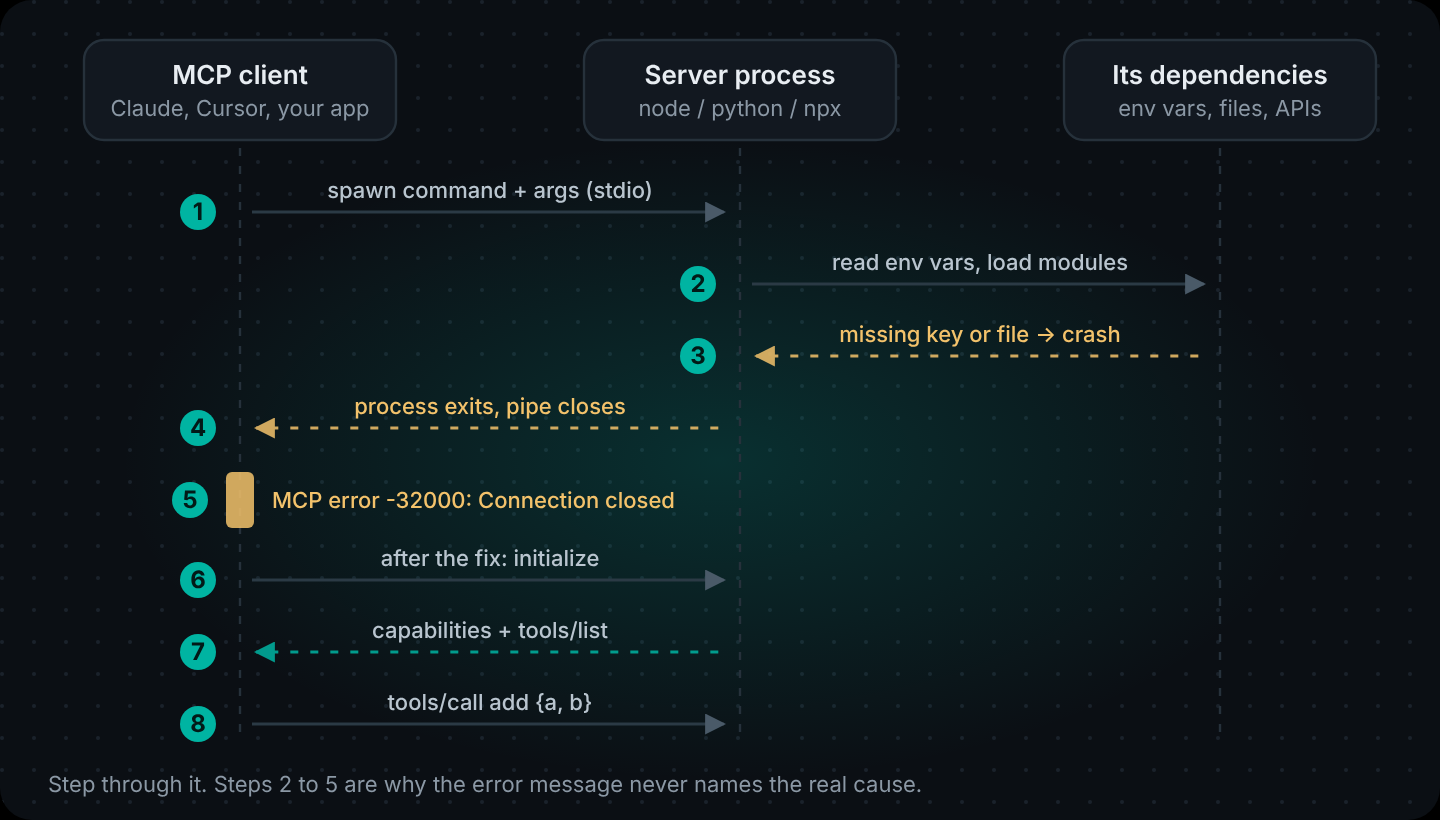
With a local MCP server, the client starts the server as a child process and talks to it over stdin and stdout. If that process exits (at startup, or halfway through a request), the pipe closes and you see -32000.
We reproduced it
To be sure which causes really produce this error, we built a tiny MCP server with the official Python SDK (version 2.3.0) and connected to it with the SDK's own stdio client. These were the results:
| What we did to the server | What the client reported |
|---|---|
| Nothing (working server, logs to stderr) | Connected, tool call returned the right answer |
| Read a required env var that the client didn't pass | MCP error -32000: Connection closed |
| Pointed the config at a script path that doesn't exist | MCP error -32000: Connection closed |
| Made the server exit in the middle of a tool call | MCP error -32000: Connection closed |
Misspelled the command itself (pythn3) | A "file not found" error, before MCP even started |
| Passed the missing env var in the config | Connected again |
Three very different problems, one identical error message. That's why the fix is always the same first step: find out what the server process printed before it died.
The fix checklist
Work through these in order. Most people are done by step 3.
1. Run the exact command yourself
Copy command and args from your MCP config and run them in a terminal, from the same folder the client would use:
# e.g. your config says: "command": "npx", "args": ["-y", "@modelcontextprotocol/server-filesystem", "/Users/me/projects"]
npx -y @modelcontextprotocol/server-filesystem /Users/me/projects
A healthy stdio server prints a startup line to stderr (or nothing) and then waits, because it's listening on stdin. That's correct. If instead you see a stack trace, "command not found", "module not found" or an error about a missing key, you've found your -32000. Fix that error first.
2. Use absolute paths
Desktop apps such as Claude Desktop don't start from your shell, so they often don't see the PATH your terminal sees. That's especially true if you installed Node with nvm, fnm or asdf. Point the config at the exact binary and the exact script:
{
  "mcpServers": {
    "my-tools": {
      "command": "/Users/me/.nvm/versions/node/v22.11.0/bin/node",
      "args": ["/Users/me/code/my-tools/dist/server.js"]
    }
  }
}
Find the right path with which node (macOS/Linux) or Get-Command node (PowerShell).
3. On Windows, wrap npx in cmd /c
On Windows, npx is a .cmd batch file, and a client can't always launch it directly. Wrap it:
{
  "mcpServers": {
    "filesystem": {
      "command": "cmd",
      "args": ["/c", "npx", "-y", "@modelcontextprotocol/server-filesystem", "C:\\Users\\me\\Documents"]
    }
  }
}
Also check that Node is installed on Windows itself. A Node install that only exists inside WSL isn't visible to a native Windows app.
4. Pass the environment variables the server needs
Servers that call an API usually read a key at startup and crash if it's missing. That was one of our reproductions. Put the variables in the config, because the client won't pass your shell's environment through:
{
  "mcpServers": {
    "weather": {
      "command": "/usr/local/bin/python3",
      "args": ["/Users/me/code/weather-mcp/server.py"],
      "env": {
        "WEATHER_API_KEY": "your-key-here",
        "PYTHONUNBUFFERED": "1"
      }
    }
  }
}
5. Keep stdout for the protocol only
In the stdio transport, stdout carries MCP messages and nothing else. Logs go to stderr:
// Node: don't
console.log("server starting");
// Node: do
console.error("server starting");
# Python: don't
print("server starting")
# Python: do
import sys
print("server starting", file=sys.stderr)To be accurate about this one: in our test, a stray print() to stdout did not break the connection, because the Python client skipped the line it couldn't parse. Other clients are stricter, and the spec says stdout is for protocol messages only. Treat it as a bug even when it seems to work.
6. Read the client's MCP logs
Every client keeps the server's stderr somewhere:
- Claude Desktop (macOS):
~/Library/Logs/Claude/mcp*.log. On Windows, look under%APPDATA%\Claude\logs. - Claude Code: run
/mcpinside a session to see each server's state, or start withclaude --debug. - Cursor: the MCP section of Cursor's settings shows each server's status, and the Output panel has its log.
The last lines before the disconnect usually name the problem.
7. Test the server on its own with MCP Inspector
npx @modelcontextprotocol/inspector node /absolute/path/to/server.jsThe Inspector starts your server, runs the real MCP handshake and lists its tools. If it fails here too, the problem is the server. If it works here but not in your client, the problem is the client config (paths, env, the Windows wrapper).
A minimal stdio server that doesn't trigger -32000
If you're writing your own server, this is the shape to start from. It uses the official TypeScript SDK and logs to stderr:
// server.mjs
import { McpServer } from "@modelcontextprotocol/sdk/server/mcp.js";
import { StdioServerTransport } from "@modelcontextprotocol/sdk/server/stdio.js";
import { z } from "zod";

const server = new McpServer({ name: "demo-tools", version: "1.0.0" });

server.registerTool(
  "add",
  {
    description: "Add two numbers",
    inputSchema: { a: z.number(), b: z.number() },
  },
  async ({ a, b }) => ({ content: [{ type: "text", text: String(a + b) }] })
);

// Fail loudly, on stderr, if configuration is missing.
if (!process.env.DEMO_TOKEN) {
  console.error("DEMO_TOKEN is not set. Add it to the env block of your MCP config.");
  process.exit(1);
}

await server.connect(new StdioServerTransport());
console.error("demo-tools MCP server running on stdio");
That process.exit(1) will still show up as -32000 in the client, but now the log tells you exactly why.
Remote MCP servers (HTTP transport)
Remote servers use the Streamable HTTP transport instead of a child process. Here -32000 means the HTTP connection or session dropped while the client was waiting. The usual causes are different:
- Wrong URL. Many servers expose MCP at a path such as
/mcp, not at the root. - Auth. A 401 or 403 from the server, often an expired or missing token.
- Proxies and load balancers that close long-lived or idle connections.
- The server restarted and lost its session.
You can check a remote server without any client. Send the initialize request with curl:
curl -i https://your-server.example.com/mcp \
  -H "Content-Type: application/json" \
  -H "Accept: application/json, text/event-stream" \
  -d '{"jsonrpc":"2.0","id":1,"method":"initialize","params":{"protocolVersion":"2025-11-25","capabilities":{},"clientInfo":{"name":"curl-check","version":"0.0.1"}}}'
A working server answers with a JSON-RPC result that includes its name and capabilities. A 404 means wrong path; a 401 means auth; a hang or reset points at the network in between.
Connecting MCP servers to your own agent
The same rules apply when the MCP client is your code rather than a desktop app. In DNotifier, an agent connects to a remote MCP server over HTTP with notifier.mcp.connect(), and the server's tools become ordinary tools the agent can be given. Connection problems surface as a typed MCPConnectionError, so you can handle them instead of seeing a vague failure mid-conversation:
import { DNotifier, MCPConnectionError } from "@dnotifier-realtime/dnotifier";

const notifier = new DNotifier({
  appId: process.env.DNOTIFIER_APP_ID,
  secret: process.env.DNOTIFIER_SECRET,
  transport: "http",
  userId: "docs-agent",
  permissionEnforcement: "backend",
});
await notifier.connect();

let mermaidTools = [];
try {
  const mermaid = await notifier.mcp.connect({
    id: "mermaid",
    name: "Agentic Mermaid",
    transport: "http",
    endpoint: "https://agentic-mermaid.dev/mcp",
    // headers: { Authorization: `Bearer ${process.env.MCP_TOKEN}` },
  });
  mermaidTools = mermaid.tools(); // tool names are prefixed with the id, e.g. "mermaid.verify"
} catch (err) {
  if (err instanceof MCPConnectionError) {
    console.error("MCP server unreachable, starting without its tools:", err.message);
  } else {
    throw err;
  }
}

const agent = DNotifier.defineAgent({
  name: "diagram-helper",
  instructions: "Help users write Mermaid diagrams. Verify every diagram with the mermaid tools before returning it.",
  provider: "open_ai",
  model: "gpt-4o",
  observability: true,
  tools: mermaidTools,
  permissions: Object.fromEntries(mermaidTools.map((t) => [t.name, ["execute"]])),
});
Two choices worth copying: the agent still starts if the MCP server is down (it just has fewer tools), and each MCP tool is listed in permissions explicitly, so a server that adds a new tool later doesn't get it called automatically. If you only want some of a server's tools, filter mermaidTools by name before passing it in. More background: DNotifier MCP support explained and Tool Calling Explained.
LangChain MCP adapters hit the same error
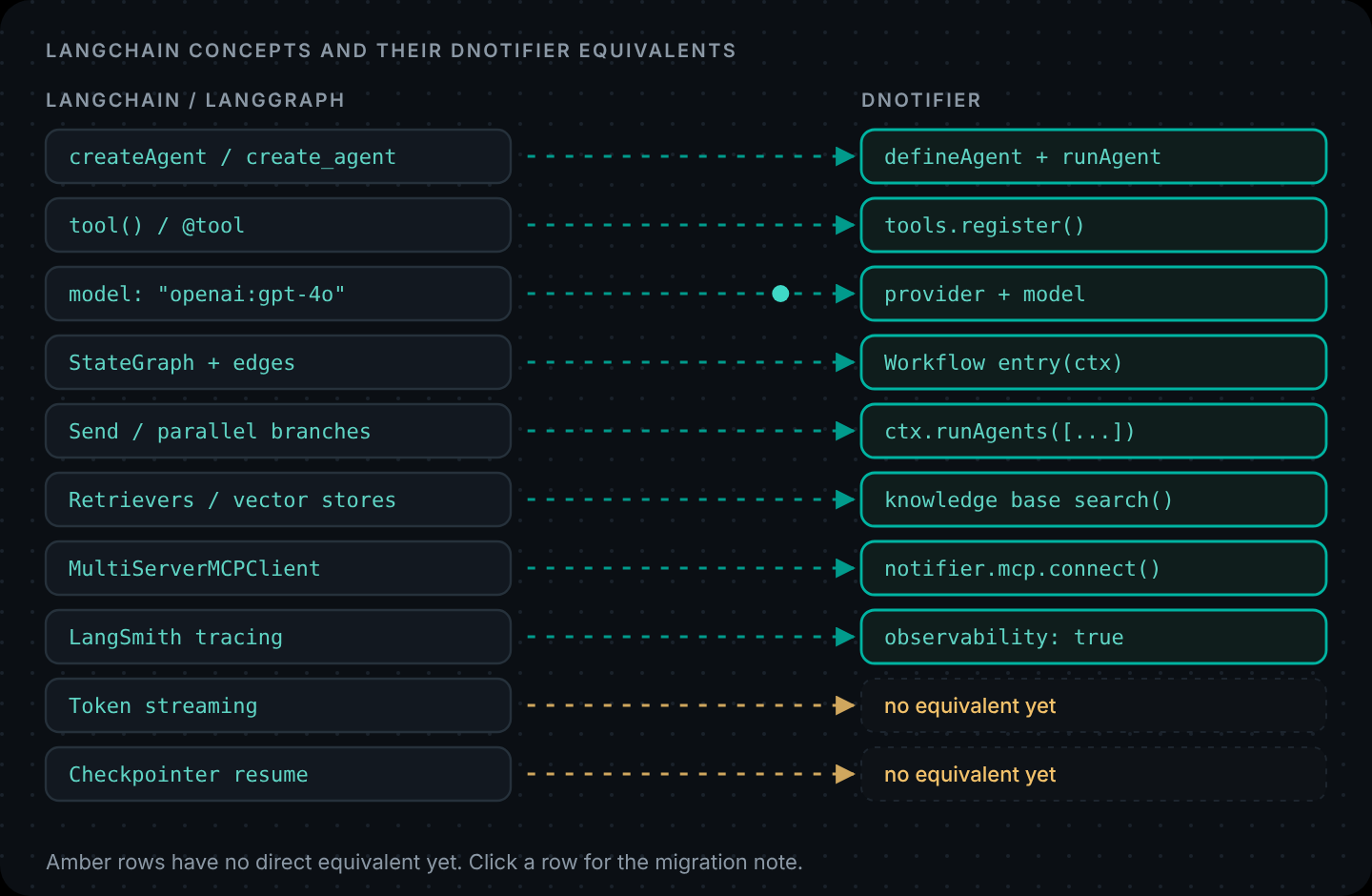
If you use LangChain's MCP adapters (MultiServerMCPClient) to load MCP tools into a LangChain agent, the same -32000 shows up for the same reasons, because the adapter starts stdio servers the same way. The checklist above applies unchanged: run the command yourself, use absolute paths, pass env, and keep stdout clean.
Give your agents MCP tools with permission checks and a trace for every call. Tools & MCP docs · Create your app
FAQ
What does MCP error -32000 connection closed mean?
The MCP client lost its connection to the server while waiting for a reply. -32000 is the code the official MCP SDKs use for "connection closed". With a local stdio server it usually means the server process failed to start or crashed.
How do I fix MCP error -32000 connection closed?
Run the exact command from your MCP config in a terminal and fix any error it prints. Then use absolute paths for the binary and script, pass required environment variables in the config's env block, wrap npx in cmd /c on Windows, and make sure the server logs to stderr, not stdout.
Why does my MCP server work in the terminal but not in Claude Desktop?
Usually because the desktop app doesn't inherit your shell's PATH or environment variables. Use the absolute path to node or python, absolute paths for scripts, and put any keys the server needs in the env block of the config.
Why do I get -32000 on Windows with npx?
On Windows, npx is a batch script that some clients can't launch directly. Use "command": "cmd" with "args": ["/c", "npx", …], and make sure Node is installed on Windows itself, not only inside WSL.
What is the difference between error -32000 and -32001?
In the official SDKs, -32000 means the connection closed and -32001 means a request timed out. A timeout means the server didn't answer in time; a closed connection means the server went away.
How do I connect an MCP server to my AI agent?
For your own agent, connect to the MCP server from your backend and give its tools to the agent. In DNotifier that's notifier.mcp.connect() with the server's HTTP endpoint, then passing the returned tools and their permissions to DNotifier.defineAgent().