Short answer: tool calling (also called function calling) lets a language model ask your code to run a function. You describe each tool with a name, a description and a JSON schema. The model replies with a tool call, a tool name plus arguments, your code runs it, and the result goes back to the model.
The first time you see tool calling work, it feels like the model is running your code. It isn't. The model only ever produces text, and with tool calling some of that text is a structured request: please run orders.lookup with { "orderId": "A-1042" }. Your code decides whether to run it, runs it, and hands back the result.
That distinction matters, because it tells you where the safety lives. The model asks. You decide.
One tool call, start to finish
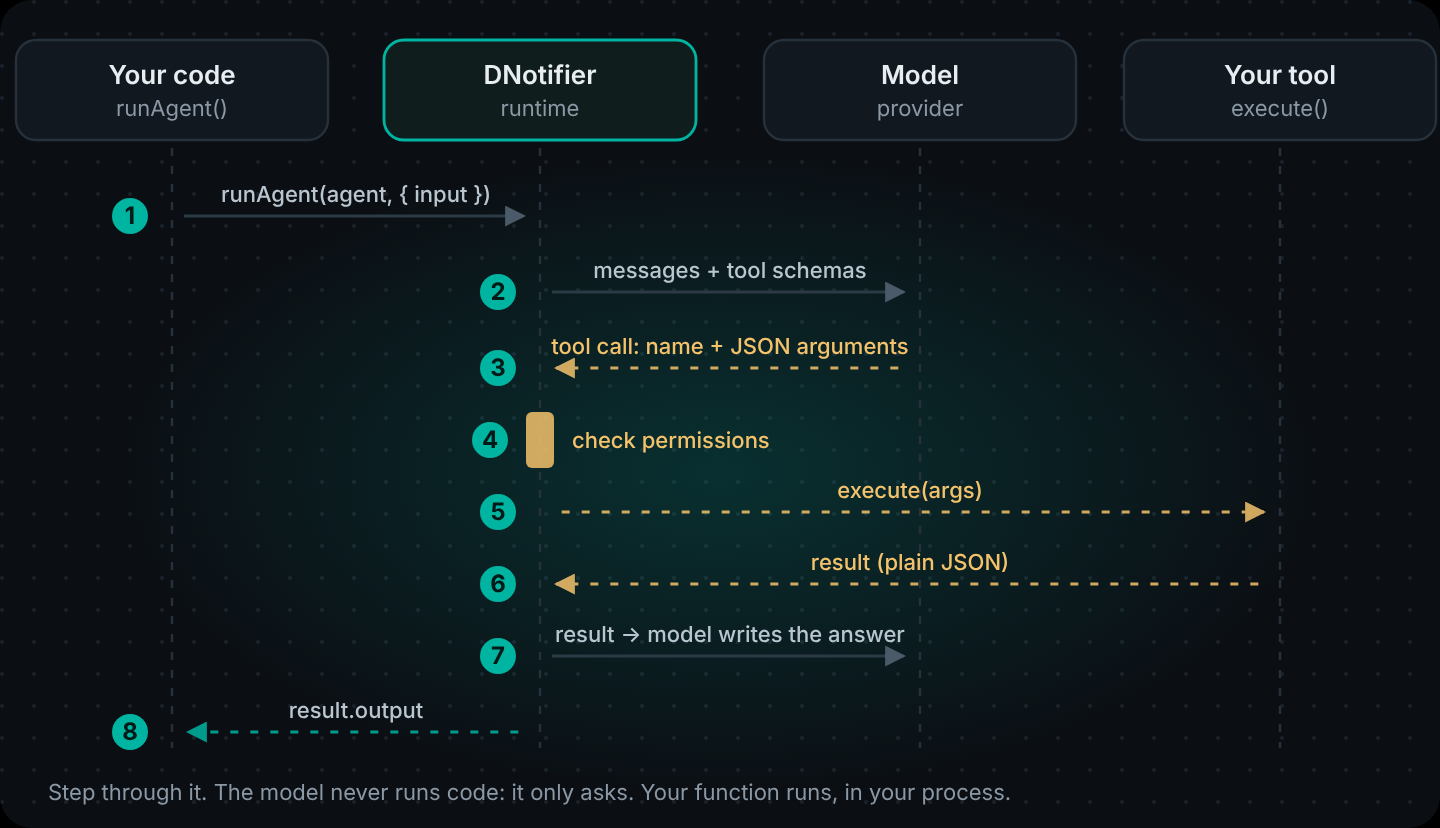
Step through the diagram and you will see the whole lifecycle of a tool call:
- You send the conversation plus a list of tool definitions.
- The model either answers in text or returns a tool call.
- Your runtime checks the call is allowed, runs the function and sends the result back as a new message.
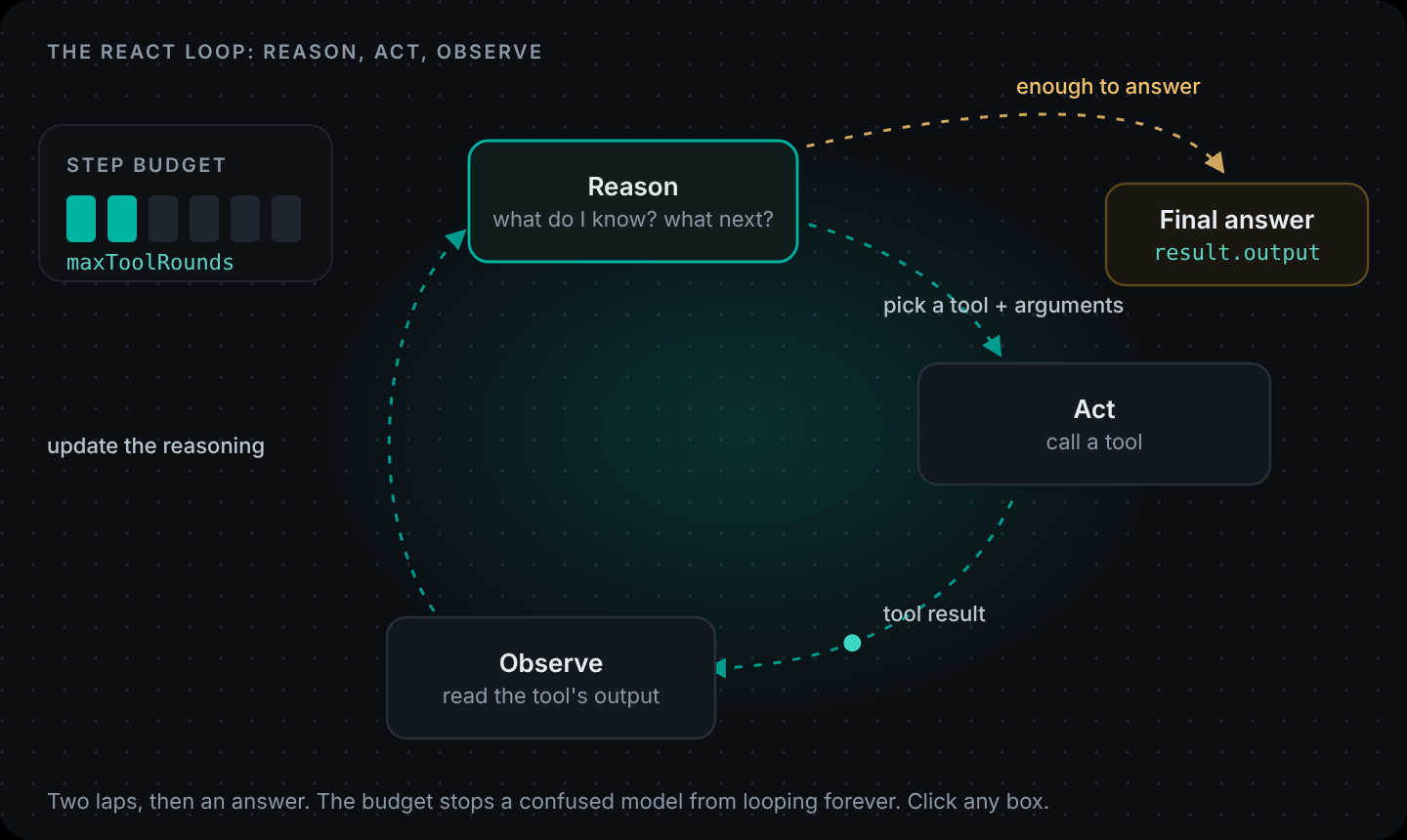
- The model reads it and either answers or makes another tool call.
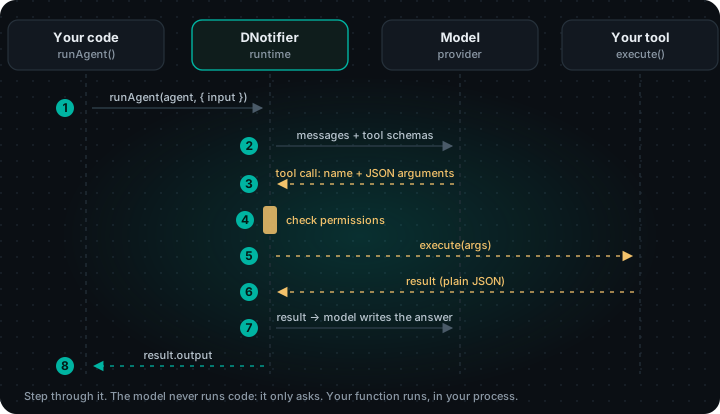
Different providers name the parts differently (OpenAI says "tools" and tool_calls, Anthropic says tool_use blocks, Gemini says "function calling"), but every major provider supports the same idea. "LLM tool use" is just the umbrella term.
What a tool call actually looks like
Simplified, a model's tool call is just this:
{
  "type": "tool_call",
  "name": "orders.lookup",
  "arguments": { "orderId": "A-1042" }
}
The model picked the tool from your list and filled in the arguments from your schema. Nothing else. Everything interesting happens in the two places you control: the tool definition the model reads, and the function that runs.
Anatomy of a tool
With DNotifier, a tool is one notifier.tools.register() call. Here is a real one:
import { DNotifier } from "@dnotifier-realtime/dnotifier";

const notifier = new DNotifier({
  appId: process.env.DNOTIFIER_APP_ID,
  secret: process.env.DNOTIFIER_SECRET,
  transport: "http",
  userId: "tools-demo",
  permissionEnforcement: "disabled", // local demo only; use "backend" in production
  onAgentEvent: (event) => console.log("  ·", event.type, event.toolId ?? ""),
});
await notifier.connect();

const findCustomer = notifier.tools.register({
  name: "customers.find",
  description:
    "Find a customer by email address. Returns their customerId. " +
    "Call this first whenever the user gives an email instead of a customer id.",
  inputSchema: {
    type: "object",
    properties: { email: { type: "string", description: "The customer's email address" } },
    required: ["email"],
  },
  async execute({ email }) {
    const customer = await db.customers.findByEmail(email); // your data access
    if (!customer) return { found: false, note: "No customer with that email." };
    return { found: true, customerId: customer.id, name: customer.firstName };
  },
});
Four parts, and each one has a job:
- name is how the model refers to the tool. Short, specific, namespaced (
customers.find, notfind). - description is what the model reads to decide when to call it. It is a prompt.
- inputSchema is a JSON schema for the arguments. The model fills it in; mark required fields as required.
- execute is your code. It runs in your process, with your database and your permissions.
Your tool descriptions are prompts
This is the single most useful thing to know about tool calling. Compare:
// Before: the model has to guess when this applies
description: "Gets orders."

// After: what it returns, when to use it, what it needs
description:
  "List a customer's 5 most recent orders with status and trackingNumber. " +
  "Needs a customerId from customers.find. Use this before answering any " +
  "question about deliveries, returns or order status."
The second version tells the model what the tool returns, which tool to call before it, and when to use it. Rewriting descriptions like this is usually the cheapest fix for "the agent picked the wrong tool", and it is worth trying before you reach for a bigger model.
Dependent tool calls: when tool B needs tool A's result
Most real questions need more than one tool, and often the calls depend on each other. "Where's the parcel for ayesha@example.com?" needs three:
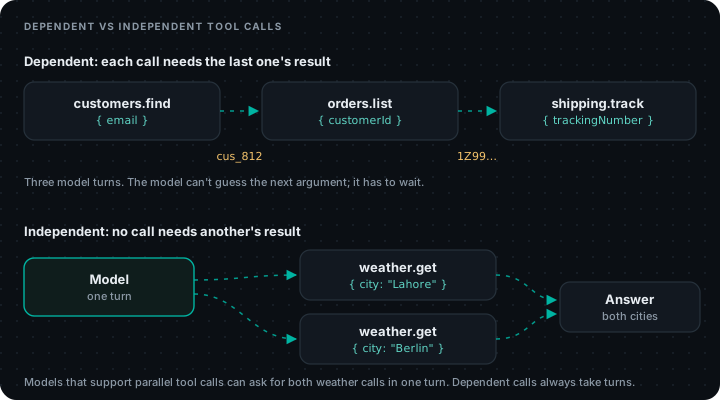
The model cannot call orders.list until it knows the customer ID, and it cannot call shipping.track until it has a tracking number. So the calls happen in sequence, one model turn each. Here are the other two tools:
const listOrders = notifier.tools.register({
  name: "orders.list",
  description:
    "List a customer's 5 most recent orders with status and trackingNumber. " +
    "Needs a customerId from customers.find.",
  inputSchema: {
    type: "object",
    properties: { customerId: { type: "string" } },
    required: ["customerId"],
  },
  async execute({ customerId }) {
    const orders = await db.orders.recentFor(customerId, 5);
    return { orders: orders.map(({ id, status, trackingNumber }) => ({ id, status, trackingNumber })) };
  },
});

const trackShipment = notifier.tools.register({
  name: "shipping.track",
  description: "Get the latest carrier event for a trackingNumber from orders.list.",
  inputSchema: {
    type: "object",
    properties: { trackingNumber: { type: "string" } },
    required: ["trackingNumber"],
  },
  async execute({ trackingNumber }) {
    const event = await carrier.latestEvent(trackingNumber); // your carrier API client
    return event ? { status: event.status, location: event.location, at: event.time } : { error: "Unknown tracking number" };
  },
});

const agent = DNotifier.defineAgent({
  name: "parcel-helper",
  instructions:
    "You help customers find their parcels. Use the tools in order: customers.find, " +
    "then orders.list, then shipping.track. Never invent tracking numbers or dates.",
  provider: "open_ai",
  model: "gpt-4o",
  observability: true,
  tools: [findCustomer, listOrders, trackShipment],
  permissions: {
    "customers.find": ["execute"],
    "orders.list": ["execute"],
    "shipping.track": ["execute"],
  },
});

const result = await notifier.runAgent(agent, {
  input: "Where's the parcel for ayesha@example.com?",
  maxToolRounds: 5,
});
console.log(result.output);
Run it and the onAgentEvent log shows the chain: customers.find, then orders.list, then shipping.track, then the answer. A few things make dependent chains reliable:
- Name fields the same way everywhere. If
customers.findreturnscustomerId, makeorders.listtakecustomerId, notcustomer_idorid. The model copies field names; matching names means fewer wrong arguments. - Say what each tool needs in its description. "Needs a customerId from customers.find" is a hint the model follows.
- Return only what the next step needs. Small results keep the prompt short and make the right next argument obvious.
- Leave room in the budget. Three dependent calls need at least three tool rounds. We give
maxToolRounds: 5so one retry fits.
Independent calls can run at the same time
When calls do not depend on each other ("what's the weather in Lahore and Berlin?"), many models can ask for both in a single turn. That saves a full round trip. You do not have to do anything special; the runtime runs whatever tool calls the model returns. Just do not expect parallelism when one call needs another's output.
Errors are data, not crashes
Tools fail: a record does not exist, a carrier API times out, the model passes a malformed ID. If your tool throws, the run fails. If your tool returns the problem, the model can recover:
async execute({ trackingNumber }) {
  try {
    const event = await carrier.latestEvent(trackingNumber);
    return event ? { status: event.status } : { error: "Unknown tracking number. Check orders.list again." };
  } catch {
    return { error: "Carrier service is not responding. Tell the customer to try again shortly." };
  }
}
The second message is not for your logs; it is for the model. It tells it what to do next.
Calling your API safely
Tool calling is safe exactly to the extent your tools are. Three rules:
- The model never chooses whose data to read. In a real app the customer comes from your session, attached to the request in code, and every tool filters by it. Our step-by-step agent guide shows how with AsyncLocalStorage.
- List allowed tools per agent. The permissions map means a support agent cannot call an admin tool even if it is registered on the same client. In production set
permissionEnforcement: "backend"so the check happens on the server. - Irreversible actions go through a person. A refund tool should create a pending request, not move money.
LangChain agent tools vs DNotifier tools
If you have used LangChain agent tools, the mapping is direct. In LangChain you usually decorate a function with @tool (Python) or use the tool() helper (JavaScript), and the docstring or description becomes what the model reads. In DNotifier the same three things (name, description, schema) are fields on tools.register(), and permissions are part of the agent definition. Moving a tool between the two is mostly copy and paste; the descriptions you have already tuned carry over.
For tools that live in another service, you do not have to re-register them at all: DNotifier agents can use any MCP server's tools. See DNotifier MCP support.
Tool calling with local models and vLLM
Tool calling depends on the model. Large hosted models handle it well; small local models vary a lot.
- Ollama: many open models support tools through Ollama, and DNotifier can use a local Ollama as a provider. Keep tool lists short and schemas flat. There is more on what to expect in Tool Calling on Local Models.
- vLLM: vLLM tool calling works with OpenAI-style requests, but if you serve models yourself it has to be switched on when you start the server, with
--enable-auto-tool-choiceand a--tool-call-parserthat matches your model family. Check the vLLM docs for the parser name for your model.
How many tools should an agent have?
There is no hard rule, but every tool description is sent with every model call, and more choices mean more wrong choices. Start with the three to five tools the job actually needs. If an agent needs fifteen tools, it is usually two or three agents in a trench coat; split them and route between them with a workflow.
Register a function, give it to an agent, done. Tool calls are permission-checked and traced, across eight model providers. Create your app · Tools & MCP in the docs.
FAQ
What is tool calling in LLMs?
A way for a language model to ask your code to run a function. You give the model tool definitions; it replies with a tool name and JSON arguments; your code runs the tool and sends the result back so the model can continue.
Is tool calling the same as function calling?
Yes. "Function calling" is the name OpenAI used first; "tool calling" and "tool use" are the more general terms now used by most providers. They describe the same mechanism.
Dependant (dependent) tool calls in an LLM: how do they work?
When one tool needs another's output, the model calls them one after another: it calls the first tool, reads the result, then uses a value from it (like a customer ID) as an argument to the next tool. Each step is a separate model turn, so leave enough tool rounds for the whole chain.
Can the model run my code directly?
No. The model only produces a request. Your runtime decides whether to run it, runs your function, and returns the result. That is why permissions and input checks belong in your tool code.
Does vLLM support tool calling?
Yes, for models with a matching parser. Start the vLLM server with --enable-auto-tool-choice and the right --tool-call-parser for your model.
What should a tool return?
Small, plain JSON with only the fields the model needs, and errors as data ({ "error": "..." }) instead of thrown exceptions, so the model can recover.