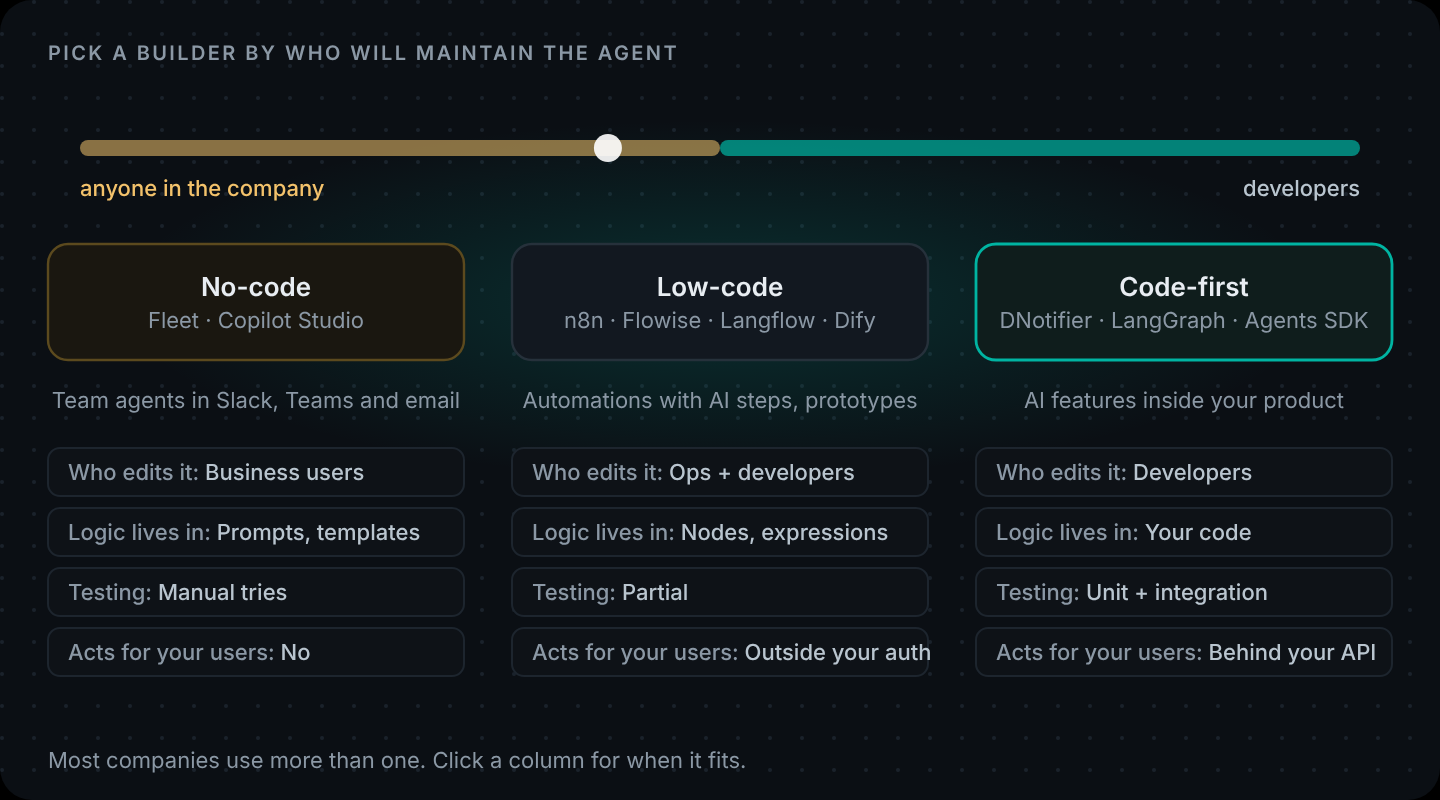
Short answer: there's no single best no-code agent builder. Pick by who will maintain the agent. For AI steps inside app-to-app automations, n8n is the usual pick. For prototyping LLM apps on a canvas, Flowise, Langflow and Dify are the common open-source options. For agents that staff use in Slack or Teams, look at LangSmith Fleet or Microsoft Copilot Studio. When the agent is part of your product and acts for your users, a code-first agent builder is usually the better fit.
Most "no-code vs code" arguments are really about something else: who owns the agent once it's live. An ops lead who changes a prompt every week needs a canvas. A developer whose agent reads customer orders needs tests, code review and the same auth as the rest of the app.
Both are reasonable. This guide covers what each kind of tool gets right, where each one starts to hurt, and how to use both without picking a side.
What counts as a no-code agent builder?
"No-code agent builder" covers three different kinds of product. They solve different problems, so it helps to separate them.
- Automation tools with AI steps. n8n, Make and Zapier started as ways to connect SaaS apps, then added AI. In n8n, the AI Agent node runs an agent loop, and you plug a chat model, memory and tools into it as sub-nodes. (Under the hood n8n's AI nodes use LangChain's JavaScript framework. We covered that in n8n + LangChain vs code.) These tools work best when the agent is one step in a bigger automation.
- Visual LLM app builders. Flowise, Langflow and Dify are open-source canvases built around LLM apps: chains, retrieval, agents and chat interfaces. You drag components, connect them and get an API endpoint or a chat widget. They're popular for prototypes and internal tools, and you can self-host all three.
- Company-wide agent builders. These target people who will never open a code editor. LangSmith Fleet, from LangChain, lets anyone build an agent in natural language or from a template. It runs inside Slack, Teams and Gmail, and admins can require approval before sensitive tool calls. Microsoft Copilot Studio plays a similar role inside the Microsoft 365 world.
One change to note if you're shortlisting tools now: OpenAI is shutting down Agent Builder, the visual canvas in AgentKit, on 30 November 2026. Its deprecation notice points developers to the Agents SDK (code) or to ChatGPT Workspace Agents instead.
What no-code agent builders get right
Credit first, because these tools solve real problems.
- Speed to a first version. Connect a trigger, an AI step and an output, and you have something running in an afternoon. For many internal jobs, that's the whole project.
- You can see the flow. A canvas is a diagram anyone can read. When a manager asks "what does this agent do?", you can show them.
- The right people can change it. If support owns the triage rules, support should be able to edit them without filing a ticket.
- Integrations are already built. CRM, email, Slack, spreadsheets, databases: someone else has written and maintains those connectors.
- Guardrails are getting better. n8n now has a Guardrails node that checks text for jailbreak attempts, PII and secret keys. Fleet adds approvals and admin control over which tools an agent can use.
If your agent connects tools your company already uses, makes one or two AI decisions and is owned by a non-developer, a no-code builder is usually the right answer. Don't let anyone talk you into writing a service for it.
Where no-code builders start to strain
The trouble rarely shows up on day one. It shows up when the agent stops being a side automation and becomes part of how the business runs.
- Logic that wants to be a function. A routing rule starts as one IF node. Six months later it's fifteen weighted conditions with exceptions, spread across a canvas. In code, that's one function you can read top to bottom.
- Testing. You'll want to run fifty saved examples through the agent every time someone edits the prompt. A test suite does that well. Most canvases weren't built for it.
- Review and history. When a change can cost money, you want a diff, a reviewer and a way to roll back. Exports and version history help, but they're not the same as a pull request.
- Your users, your permissions. If the agent acts for a signed-in user of your product (looking up their orders, changing their settings), the identity check belongs next to your auth code. An automation server on the side doesn't know who's signed in to your app.
- Many agents. Two agents on a canvas are fine. Six agents with a router, parallel steps and a merge rule get hard to follow visually.
- Platform risk. A hosted canvas is somebody else's product. The OpenAI Agent Builder shutdown is a reminder that workflows can need a migration on a deadline you didn't choose. Code you own moves more easily.
None of this means visual tools are bad. These are the natural limits of a canvas, and they usually show up together.
Visual multi agent builders: what exists
People search for this in almost these words: "is there a visual builder for multi-agent orchestration?" Yes, with caveats.
- n8n: an AI Agent node can call another workflow as a tool, so you can nest agents. It works, and gets busy on the canvas quickly.
- Flowise: has Agentflows, a canvas made for multi-agent flows with supervisor and worker agents.
- Langflow and Dify: both let you chain several agent components and route between them.
- LangSmith Fleet: aimed at many individual agents across a company rather than one orchestrated system, with approvals and an agent inbox.
What these canvases do well is show the shape. They struggle with the questions you'll get asked once the system is live: why did the router pick that agent, what did each one cost, and what changed since last week? Those answers come from traces, tests and history.
What a code-first agent builder looks like
"Code-first agent builder" means you define agents and workflows in your own language and repo, and a platform runs the agent loop, permissions and tracing for you. You keep the parts you'd want to review; the platform keeps the plumbing.
Here's a small support agent with two tools on DNotifier:
// agent.js
import { DNotifier } from "@dnotifier-realtime/dnotifier";
import { lookupOrder, searchPolicy } from "./tools.js";

export const supportAgent = DNotifier.defineAgent({
  name: "support",
  instructions:
    "You help customers with orders. Check the order with orders.lookup before " +
    "answering order questions, and check policy.search before quoting a rule. " +
    "If you can't help, offer to pass the chat to a person.",
  provider: "open_ai",
  model: "gpt-4o",
  observability: true,
  tools: [lookupOrder, searchPolicy],
  permissions: {
    "orders.lookup": ["execute"],
    "policy.search": ["execute"],
  },
});
That's the whole agent: instructions, a model, the tools it can see, and the ones it may run. Because it's a plain value in your repo, three things that are hard on a canvas become routine:
// tools.test.js (node --test)
import { test } from "node:test";
import assert from "node:assert/strict";
import { requestContext } from "./context.js";
import { lookupOrderFn } from "./tools.js";

test("a customer can't see someone else's order", async () => {
  const result = await requestContext.run({ userId: "cus_ayesha" }, () =>
    lookupOrderFn({ orderId: "B-2001" }) // belongs to another customer
  );
  assert.equal(result.found, false);
});- The test runs in milliseconds, with no model involved.
- The diff for a prompt change shows up in a pull request like any other change.
- The identity comes from your session (
requestContext), so the model never decides whose data it reads.
To build this one step at a time, start with Create an AI Agent in 5 Minutes. For everything the platform includes, see DNotifier features, and for how it compares with other agent tools, our alternatives pages.
No-code vs low-code vs code-first, side by side
| No-code builder | Low-code builder | Code-first agent builder | |
|---|---|---|---|
| Examples | LangSmith Fleet, Copilot Studio, Zapier | n8n, Flowise, Langflow, Dify | DNotifier, LangGraph, OpenAI Agents SDK |
| Who builds it | Anyone in the company | Ops, analysts, developers | Developers |
| Best at | Personal and team agents in chat tools | Automations with AI steps, prototypes | AI features inside your product |
| How logic is written | Natural language, templates | Nodes plus some expressions or code | Ordinary code |
| Testing | Manual tries | Partial | Unit and integration tests |
| Review and rollback | Platform history | Exports, version history | Git, pull requests, CI |
| Acts for your app's users | No | Possible, but outside your auth | Yes, behind your own API |
| Multi-agent | Many separate agents | Nested agents on a canvas | Router, parallel steps and merge in code |
A quick test for which one you need
Answer these four questions about the agent you're planning:
- Will a non-developer change it more than once a month? If yes, lean no-code or low-code.
- Does it act for signed-in users of your product? If yes, lean code-first.
- Would a bad change cost real money or leak data? If yes, you'll want tests and review: code-first.
- Is most of the value in connecting existing SaaS tools? If yes, a low-code automation tool will save you weeks.
Mixed answers are common. That's what the next section is for.
Use both: the builder triggers, the code decides
You don't have to choose one tool for everything. A pattern that holds up well: keep the trigger and integrations in the visual tool, and put the AI logic that needs tests behind one HTTP endpoint you own.
On your side, the endpoint is small:
// server.js (Express)
import express from "express";
import { notifier } from "./notifier.js";
import { supportAgent } from "./agent.js";

const app = express();
app.use(express.json({ limit: "20kb" }));

app.post("/api/triage", async (req, res) => {
  if (req.get("x-api-key") !== process.env.BUILDER_SHARED_KEY) return res.status(401).end();
  const text = String(req.body?.text ?? "").slice(0, 4000);
  if (!text) return res.status(400).json({ error: "text is required" });

  const result = await notifier.runAgent(supportAgent, {
    input: text,
    userId: "builder-integration",
    maxToolRounds: 4,
  });
  res.json({ answer: result.output, finishReason: result.finishReason, executionId: result.executionId });
});

app.listen(process.env.PORT ?? 3000);
In n8n, Make or Zapier, that's one HTTP request step that posts text and reads answer back. The ops team keeps the flow they know. Developers own the part with the tests. The executionId in the reply links any odd answer straight to its trace.
A word on the shared key: it proves the call came from your automation tool. It doesn't tell you which end user the request is for. If the agent needs to act for a specific customer, look that customer up on your side from an ID the automation sends, and keep the customer-scoped tools behind your own auth.
What we'd pick
- A team assistant in Slack that summarises threads and drafts replies: a no-code builder like LangSmith Fleet or Copilot Studio.
- New-lead enrichment that writes to the CRM and pings sales: n8n or another low-code automation tool, with the scoring in code if it grows.
- A prototype to show stakeholders this week: Flowise, Langflow or Dify.
- An order-help agent inside your app that reads customer data: code-first, behind your API. How to Build an AI Workflow in Code shows the pattern with parallel agents and human approval.
Prefer code? Your first agent takes about five minutes. One file, one tool, a step limit and a trace for every run. Create your first agent · Create your app
FAQ
What is the best no-code AI agent builder?
It depends on who maintains the agent. n8n is a strong choice for AI steps inside app-to-app automations. Flowise, Langflow and Dify suit visual LLM prototypes and can be self-hosted. LangSmith Fleet and Microsoft Copilot Studio suit company-wide agents that run in chat tools.
Is there a visual builder for multi-agent orchestration?
Yes. Flowise has Agentflows for supervisor and worker agents, n8n can nest agents by calling workflows as tools, and Langflow and Dify can chain agent components. They show the structure well. Testing, cost tracking and change history get harder as the number of agents grows.
What is the difference between a no-code and a low-code AI agent builder?
A no-code builder is configured entirely through a UI or natural language. A low-code builder is mostly visual but lets you add expressions or small code blocks for logic the nodes don't cover. n8n and Flowise are usually described as low-code.
What is a code-first agent builder?
A platform where you define agents, tools and workflows in your own codebase, while the platform runs the agent loop, permission checks and tracing. You get tests, code review and your own auth, and you don't host the orchestration yourself.
Is OpenAI Agent Builder being shut down?
Yes. OpenAI's deprecation notice says Agent Builder is scheduled to shut down on 30 November 2026. It points developers to the Agents SDK or ChatGPT Workspace Agents. ChatKit remains available.
Can I use a no-code builder and code together?
Yes, and it often works best. Keep triggers and SaaS integrations in the visual tool, and have it call one HTTP endpoint that runs your tested AI logic in code.