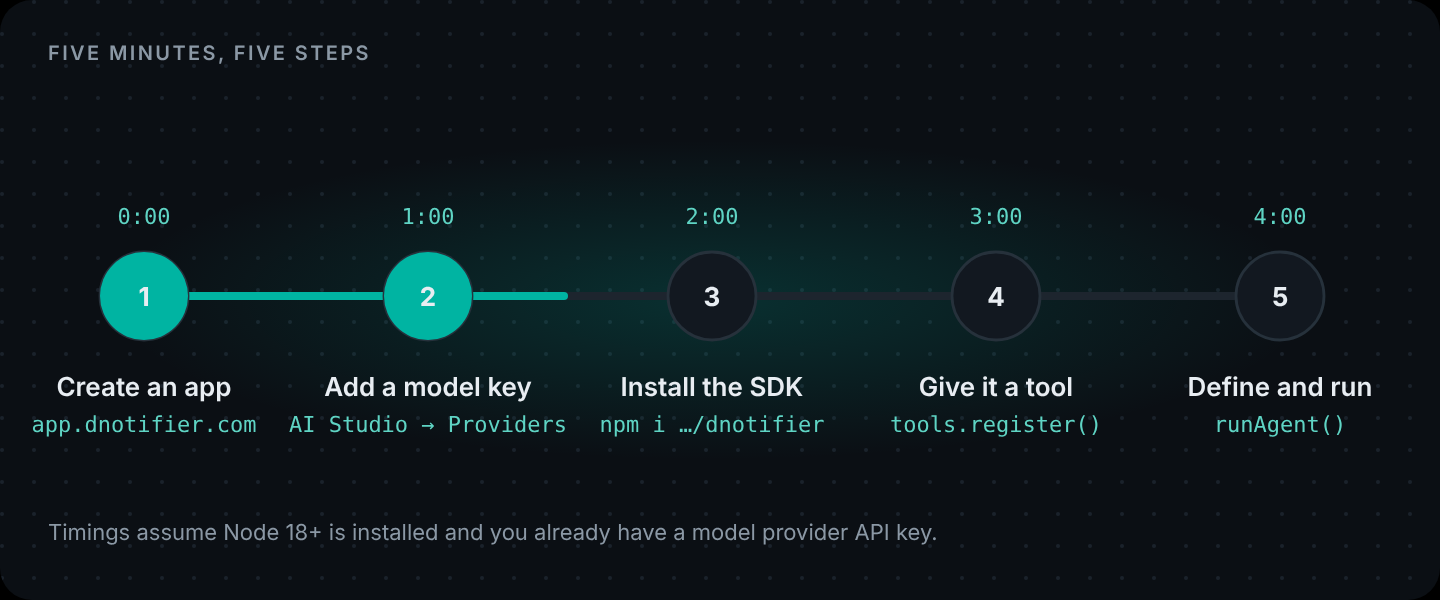
Short answer: create an app in the DNotifier dashboard, add a model provider key, install the SDK, register one tool with
notifier.tools.register(), then define the agent withDNotifier.defineAgent()and callnotifier.runAgent(). The full agent below is one file of about 60 lines, in Node.js or Dart.
Five minutes is honest if two things are already true: you have Node.js 18+ (or Dart 3) installed, and you have an API key from a model provider like OpenAI. If you're starting from zero, add ten minutes for those.
We'll build a small agent with one real ability: it can check the current time anywhere in the world. That sounds trivial until you remember that a language model has no clock. Ask a bare model "is it a good time to call Tokyo?" and it has to guess. Give it a tool and it checks.
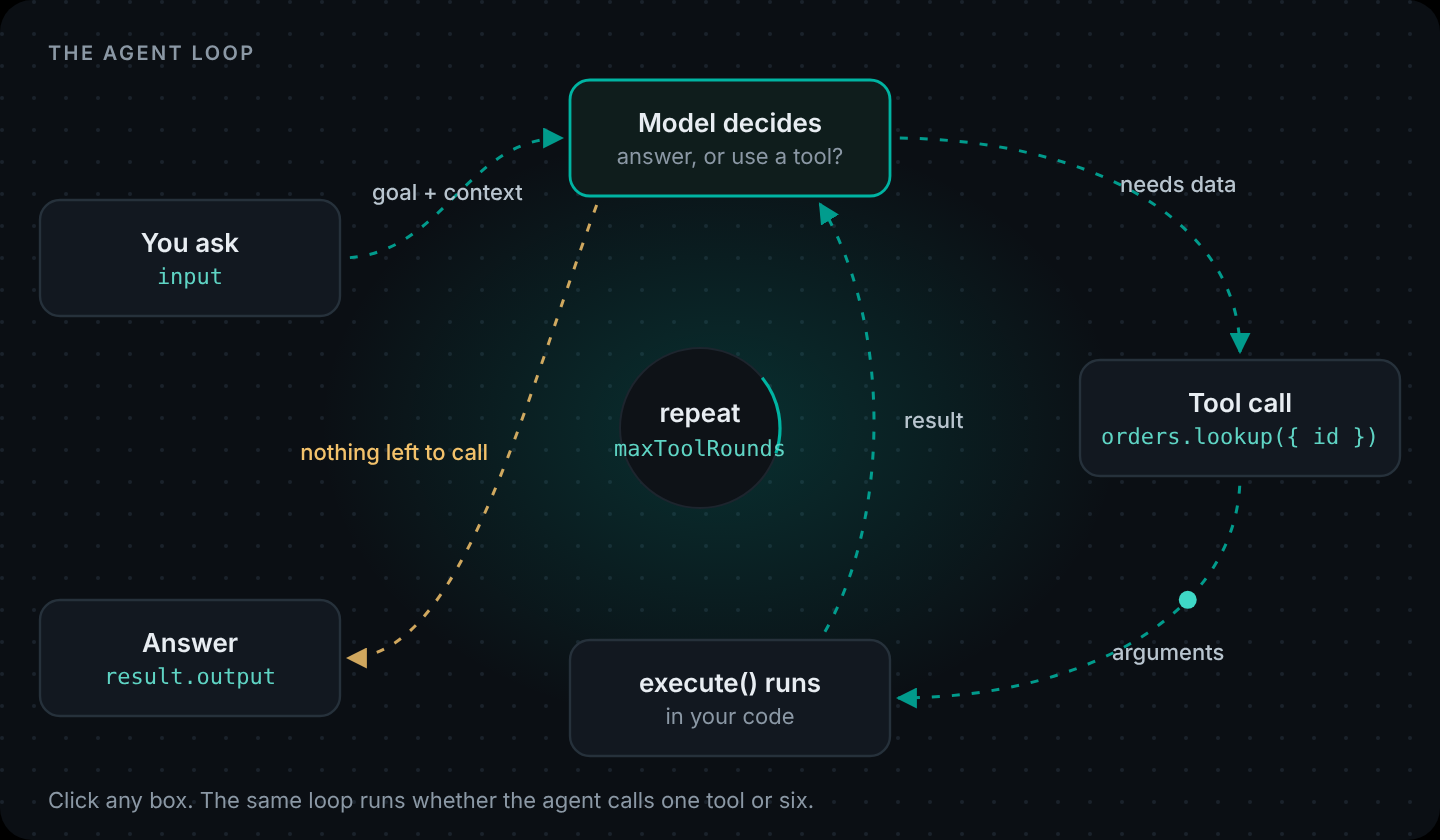
That's the whole idea behind agents in one example, and it's how to create AI agents of any size: the model decides when it needs something it doesn't know, and your code gets it. That cycle is the ReAct pattern. AI agent creation is mostly writing that "something" as a function.
Part of the Build it with DNotifier series: Part 1 · Part 2 · Part 3 · Part 4 · Part 5 · Part 6.
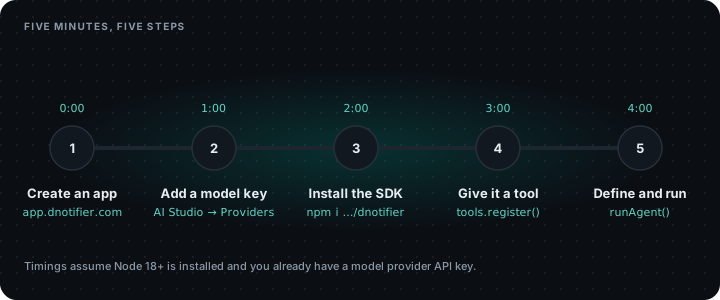
Minute 0: Create an app
Sign in at app.dnotifier.com (Google sign-in works), open Apps, and create one. Copy the app ID and secret.
AI features need the Starter plan or above. The free plan is realtime messaging only. Pricing is here if you want to check first.
Minute 1: Add a model key
In the dashboard, open AI Studio → Providers and paste your OpenAI key. DNotifier calls the model with your key, so you keep your own provider account and rates. You can add Anthropic, Gemini, Bedrock, Azure, Perplexity, Hugging Face or a local Ollama later and switch per agent.
Minute 2: Install the SDK
mkdir world-clock && cd world-clock
npm init -y && npm pkg set type=module
npm install @dnotifier-realtime/dnotifier
Minute 3: Give it a tool
Create agent.mjs. First, connect:
import { DNotifier } from "@dnotifier-realtime/dnotifier";

const notifier = new DNotifier({
  appId: process.env.DNOTIFIER_APP_ID,
  secret: process.env.DNOTIFIER_SECRET,
  transport: "http",
  userId: "quickstart",
  permissionEnforcement: "disabled", // fine on your laptop; use "backend" in production
  onAgentEvent: (event) => console.log("  ·", event.type, event.toolId ?? ""),
});

await notifier.connect();
Then register the tool. The description and inputSchema are what the model sees. execute is what your machine runs:
const clock = notifier.tools.register({
  name: "clock.now",
  description:
    "Current local date and time for an IANA time zone such as Asia/Tokyo or Europe/London.",
  inputSchema: {
    type: "object",
    properties: {
      timeZone: { type: "string", description: "IANA time zone name" },
    },
    required: ["timeZone"],
  },
  async execute({ timeZone }) {
    try {
      const now = new Intl.DateTimeFormat("en-GB", {
        timeZone,
        weekday: "long",
        hour: "2-digit",
        minute: "2-digit",
      }).format(new Date());
      return { timeZone, now };
    } catch {
      return { error: `Unknown time zone: ${timeZone}` };
    }
  },
});
The try/catch matters more than it looks. If the model passes a time zone that doesn't exist, we hand back an error it can read and recover from ("I couldn't find that city's time zone, did you mean...?") instead of crashing the run.
Minute 4: Define the agent and run it
const agent = DNotifier.defineAgent({
  name: "world-clock",
  instructions:
    "You help people pick a good time to call someone abroad. " +
    "Always check the real time with clock.now before answering. " +
    "Office hours are 09:00 to 18:00, Monday to Friday. Keep replies to two sentences.",
  provider: "open_ai",
  model: "gpt-4o",
  observability: true,
  tools: [clock],
  permissions: { "clock.now": ["execute"] },
});

const question = process.argv[2] ?? "Is it a good time to call our team in Tokyo right now?";
const result = await notifier.runAgent(agent, { input: question, maxToolRounds: 4 });

console.log("\n" + result.output);
console.log(`\n(finishReason: ${result.finishReason}, executionId: ${result.executionId})`);
Run it:
DNOTIFIER_APP_ID=your-app-id DNOTIFIER_SECRET=your-secret \
  node agent.mjs "Can I call Karachi and Berlin now, or should I wait?"
You'll see a line for each tool call (two here, one per city), then a two-sentence answer based on the real time in each place. That's your agent.
What just happened
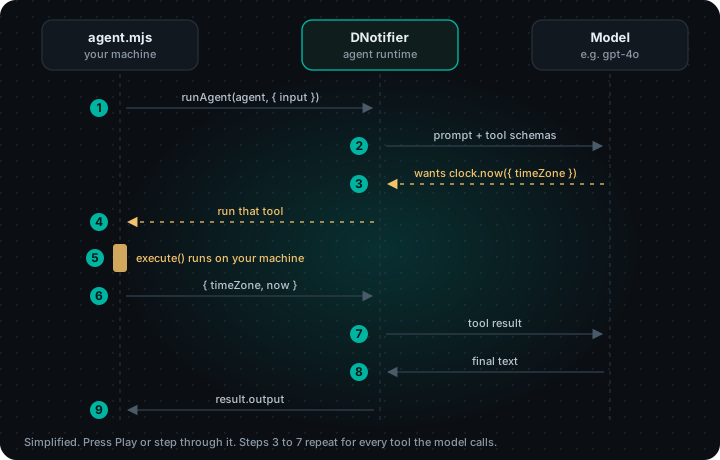
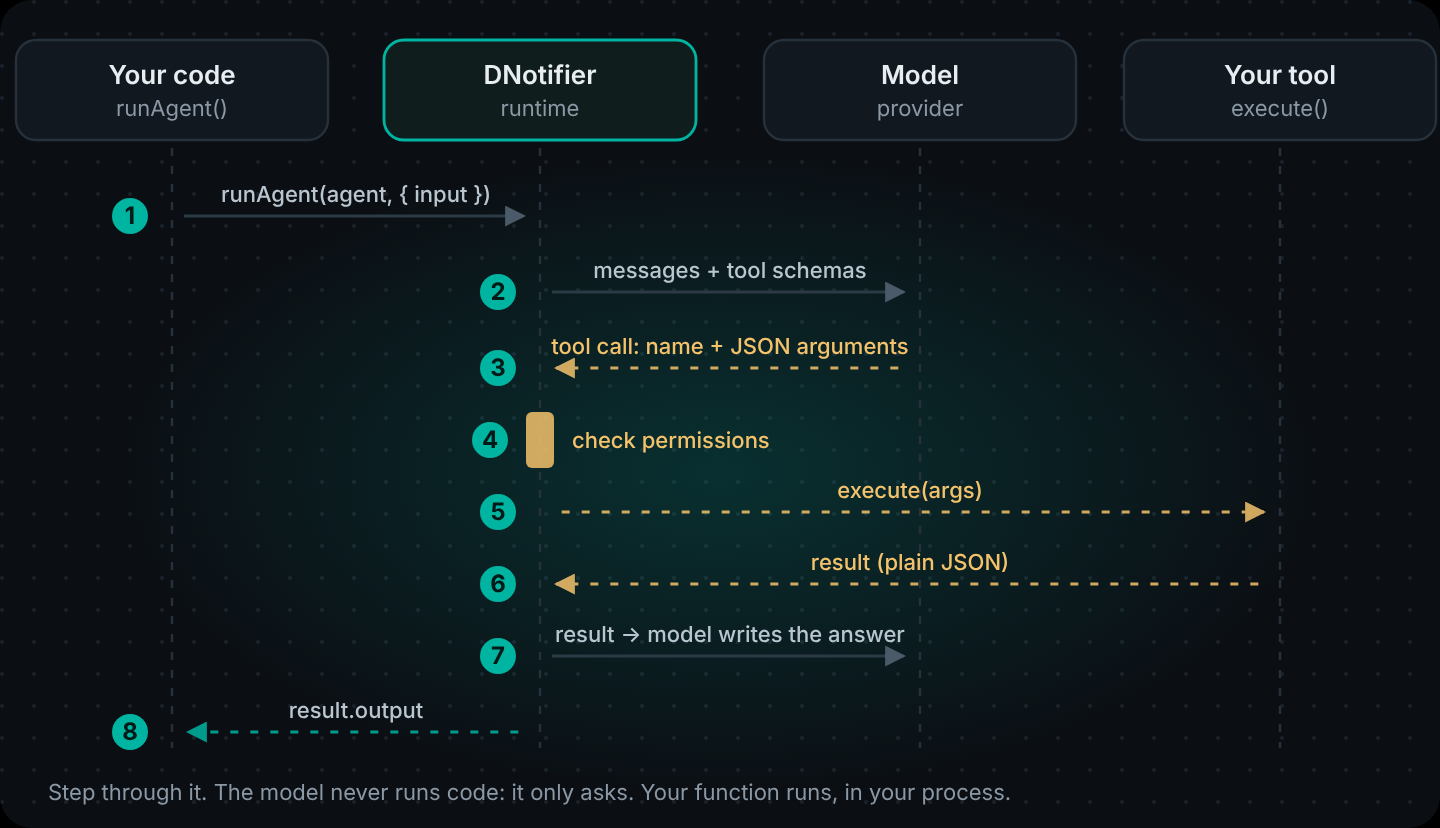
runAgent sent your question to the model along with the tool's name, description and schema. The model replied with a request to call clock.now, the SDK ran your execute function on your machine, and the result went back to the model. Once it had both times it wrote the answer. maxToolRounds: 4 stops the loop if the model gets confused and keeps calling tools.
Because we set observability: true, the run is also in your dashboard with its execution ID, so you can see each step's input and output.
The same agent in Dart
Same tool, same agent, same result. The only extra dependency is the timezone package, because Dart's standard library doesn't ship a time zone database.
# pubspec.yaml
dependencies:
  dnotifier: ^1.1.10
  timezone: ^0.9.4
dart/bin/agent.dart
// bin/agent.dart: the same world-clock agent, in Dart.
// Run: dart run bin/agent.dart --define=DNOTIFIER_APP_ID=... --define=DNOTIFIER_SECRET=...
import 'package:dnotifier/dnotifier.dart';
import 'package:timezone/data/latest.dart' as tzdata;
import 'package:timezone/timezone.dart' as tz;

const appId = String.fromEnvironment('DNOTIFIER_APP_ID');
const secret = String.fromEnvironment('DNOTIFIER_SECRET');

Future<void> main(List<String> args) async {
  tzdata.initializeTimeZones();

  final notifier = DNotifier(
    appId: appId,
    secret: secret,
    transport: 'http',
    userId: 'quickstart',
    onConnected: () {},
  );
  await notifier.connect();

  final clock = notifier.tools.register(
    name: 'clock.now',
    description:
        'Current local date and time for an IANA time zone such as Asia/Tokyo.',
    inputSchema: {
      'type': 'object',
      'properties': {
        'timeZone': {'type': 'string', 'description': 'IANA time zone name'},
      },
      'required': ['timeZone'],
    },
    execute: (input, context) async {
      final zone = input['timeZone'] as String;
      try {
        final now = tz.TZDateTime.now(tz.getLocation(zone));
        return {'timeZone': zone, 'now': now.toIso8601String()};
      } catch (_) {
        return {'error': 'Unknown time zone: $zone'};
      }
    },
  );

  final agent = defineAgent(
    name: 'world-clock',
    instructions: 'You help people pick a good time to call someone abroad. '
        'Always check the real time with clock.now before answering. '
        'Office hours are 09:00 to 18:00, Monday to Friday. Two sentences max.',
    provider: 'open_ai',
    model: 'gpt-4o',
    tools: [clock],
    permissions: {
      'clock.now': ['execute'],
    },
  );

  final question = args.isNotEmpty
      ? args.first
      : 'Is it a good time to call our team in Tokyo right now?';

  final result = await notifier.runAgent(agent, input: question, maxToolRounds: 4);
  print(result['output']);
}
dart pub get
dart run bin/agent.dart --define=DNOTIFIER_APP_ID=... --define=DNOTIFIER_SECRET=...What you didn't get in five minutes
Creating AI agents for real users takes a bit more than this. Right now it's a script on your laptop with your secret in an environment variable. That's the right way to start and the wrong way to ship. Before real users touch it you'll want:
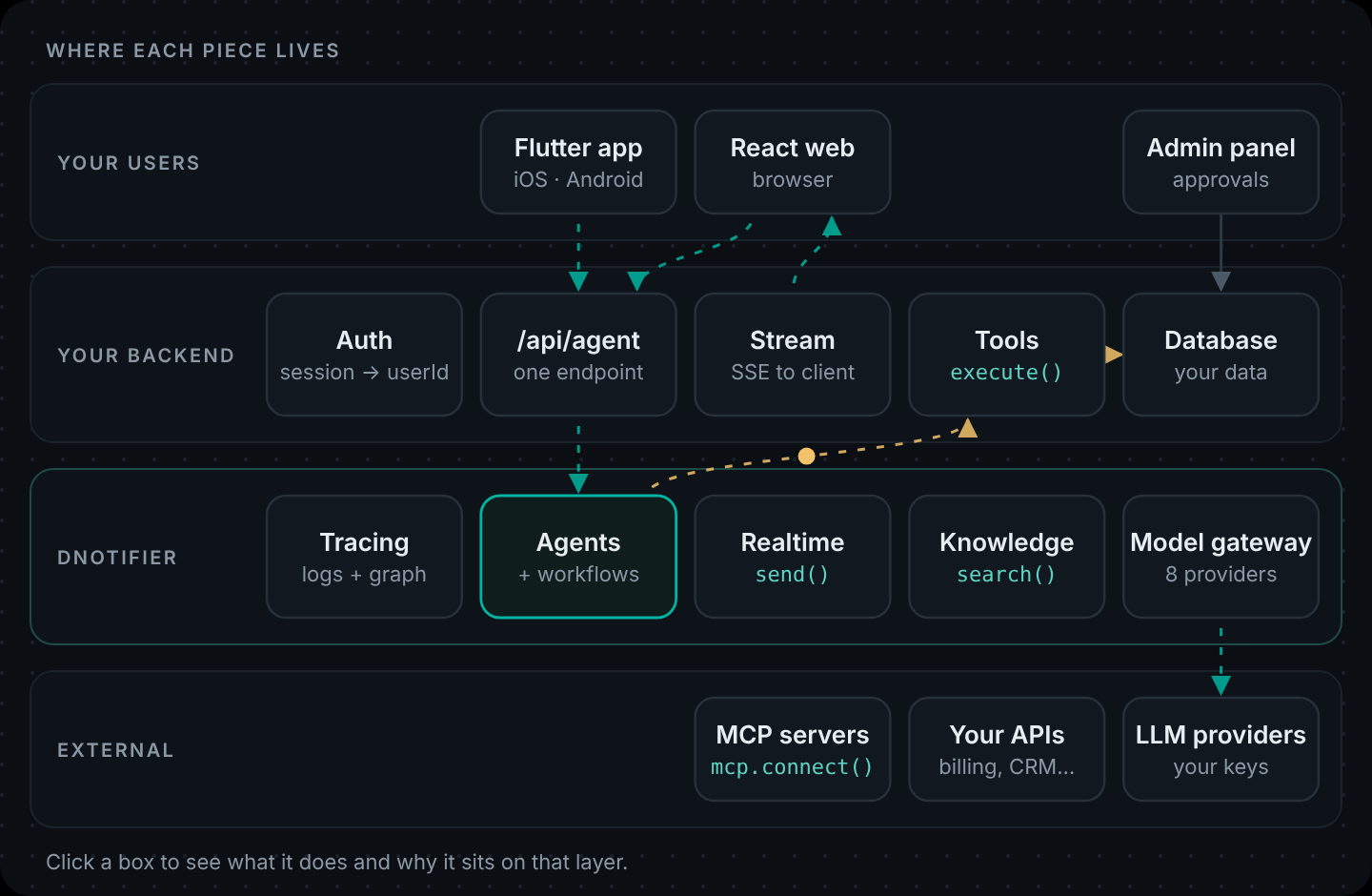
- A backend in front of the agent. Browsers and mobile apps should call your API, which calls DNotifier. Never put the DNotifier secret in front-end or Flutter code you ship. AI Agent Architecture explains why, and how to set it up.
- Tools that know who's asking. As soon as a tool reads user data, it has to scope by the signed-in user, and that user must come from your auth, not from the model.
- A UI. A React chat box and a Flutter screen that call your API.
All three are in How to Build an AI Agent: A Step-by-Step Guide, where we build a full order-help agent for an online store. For a job too long for this one loop, deep agents plan the work and hand each piece to a subagent.
Your API key, your tools, our runtime. DNotifier runs the agent loop, tool calls and traces across 8 model providers. Create your app · Read the agent docs
Where this runs in production
A script on your laptop isn't a deployment. Once you wrap the agent in a small API (the step-by-step guide shows how), it runs as one container on any of the big clouds. Here's what that looks like:
Deploy to AWS
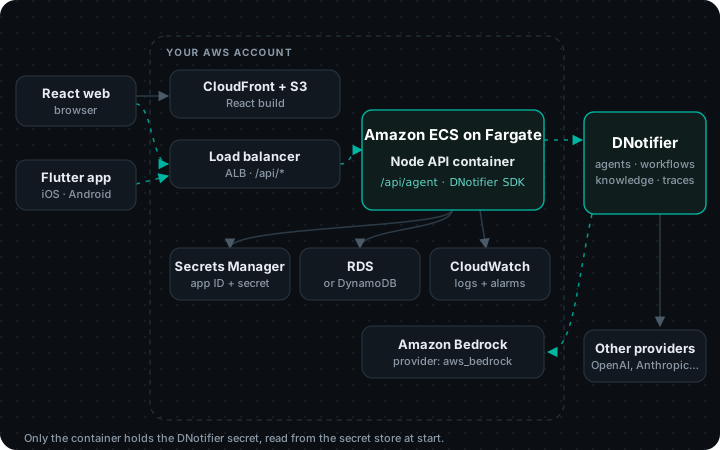
| Piece | AWS service | Why |
|---|---|---|
| React build | S3 bucket behind CloudFront | Static files on a CDN. Add a second CloudFront behavior for /api/* pointing at the load balancer, so the browser calls the same domain. |
| Node container | Amazon ECS on Fargate, behind an Application Load Balancer | Long-lived containers handle server-sent events and WebSockets without timeouts. (App Runner moved to maintenance mode in 2026; AWS points new apps to ECS Express Mode.) |
| App ID + secret | AWS Secrets Manager | Injected into the task as environment variables through the task definition's secrets block. Never baked into the image. |
| Your data | Amazon RDS or DynamoDB | Only your tool code talks to it, from inside the VPC. |
| Logs | CloudWatch Logs | Log the DNotifier executionId next to each request, so you can jump from a CloudWatch line to the run trace. |
| Models (optional) | Amazon Bedrock via the aws_bedrock provider | Add Bedrock in AI Studio → Providers if you want inference billed to your AWS account. Any other provider works too. |
# 1. Store the credentials (once)
aws secretsmanager create-secret --name dnotifier/prod \
  --secret-string '{"DNOTIFIER_APP_ID":"<app-id>","DNOTIFIER_SECRET":"<secret>"}'

# 2. Build and push the image
aws ecr create-repository --repository-name order-help-api
aws ecr get-login-password | docker login --username AWS --password-stdin <account>.dkr.ecr.<region>.amazonaws.com
docker build -t <account>.dkr.ecr.<region>.amazonaws.com/order-help-api:1 .
docker push <account>.dkr.ecr.<region>.amazonaws.com/order-help-api:1

# 3. In the ECS task definition, pull the values from Secrets Manager:
#   "secrets": [
#     { "name": "DNOTIFIER_APP_ID", "valueFrom": "<secret-arn>:DNOTIFIER_APP_ID::" },
#     { "name": "DNOTIFIER_SECRET", "valueFrom": "<secret-arn>:DNOTIFIER_SECRET::" }
#   ],
#   "portMappings": [{ "containerPort": 3001 }]
Watch out: Set the load balancer's idle timeout above your longest agent run if you use the streaming endpoint.
Deploy to Azure
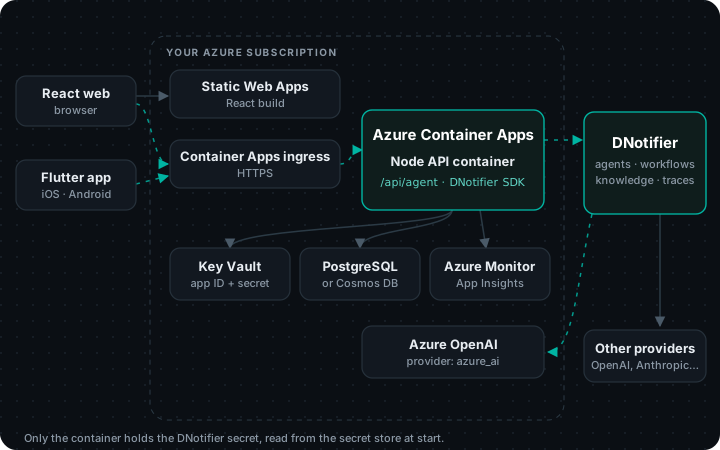
| Piece | Azure service | Why |
|---|---|---|
| React build | Azure Static Web Apps | Link the Container App as the site's backend (Standard plan) so /api calls stay on the same domain, or call the API's own URL with CORS. |
| Node container | Azure Container Apps | Managed containers with HTTPS ingress, scale rules and long-lived connections. |
| App ID + secret | Container Apps secrets, backed by Key Vault | Store the secret in Key Vault and reference it from the app with a managed identity; expose it as an env var with secretref:. |
| Your data | Azure Database for PostgreSQL or Cosmos DB | Reachable only from your app's environment. |
| Logs | Azure Monitor / Application Insights | Log the DNotifier executionId with each request. |
| Models (optional) | Azure OpenAI via the azure_ai provider | Keeps model usage on your Azure bill and in your chosen region. Any other provider works too. |
# 1. Build from source and deploy (creates the environment if needed)
az containerapp up --name order-help-api --resource-group dnotifier-rg \
  --location westeurope --source . --ingress external --target-port 3001

# 2. Add the secret and point env vars at it
az containerapp secret set -n order-help-api -g dnotifier-rg \
  --secrets dnotifier-secret=<secret>
az containerapp update -n order-help-api -g dnotifier-rg \
  --set-env-vars DNOTIFIER_APP_ID=<app-id> DNOTIFIER_SECRET=secretref:dnotifier-secret NODE_ENV=production
Watch out: If you use Static Web Apps linked backends, the API is only reachable through the site; that's usually what you want.
Deploy to Google Cloud
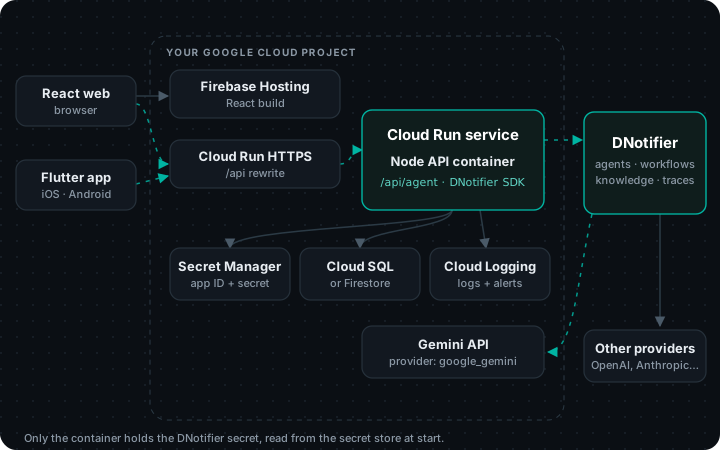
| Piece | Google Cloud service | Why |
|---|---|---|
| React build | Firebase Hosting | Rewrite /api/** to the Cloud Run service so the browser calls the same domain. Hosting-to-Cloud Run requests time out after 60 seconds, so keep agent runs short or call Cloud Run's URL directly for long streams. |
| Node container | Cloud Run | Deploy straight from source. Cloud Run sets PORT, which the example server already reads. |
| App ID + secret | Secret Manager | Mounted as env vars with --set-secrets. Never in the image or in the repo. |
| Your data | Cloud SQL or Firestore | Only your tool code reads it. |
| Logs | Cloud Logging | Log the DNotifier executionId with each request. |
| Models (optional) | Gemini via the google_gemini provider | Add your Gemini key in AI Studio → Providers. Any other provider works too. |
# 1. Store the secret (once)
printf '%s' '<secret>' | gcloud secrets create dnotifier-secret --data-file=-

# 2. Build from source and deploy
gcloud run deploy order-help-api --source . --region europe-west1 \
  --set-env-vars DNOTIFIER_APP_ID=<app-id>,NODE_ENV=production \
  --set-secrets DNOTIFIER_SECRET=dnotifier-secret:latest \
  --allow-unauthenticated   # your own auth still runs inside the app
Watch out: Cloud Run scales to zero by default. The first request after a quiet period pays a cold start; set --min-instances 1 if that matters.
# Dockerfile (same on every cloud)
FROM node:22-slim
WORKDIR /app
COPY package*.json ./
RUN npm install --omit=dev
COPY . .
ENV NODE_ENV=production
EXPOSE 3001
CMD ["node", "index.js"]
Prefer fixed steps over an agent that decides for itself? The same setup runs a workflow; see How to Build an AI Workflow in 5 Minutes.
Next in the series: Part 3: AI Agent Architecture
Previous: Part 1: How to Build an AI Agent
Get the code. Every example in this series, as runnable projects: dnotifier-agent-workflow-examples.zip. Run each one with your own app ID, secret and model key.
FAQ
Can I really create an AI agent in 5 minutes?
Yes, if Node.js or Dart is installed and you have a model provider key. The agent is one file. Getting it production-ready (auth, a backend, a UI) takes longer; the step-by-step guide covers that.
How do you create an AI agent that uses my own data?
Give it a tool that reads your data. Swap clock.now for something like orders.lookup or a search over your help articles; the rest of the code stays the same. That's how to create your own AI agent for your product instead of a general chatbot.
Do I need to know machine learning to create an AI agent?
No. You're writing ordinary functions and a plain-English job description. The model provider handles the model; you decide which of your functions it can call.
Can I use Claude or Gemini instead of GPT-4o?
Yes. Change provider and model in defineAgent (for example provider: "anthropic") and add that provider's key in AI Studio. The tool code doesn't change.
Is there a free way to try it?
DNotifier's free plan covers realtime messaging; AI agents start on the Starter plan. You pay your model provider directly for tokens with your own key.
What's a good second tool to add?
Something only your system knows: an order lookup, a calendar check, a search over your docs. The more the answer depends on your data, the more an agent helps.
What's the easiest way to make AI agent answers more reliable?
Tell it exactly when to use each tool in the instructions ("always check the real time with clock.now"), keep maxToolRounds low, and return clear errors from tools. If you want to create your own AI agent for several tasks, give each task its own small agent instead of one big prompt.