Short answer: n8n's AI nodes use LangChain's JavaScript framework under the hood. You build with an AI Agent node and plug in a chat model, memory and tools as sub-nodes, or drop down to the LangChain Code node. It works well for AI steps inside app-to-app automations. Move the AI logic to code when it needs real branching, tests, or your app's users and data.
We like n8n. For wiring a form to a CRM to Slack, it's hard to beat: you can see the whole flow, ops people can change it, and there's a ready-made node for most SaaS tools you'd want to connect. Adding AI to those flows through n8n's LangChain nodes is a natural next step.
This article is about the point where that stops being the easiest option, and what to do about it without throwing n8n away.
For the wider pick between canvases and a product-embedded agent (Fleet, Flowise, code-first SDKs), see no-code agent builders vs code-first agents.
How the n8n LangChain integration works
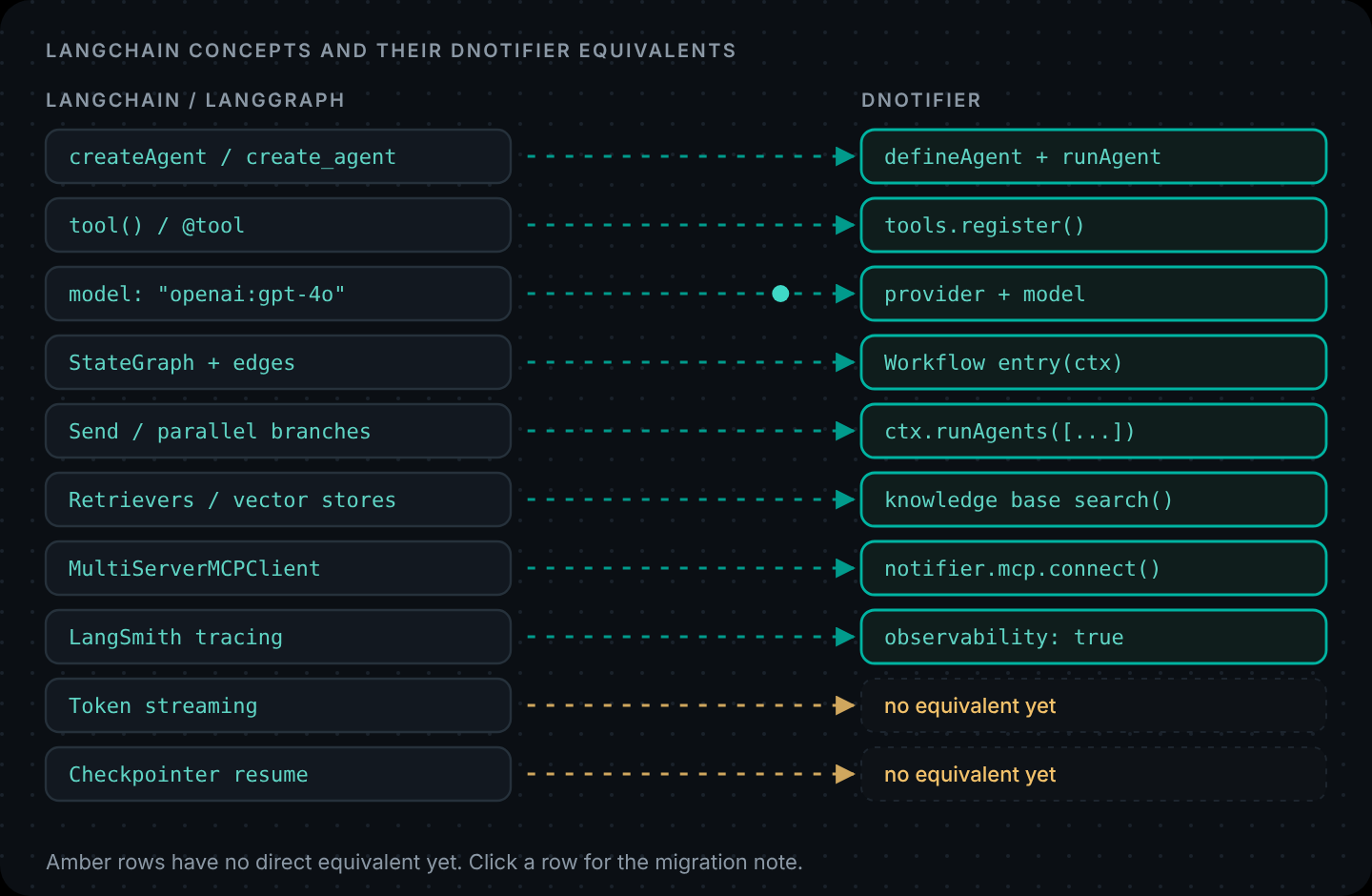
According to n8n's own docs, its AI nodes use LangChain's JavaScript framework. n8n models most LangChain concepts as cluster nodes: a root node that does the main job, plus sub-nodes that plug into it.
- AI Agent is the root node most people start with. It runs an agent loop.
- Sub-nodes attach to it: a chat model (OpenAI, Anthropic, Gemini and others), memory, and tools.
- Memory only attaches to the AI Agent node. Chain nodes don't support memory, so multi-turn conversations need an agent.
- The LangChain Code node lets you write LangChain JavaScript directly, for anything that doesn't have a dedicated node yet.
- LangSmith tracing can be enabled on self-hosted n8n; n8n's docs note it isn't available on n8n Cloud.
So "n8n + LangChain" isn't two products you connect. If you've used the n8n AI Agent node, you've used LangChain.
The same workflow, two ways
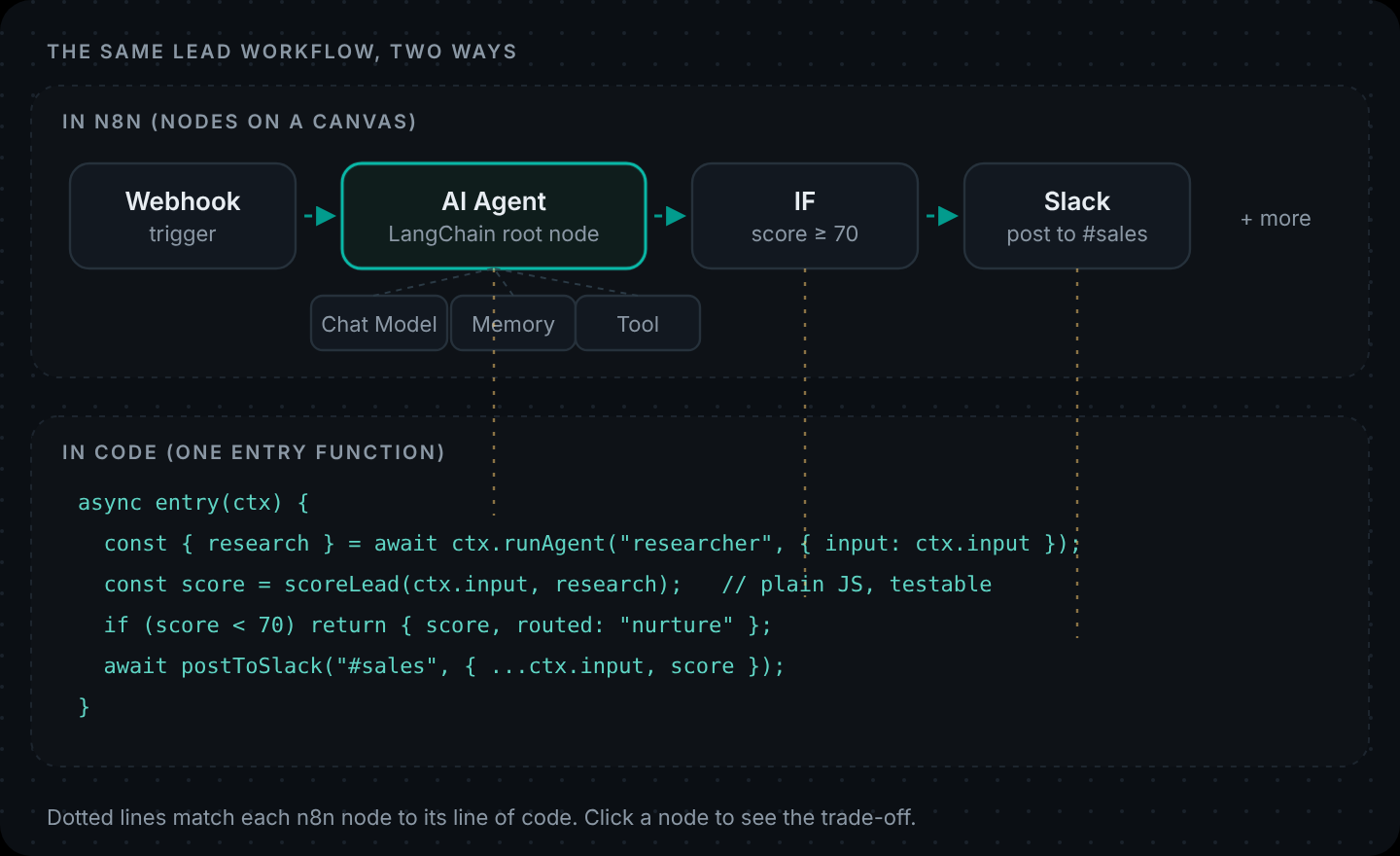
Here's a typical AI automation: a new lead comes in, an AI step researches the company, the lead gets a score, and good leads go to the sales channel.
In n8n that's four nodes and some sub-nodes, and it takes minutes to build. In code it's one function of about six lines. At this size both are fine. The difference shows up as the workflow grows.
Where n8n is the better choice
Be honest about this part, because it's most automations:
- The value is in the connections. Trigger in HubSpot, enrich, post to Slack, update a sheet. n8n's integrations do the heavy lifting; the AI step is one node among many.
- Non-developers maintain it. Ops and marketing teams can read and change an n8n canvas. They can't safely change a TypeScript service.
- The logic is shallow. One AI call, one IF node, done.
- You want it running today. n8n is quick to start, and you can self-host it if your data has to stay in your infrastructure.
If that describes your n8n workflow, AI included, keep it in n8n.
n8n AI Agent node limits teams run into
None of these are bugs in n8n. They're the natural edges of a visual tool, and they tend to show up together once an AI workflow becomes part of a product rather than a side automation:
- Logic that wants to be a function. Lead scoring starts as one IF node and ends as fifteen weighted rules with exceptions. That's a function with unit tests, not a canvas of IF nodes.
- Testing. You'll want to run the scoring and routing against fifty sample leads every time someone changes it. That's natural in a test suite and awkward on a canvas.
- Code review. When the workflow is business-critical, changes should be reviewed like other code: a diff, a pull request, a CI run.
- Your app's users and data. If the agent must act for a signed-in user of your product, with their permissions, the tools belong in your backend next to your auth, not in a separate automation server.
- Shared state with the rest of your app. Types, database models and helpers already exist in your codebase. Re-creating them inside nodes drifts over time.
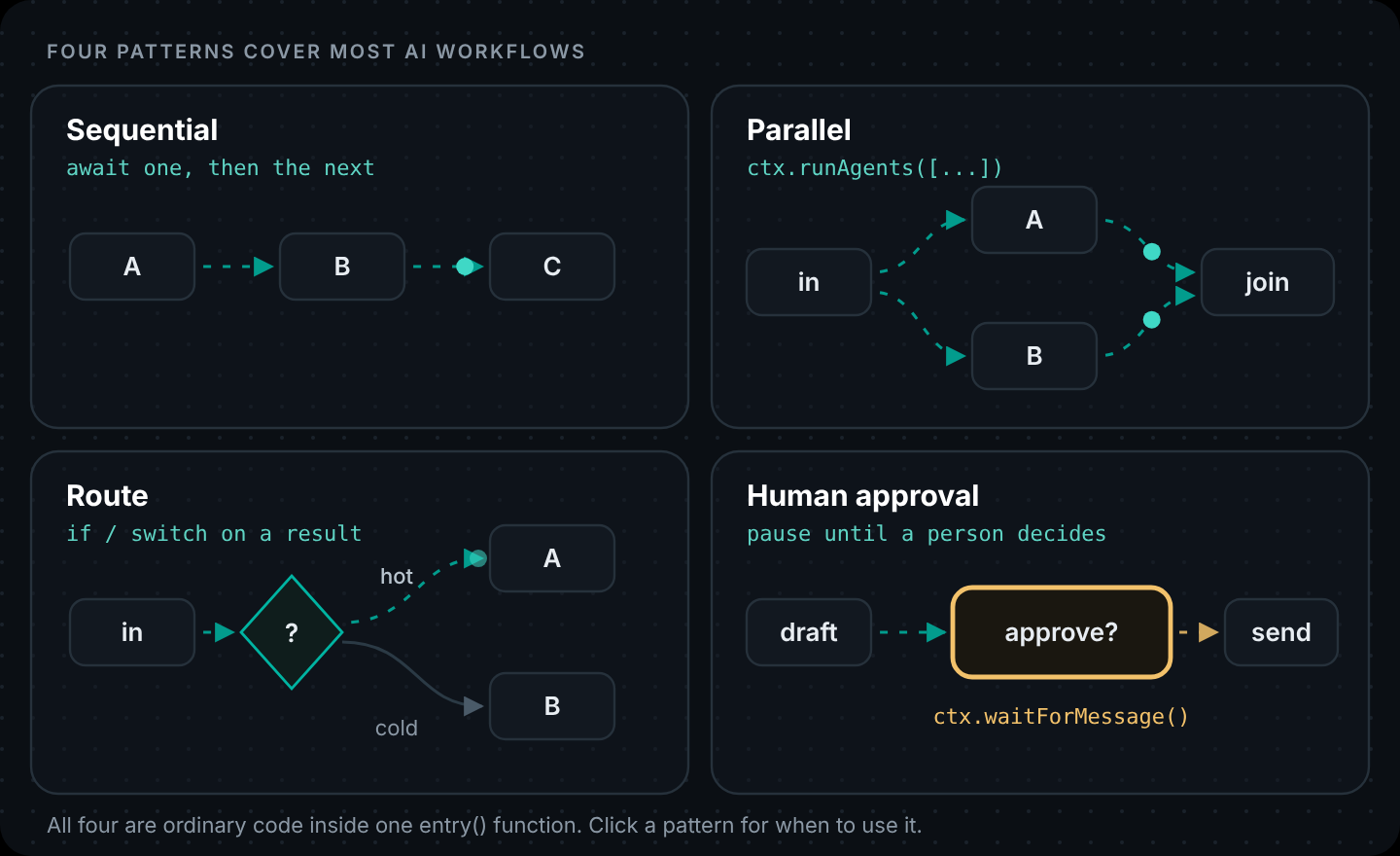
- Multi-agent logic. Several agents working in parallel, a router in front of specialists, a human approval that pauses the run: all possible in n8n, but much easier to read as code once there are more than a few of them.
A quick test: if you'd be nervous letting a teammate edit the workflow without someone checking their change, it probably wants to be code.
n8n vs a code-first workflow
| n8n (AI Agent / LangChain nodes) | Code-first (DNotifier workflow) | |
|---|---|---|
| Who builds it | Ops, marketing, developers | Developers |
| Best at | Connecting SaaS tools with light AI steps | AI logic inside your product |
| Branching and scoring | IF / Switch nodes | Plain code, unit-tested |
| Parallel agents | Possible, gets busy on the canvas | ctx.runAgents([...]) |
| Human approval | Wait / form nodes | ctx.waitForMessage() |
| Your users and permissions | Separate from your app | Same backend, same auth |
| Review and versioning | Workflow history / exports | Git, pull requests, CI |
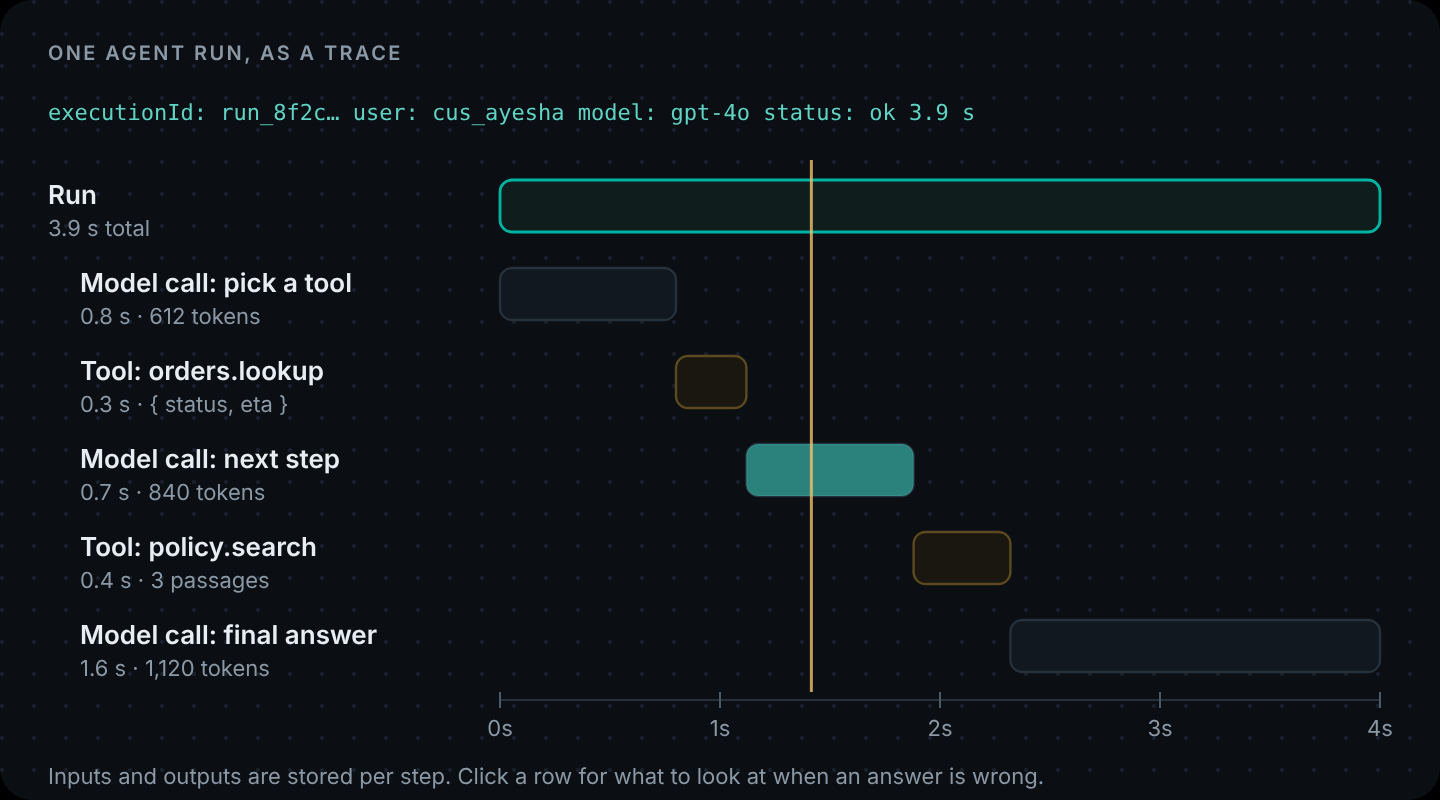
| Tracing | LangSmith on self-hosted n8n | Built in (observability: true) |
The same lead workflow in code
Here's the n8n flow from the diagram as a DNotifier workflow. The research step is an agent; the scoring is plain JavaScript you can test; the routing is an if.
// lead-review.js
import { DNotifier } from "@dnotifier-realtime/dnotifier";

const textOf = (res) => res?.data?.content ?? res?.content ?? "";

const researcher = DNotifier.defineAgent({
  name: "researcher",
  async run(ctx) {
    const lead = ctx.input;
    const res = await ctx.sendAI({
      message: {
        useKnowledgeBase: false,
        messages: [
          {
            role: "system",
            content:
              "From the lead details, estimate company size and whether they build software. " +
              'Reply with JSON only: {"employees": number|null, "buildsSoftware": boolean, "notes": "one sentence"}',
          },
          { role: "user", content: JSON.stringify(lead) },
        ],
      },
      saveHistory: false,
      label: "Research lead",
    });
    try {
      return { research: JSON.parse(textOf(res)) };
    } catch {
      return { research: { employees: null, buildsSoftware: false, notes: "Could not parse research" } };
    }
  },
});

// Plain code: easy to read, easy to test, no model involved.
export function scoreLead(lead, research) {
  let score = 0;
  if (research.buildsSoftware) score += 40;
  if ((research.employees ?? 0) >= 10) score += 20;
  if (/cto|engineering|founder/i.test(lead.role ?? "")) score += 25;
  if (!/gmail|yahoo|hotmail/i.test(lead.email ?? "")) score += 15;
  return score;
}

export const leadReview = new DNotifier.Workflow({
  name: "lead-review",
  observability: true,
  async entry(ctx) {
    const { research } = await ctx.runAgent("researcher", { input: ctx.input });
    const score = scoreLead(ctx.input, research);
    ctx.state.score = score;

    if (score < 70) return { score, route: "nurture", research };

    await fetch(process.env.SLACK_WEBHOOK_URL, {
      method: "POST",
      headers: { "content-type": "application/json" },
      body: JSON.stringify({ text: `New lead (${score}): ${ctx.input.email} — ${research.notes}` }),
    });
    return { score, route: "sales", research };
  },
}).registerAgents({ researcher });
The workflow is longer than four nodes, but every line can be read in a pull request, scoreLead gets its own unit tests, and each run shows up in the dashboard with the research, the score and the route.
Use both: n8n for the glue, code for the AI logic
You don't have to choose. A pattern that works well is to keep n8n for triggers and integrations, and call your code-first workflow from an HTTP Request node:
On your side, that's one small endpoint:
// server.js (Express)
import express from "express";
import { DNotifier } from "@dnotifier-realtime/dnotifier";
import { leadReview } from "./lead-review.js";

const notifier = new DNotifier({
  appId: process.env.DNOTIFIER_APP_ID,
  secret: process.env.DNOTIFIER_SECRET,
  transport: "http",
  userId: "lead-review-api",
});
await notifier.connect();

const app = express();
app.use(express.json({ limit: "20kb" }));

app.post("/api/lead-review", async (req, res) => {
  if (req.get("x-api-key") !== process.env.N8N_SHARED_KEY) return res.status(401).end();
  const { email, company, role } = req.body ?? {};
  if (!email) return res.status(400).json({ error: "email is required" });
  const run = await notifier.runWorkflow({ workflow: leadReview, input: { email, company, role } });
  res.json({ ...run.result, executionId: run.executionId });
});

app.listen(process.env.PORT ?? 3000);
And in n8n, the HTTP Request node needs four settings:
| Setting | Value |
|---|---|
| Method | POST |
| URL | https://your-api.example.com/api/lead-review |
| Header | x-api-key = your shared key (stored as an n8n credential) |
| Body (JSON) | { "email": "...", "company": "...", "role": "..." } mapped from the trigger |
The next n8n node gets score, route and research back as JSON and carries on: post to Slack, update the CRM, add to a nurture list. Ops keeps the canvas; developers own the logic that needs tests.
What we'd do
- Simple AI step inside a SaaS automation: keep it in n8n.
- AI logic that's becoming part of your product: move it to code, and call it from n8n if the trigger lives there.
- Agents that act for your users: code, in your backend, with tools scoped to the signed-in user. See How to Build an AI Workflow in Code for a full example with parallel agents and human approval.
Try the code-first version in five minutes. A two-step AI workflow you can run from a terminal, then call from n8n. Build an AI workflow in 5 minutes · Create your app · Workflows
FAQ
Does n8n use LangChain?
Yes. n8n's documentation says its AI nodes use LangChain's JavaScript framework. The AI Agent node and its model, memory and tool sub-nodes map to LangChain concepts.
What are the n8n LangChain nodes?
n8n's AI cluster nodes: root nodes such as AI Agent and chains, sub-nodes for chat models, memory, tools and other components, and the LangChain Code node for writing LangChain JavaScript directly.
Is n8n good for AI agents?
For AI steps inside automations that connect SaaS tools, yes. For agents that act on behalf of your own app's users, or workflows with heavy branching and testing needs, code in your backend is usually easier to maintain.
Can I write LangChain code inside n8n?
Yes, with the LangChain Code node, which runs LangChain JavaScript for functionality that has no dedicated node.
When should I move an n8n AI workflow to code?
When the logic needs unit tests, code review, your app's users and permissions, or several agents working together. A good sign is when you'd want every change reviewed before it goes live.
Can n8n call a DNotifier workflow?
Yes. Expose the workflow through an endpoint on your API (as above) and call it with n8n's HTTP Request node. The JSON result flows into the next n8n node.