Short answer: a RAG agent is an AI agent that has retrieval as one of its tools. Instead of always searching your documents before every answer (a fixed RAG pipeline), the agent decides whether to search, what to search for, and whether to search again with a better query before it answers. That’s agentic RAG. You build one by registering a knowledge-base search as a tool, telling the agent when to use it and how to cite what it finds, and capping the number of tool rounds.
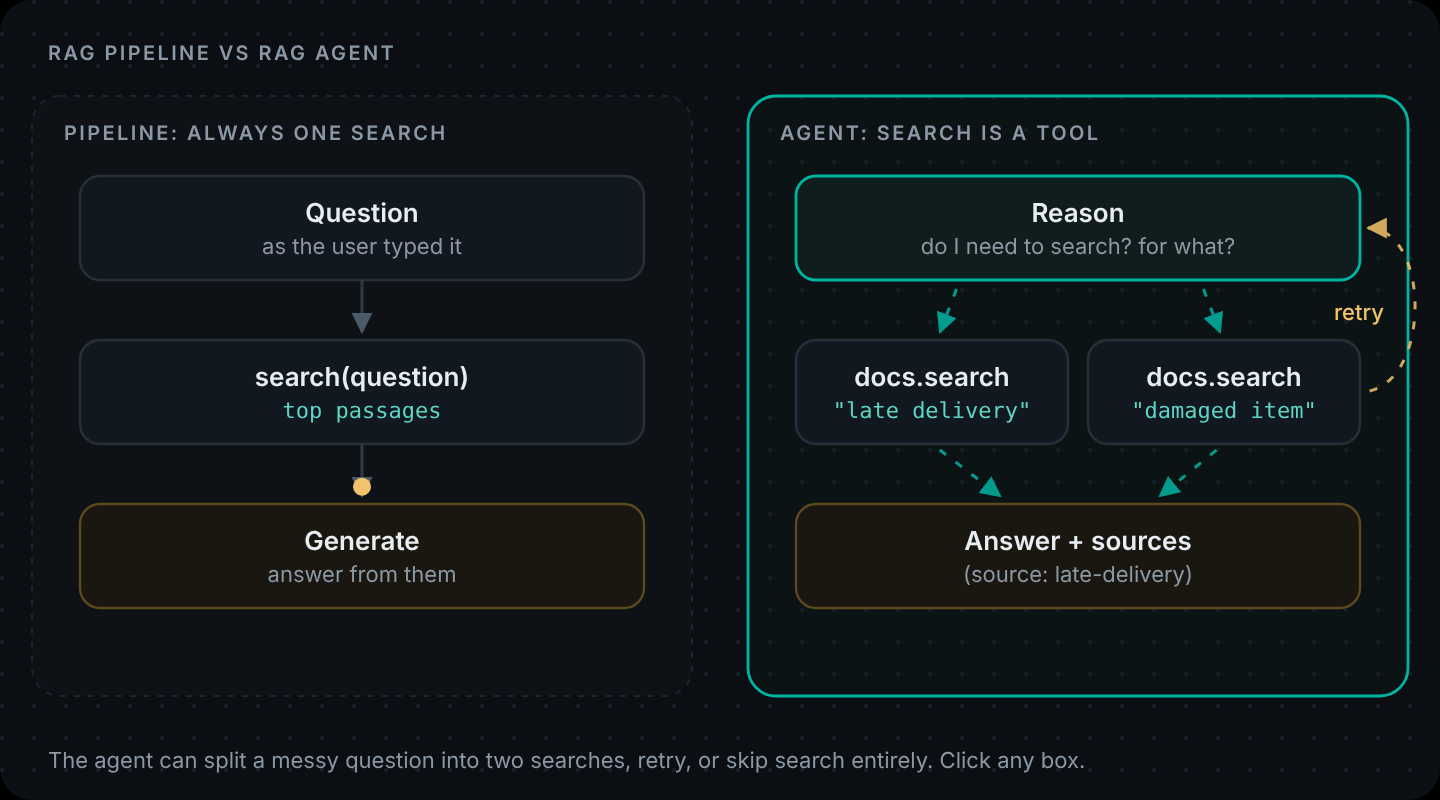
Classic retrieval-augmented generation (RAG) is a pipeline: take the user’s question, search a vector index, paste the top results into the prompt, generate an answer. It works well for simple questions. It works less well when the question needs two searches, when the first search finds nothing useful, or when no search is needed at all (“thanks, that’s all!”).
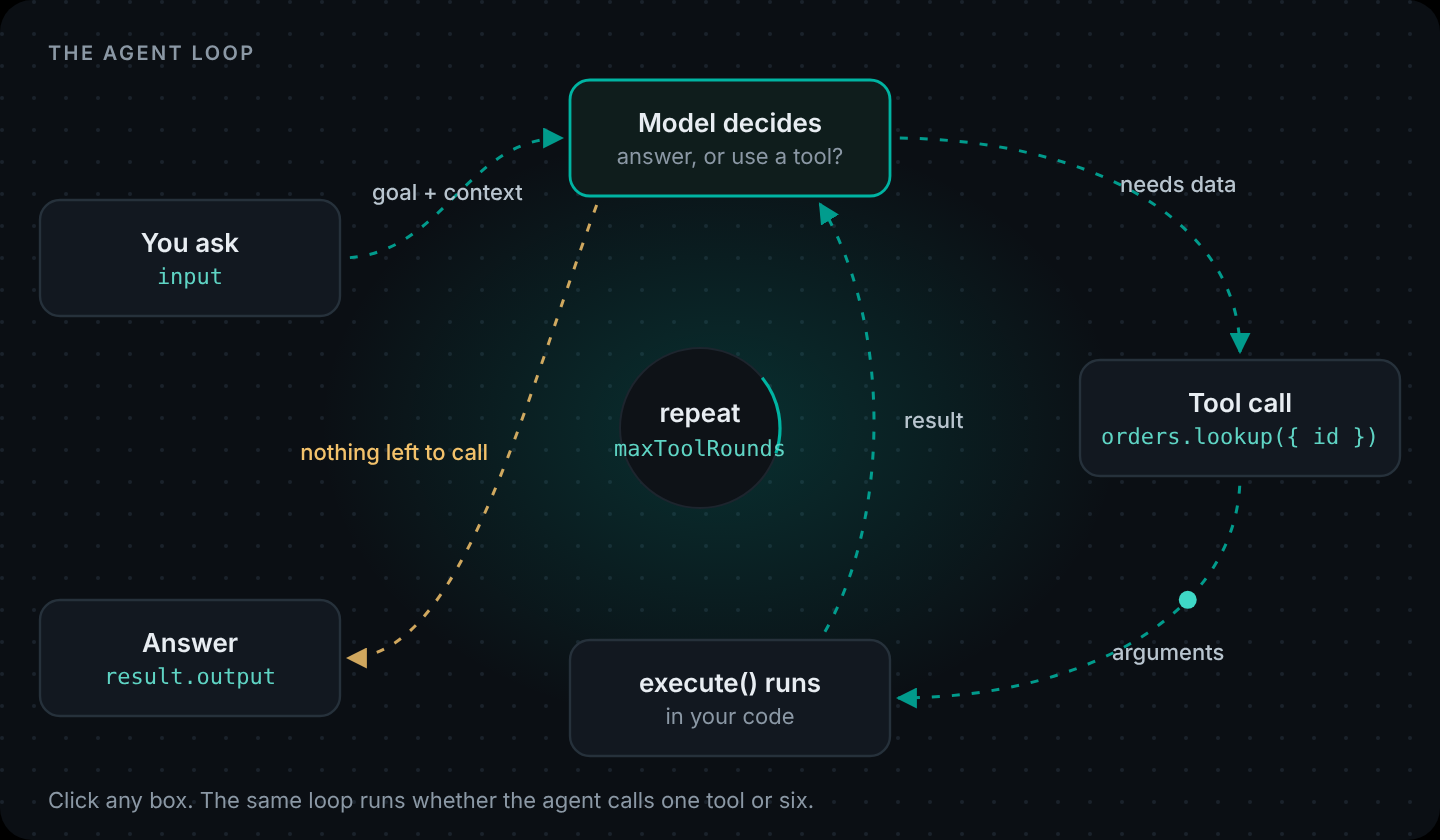
A RAG agent fixes those cases by letting the model decide. RAG becomes a tool the agent chooses to call, not a step that always runs.
Pipeline RAG vs agentic RAG
| Comparison | RAG pipeline | Agentic RAG (RAG agent) |
|---|---|---|
| When it searches | Every question, once | When the agent decides it needs to |
| What it searches for | The user’s exact words | A query the agent writes, possibly several |
| If the first search misses | Answers from weak context | Can rephrase and search again |
| Other tools | Usually none | Can combine search with lookups, APIs, calculators |
| Cost and latency | Predictable: one search, one call | Varies: one to several rounds |
| Best for | FAQ bots, simple doc Q&A | Questions that need judgment, several sources, or follow-ups |
Neither is better in general. If 90% of your questions are “what’s your return policy?”, a pipeline is cheaper and just as good. Agentic RAG earns its extra calls when questions are messier.
The simplest RAG pipeline, for comparison
With DNotifier, the knowledge base is managed (no vector database to run), and the plain pipeline version is one flag on an AI call:
const res = await notifier.sendAI({
  senderId: userId,
  message: {
    useKnowledgeBase: true, // search the knowledge base and use the results to answer
    messages: [{ role: "user", content: "How long do refunds take?" }],
  },
});
That’s fine for a help widget. Now let’s turn retrieval into a tool.
Build a RAG agent in about 50 lines
1. Put documents in the knowledge base
Use the connected notifier client from step 2 to run this indexing snippet once before querying the agent, then run it again whenever the documents change.
const docs = [
  { id: "refund-policy", text: "Refunds are processed within 5 business days after approval." },
  { id: "late-delivery", text: "If an order arrives more than 5 days late, customers can request a refund." },
  { id: "damaged-items", text: "Damaged items can be returned within 30 days with a photo of the damage." },
];
for (const d of docs) {
  await notifier.addDocument({
    senderId: "indexer",
    recordId: d.id,
    content: d.text,
    type: "policy",
    metadata: { source: "help-center" },
  });
}
In practice you’d load these from your help center or docs and re-run it on change. recordId lets you update or delete a document later.
2. Register search as a tool
// rag-agent.mjs
import { DNotifier } from "@dnotifier-realtime/dnotifier";

const notifier = new DNotifier({
  appId: process.env.DNOTIFIER_APP_ID,
  secret: process.env.DNOTIFIER_SECRET,
  transport: "http",
  userId: "rag-agent",
  permissionEnforcement: "disabled", // local demo only; use "backend" in production
  onAgentEvent: (e) => console.log("  ·", e.type, e.toolId ?? ""),
});
await notifier.connect();

const searchDocs = notifier.tools.register({
  name: "docs.search",
  description:
    "Search the store's help articles (refunds, returns, delivery, warranty). Returns short passages " +
    "with their recordId. Write a short, specific query. If the results don't answer the question, " +
    "try once more with different words before saying you don't know.",
  inputSchema: {
    type: "object",
    properties: { query: { type: "string", description: "A short search query, not the whole question" } },
    required: ["query"],
  },
  async execute({ query }) {
    const hits = await notifier.search({
      senderId: "rag-agent",
      query,
      limit: 4,
      minSimilarity: 0.5,
      filterbySource: "help-center",
    });
    const results = hits?.data ?? hits;
    return Array.isArray(results) && results.length
      ? { results }
      : { results: [], note: "Nothing relevant found for that query." };
  },
});
The description is doing real work here (more on that in Tool Calling Explained). It tells the model what’s in the index, how to write a query, and that a second try is allowed.
3. Define the agent and run it
const ragAgent = DNotifier.defineAgent({
  name: "help-center-agent",
  instructions: [
    "You answer customer questions about the store's policies.",
    "Use docs.search for any question about rules, times or eligibility. Don't search for greetings or thanks.",
    "Answer only from what docs.search returns, and name the recordId you used, like (source: refund-policy).",
    "If the search finds nothing relevant after two tries, say you don't know and offer a person.",
  ].join(" "),
  provider: "open_ai",
  model: "gpt-4o",
  observability: true,
  tools: [searchDocs],
  permissions: { "docs.search": ["execute"] },
});

const question = process.argv[2] ?? "My parcel came 8 days late and the box was crushed. What are my options?";
const result = await notifier.runAgent(ragAgent, { input: question, maxToolRounds: 4 });
console.log("\n" + result.output);
Save the client setup, search tool, and agent code as rag-agent.mjs and run node rag-agent.mjs after indexing the documents.
Run it with that default question and watch the event log. The question mixes two problems, late delivery and a damaged box, and the instructions let the agent search for each one separately before answering. A pipeline would run one search with the whole sentence, which can easily surface only one of the two policies. That difference is agentic RAG in one example.
Ask “thanks, that’s all” and there should be no search at all.
Making a RAG agent reliable
- Return “nothing found” explicitly. An empty list invites the model to answer from general knowledge. A note saying nothing matched pushes it to try again or admit it doesn’t know.
- Ask for citations. Naming the
recordIdmakes answers checkable, and makes wrong answers easy to trace back to a bad document. - Tune
minSimilarityon real questions. Too high and good passages are dropped; too low and the prompt fills with noise. Try 0.5 first and look at the traces. - Keep passages short. Index sections or paragraphs, not whole 20-page documents.
- Cap the rounds. Two or three searches cover almost every question.
maxToolRounds: 4leaves room without letting the agent wander. - Filter by source. If the knowledge base holds several kinds of content, set
filterbySourcein the tool’s code so the agent only searches what it should.
Multi-agent RAG
When answers need several separate sources (your docs, your contracts, your past tickets), one agent with one search tool can get muddled. Multi-agent RAG gives each source its own small agent, runs them in parallel, and merges:
const research = new DNotifier.Workflow({
  name: "multi-source-answer",
  observability: true,
  async entry(ctx) {
    const { results } = await ctx.runAgents([
      { name: "policy-agent", input: ctx.input },   // searches source "help-center"
      { name: "contract-agent", input: ctx.input }, // searches source "contracts"
    ]);
    return ctx.runAgent("writer", { input: { question: ctx.input, findings: results } });
  },
}).registerAgents({ "policy-agent": policyAgent, "contract-agent": contractAgent, writer });
Each researcher sees only its own source and returns a short summary; the writer sees only the summaries. It’s the same planner-and-subagents idea as deep agents, applied to retrieval.
When you don’t need a RAG agent
- The questions are simple and repetitive: use the pipeline (
useKnowledgeBase: true). It’s cheaper and more predictable. - The data is structured (orders, accounts, inventory): use a normal lookup tool, not semantic search, as in How to Build an AI Agent. “Where is order A-1042?” is a database query, not a retrieval problem.
- The facts are about this user’s earlier conversations: that’s agent memory, which uses the same search, filtered per user.
A managed knowledge base with semantic search, usable as a pipeline or as an agent tool.
Explore the knowledge base · Knowledge base docs · Create your app
FAQ
What is a RAG agent?
An AI agent that has retrieval from your documents as one of its tools. It decides when to search, writes its own queries, can search again if the first results don’t help, and answers from what it finds.
What is agentic RAG?
Retrieval-augmented generation where an agent controls retrieval instead of a fixed pipeline. The agent chooses whether to search, what to search for and how many times, and can combine search with other tools.
What is the difference between RAG and a RAG agent?
Standard RAG always runs one search on the user’s question and passes the results to the model. A RAG agent treats search as a tool it can call zero, one or several times, with queries it writes itself.
How do I build a RAG agent without managing a vector database?
Use a managed knowledge base. In DNotifier you add documents with addDocument(), register a tool that calls search() with a source filter, and give that tool to an agent defined with DNotifier.defineAgent(). Indexing and vector search are handled for you.
What is multi-agent RAG?
A design where several agents each retrieve from one source, often in parallel, and a final step combines their findings. It keeps each agent’s context small and focused when an answer needs facts from several places.
Is agentic RAG always better than a RAG pipeline?
No. It costs more calls and varies more in latency. For simple, repetitive questions a pipeline is cheaper and just as accurate. Agentic RAG pays off for questions that need several searches, query rewriting or other tools.