Short answer: a deep agent is an AI agent built for long, multi-step tasks. Instead of one model doing everything in one conversation, it writes a plan (a to-do list), hands each piece to a subagent with a fresh context, keeps notes outside the prompt, and checks the results before it answers.
A normal tool-calling agent is great at short jobs: look up an order, check a policy, answer. How to Create an AI Agent in 5 Minutes is that agent in one file, and How to Build an AI Agent is the same idea with a real UI. Ask the same agent to "compare these three vendors on pricing, SDK support and rate limits, and give me a recommendation" and it starts to wobble. It reads a pricing page, then a docs page, then another, and by the tenth tool call the prompt is full of half-relevant text. It forgets part of the question, repeats a lookup, or answers before it has checked everything.
Deep agents are the fix people converged on. They're not a new kind of model. They're a way of organising the work around one.
Shallow agents vs deep agents
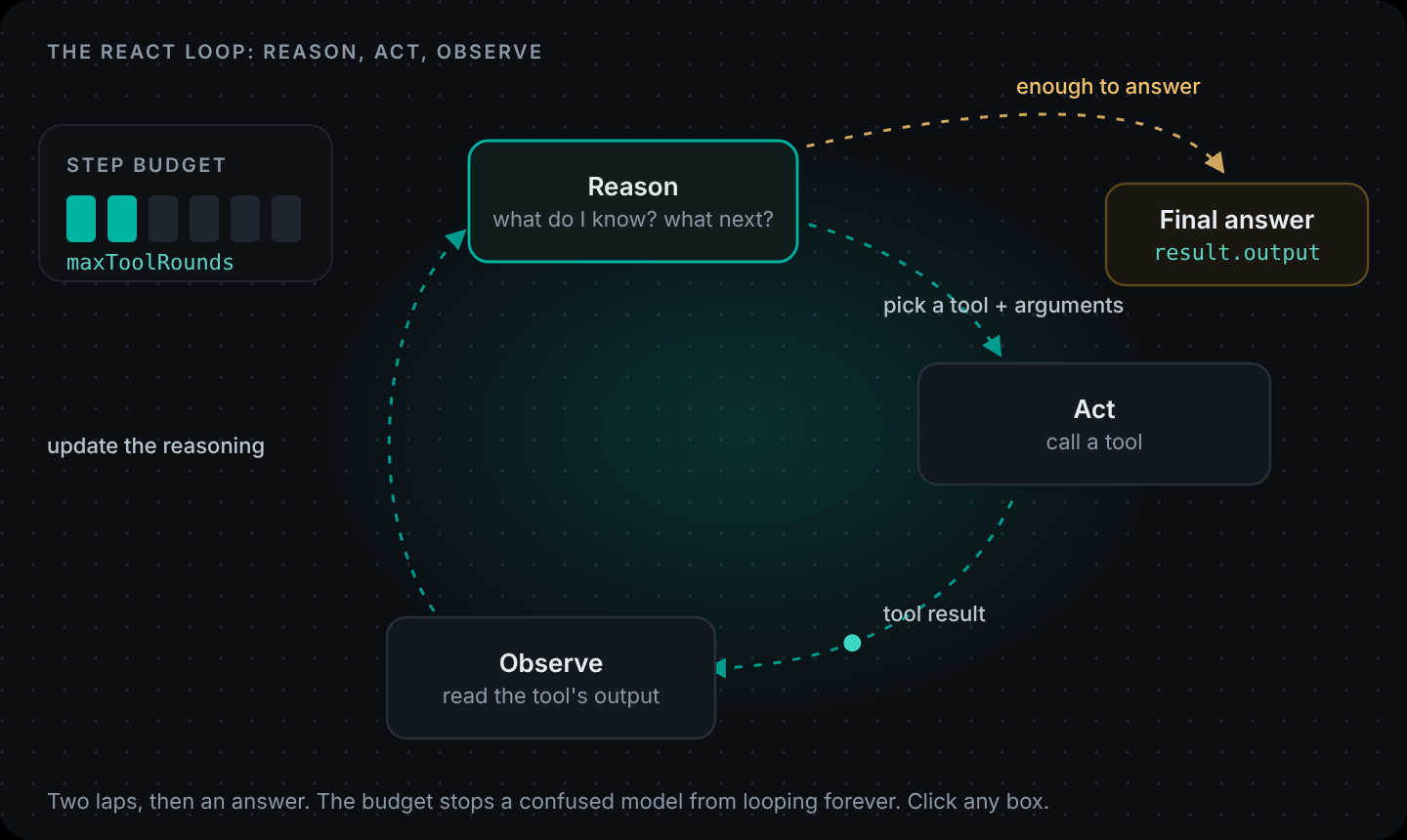
The plain ReAct loop keeps everything in one conversation: question, every tool call, every result. That's fine for three or four steps. It breaks down on long tasks for three reasons:
- The context fills up. Every observation stays in the prompt, so each model call gets slower and more expensive, and early details get crowded out.
- The plan lives only in the model's head. Nothing outside the conversation says what's done and what's left, so it's easy to skip a part.
- One generalist prompt does everything. The same instructions have to cover searching, reading, comparing and writing.
A deep agent splits those apart.
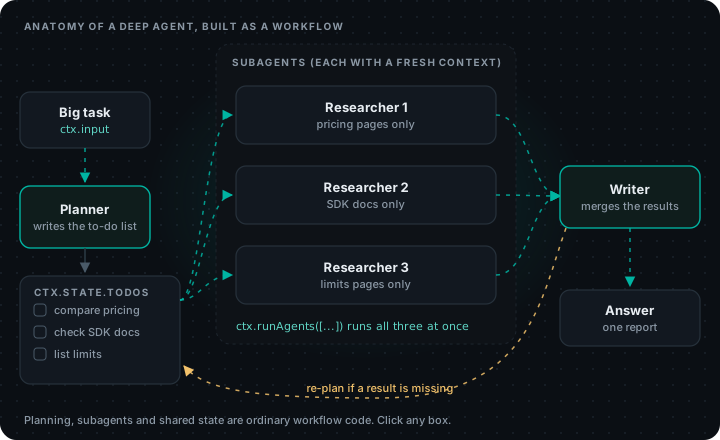
The four parts of a deep agent
Most deep agent designs, whatever library they use, have the same four parts:
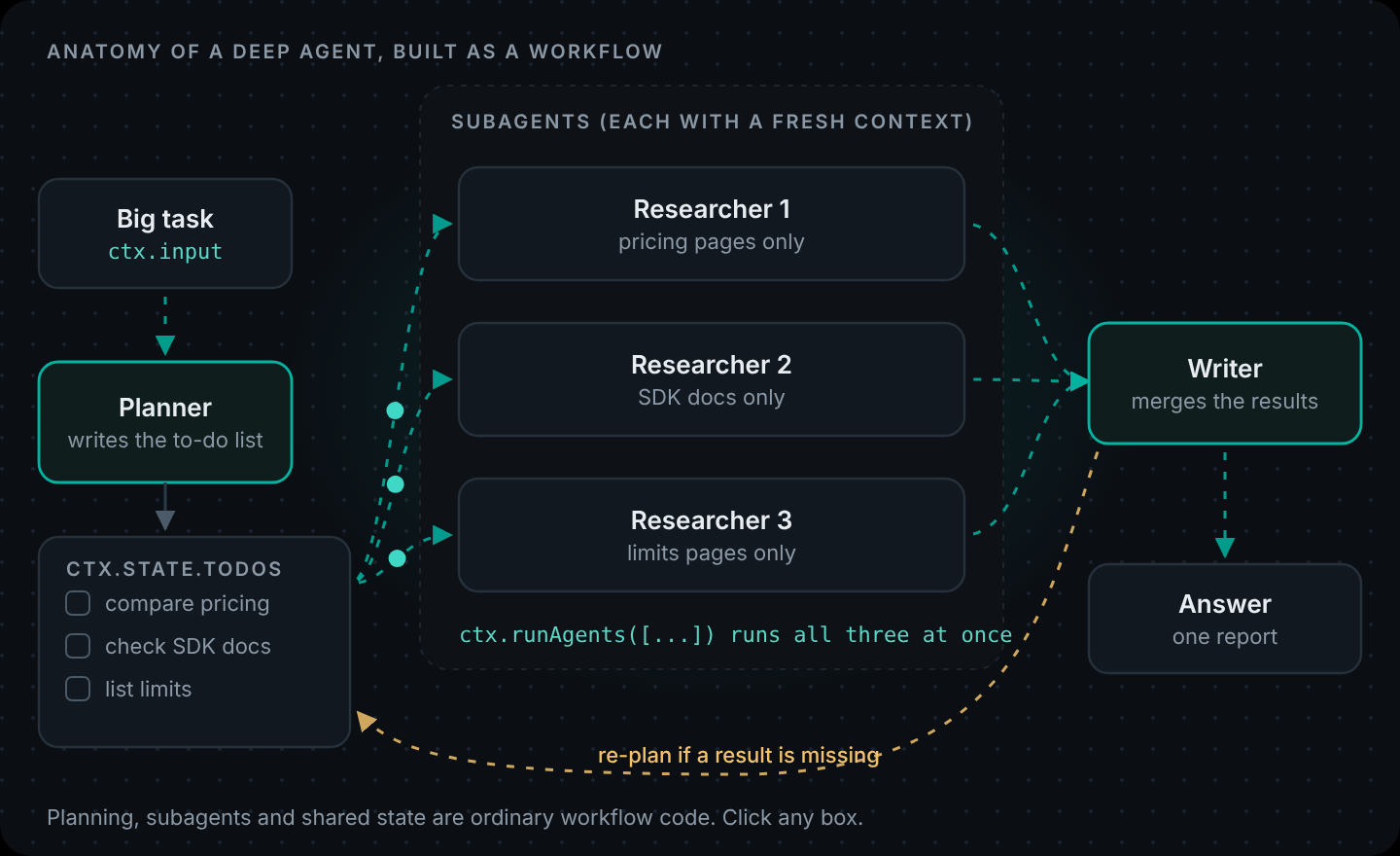
- A planning step. A planning agent turns the task into a short to-do list before any research starts. This is the "agent with todo list" pattern you'll see in coding agents: the list is explicit, so progress can be checked.
- Subagents. Each to-do item goes to a subagent that sees only that item. An agent–subagent split works the way a lead and a team member do: the lead hands over a clear task and gets back a summary, not the whole working process.
- Notes outside the prompt. The plan and intermediate results are stored somewhere other than the conversation (a file, a store, or workflow state), so nothing important depends on the model remembering it.
- Detailed instructions per role. The planner, the researchers and the writer each get a short, specific job description instead of one long prompt that tries to cover everything.
The second part, giving each subagent a fresh context, does more work than it looks:
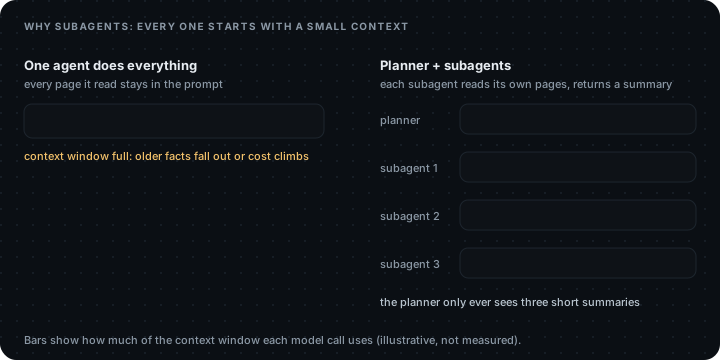
Each subagent can read as much as it needs. The planner and the writer only ever see short summaries, so their prompts stay small no matter how big the task gets.
Where the term "deep agents" comes from
The name was popularised by LangChain's open-source deepagents package (often searched as "langchain deepagent"), which describes itself as an agent harness for long-running tasks. It bundles a planning tool, a virtual file system for notes and memory, a way to spawn subagents with isolated context, and middleware that compresses long conversations. It's a well-made package and worth reading if you work in Python or TypeScript with LangChain.
You don't need that package to use the pattern, though. Planning, subagents and shared notes are ideas, not a library. Below we build the same shape as an ordinary DNotifier workflow.
Build a small deep agent as a workflow
Our deep agent answers comparison questions from documents you've already loaded into the DNotifier knowledge base (vendor pricing pages, docs, contracts). It has three agents:
- a planner that writes up to four research tasks as JSON,
- a researcher that answers one task from the knowledge base, and
- a writer that turns the findings into one recommendation.
The three agents
// deep-agent.mjs
import { DNotifier } from "@dnotifier-realtime/dnotifier";

const textOf = (res) => res?.data?.content ?? res?.content ?? "";

// 1. Planner: turns the task into a short to-do list.
const planner = DNotifier.defineAgent({
  name: "planner",
  async run(ctx) {
    const res = await ctx.sendAI({
      message: {
        useKnowledgeBase: false,
        messages: [
          {
            role: "system",
            content:
              "Break the user's task into at most 4 independent research questions. " +
              'Reply with JSON only: {"todos":["question 1","question 2"]}',
          },
          { role: "user", content: String(ctx.input) },
        ],
      },
      saveHistory: false,
      label: "Plan",
    });
    let todos = [];
    try {
      todos = JSON.parse(textOf(res)).todos ?? [];
    } catch {
      todos = [String(ctx.input)]; // no usable plan: research the task as one question
    }
    return { todos: todos.slice(0, 4) };
  },
});

// 2. Researcher: one question, its own small context, a short summary back.
const researcher = DNotifier.defineAgent({
  name: "researcher",
  async run(ctx) {
    const question = String(ctx.input);
    const hits = await ctx.search({ query: question, limit: 4, minSimilarity: 0.5, label: "Search documents" });
    const res = await ctx.sendAI({
      message: {
        useKnowledgeBase: false,
        messages: [
          {
            role: "system",
            content:
              "Answer the question using only these excerpts. 3 bullet points maximum. " +
              'If the excerpts don\'t answer it, reply exactly "NOT FOUND".\n\n' + JSON.stringify(hits),
          },
          { role: "user", content: question },
        ],
      },
      saveHistory: false,
      label: "Summarise findings",
    });
    return { question, summary: textOf(res) };
  },
});

// 3. Writer: sees only the task and the summaries.
const writer = DNotifier.defineAgent({
  name: "writer",
  async run(ctx) {
    const { task, findings } = ctx.input;
    const res = await ctx.sendAI({
      message: {
        useKnowledgeBase: false,
        messages: [
          {
            role: "system",
            content:
              "Write a short recommendation (under 200 words) from these findings. " +
              "Say clearly which questions could not be answered.",
          },
          { role: "user", content: `Task: ${task}\n\nFindings: ${JSON.stringify(findings)}` },
        ],
      },
      saveHistory: false,
      label: "Write recommendation",
    });
    return { answer: textOf(res) };
  },
});
The researcher never sees the other questions or the other answers. That's the context isolation from the diagram, done with nothing more than "only pass it what it needs".
The workflow that ties them together
export const deepResearch = new DNotifier.Workflow({
  name: "deep-research",
  description: "Plan → parallel subagents → re-plan once if needed → write",
  observability: true,
  async entry(ctx) {
    // Plan, and keep the plan in shared state (outside every prompt).
    const { todos } = await ctx.runAgent("planner", { input: ctx.input });
    ctx.state.todos = todos;

    // Run one researcher per to-do item, all at the same time.
    let { results } = await ctx.runAgents(todos.map((t) => ({ name: "researcher", input: t })));

    // Re-plan once, only for the questions that came back empty.
    const missing = results.filter((r) => !r?.summary || r.summary.includes("NOT FOUND"));
    if (missing.length && missing.length < todos.length) {
      const retry = await ctx.runAgent("planner", {
        input: `Rephrase these as more specific questions: ${missing.map((m) => m.question).join("; ")}`,
      });
      const more = await ctx.runAgents(retry.todos.slice(0, 2).map((t) => ({ name: "researcher", input: t })));
      results = results.concat(more.results);
    }
    ctx.state.findings = results;

    return ctx.runAgent("writer", { input: { task: ctx.input, findings: results } });
  },
}).registerAgents({ planner, researcher, writer });
And to run it:
const notifier = new DNotifier({
  appId: process.env.DNOTIFIER_APP_ID,
  secret: process.env.DNOTIFIER_SECRET,
  transport: "http",
  userId: "deep-research-worker",
});
await notifier.connect();

const run = await notifier.runWorkflow({
  workflow: deepResearch,
  input: "Compare Vendor A and Vendor B on pricing, SDK languages and rate limits. Which fits a 5-person startup?",
});
console.log(run.result.answer);
console.log("executionId:", run.executionId);
Run that client on your server. AI Agent Architecture is where the secret, the tools and the UI should live. Open the run in the dashboard and you'll see each step on its own: the plan, every researcher call with its search and summary, the optional re-plan, and the final write-up. When the answer is wrong, you can tell whether the plan was bad, the search missed, or the writer ignored a finding. With a single long agent conversation, that question is much harder to answer.
Guardrails that keep deep agents cheap and predictable
Deep agents can get expensive fast, because each subagent is at least one model call. A few limits we'd put on any deep agent:
- Cap the plan. We slice to four to-do items. More than that is usually a sign the task should be split by a person first.
- Re-plan once, at most. One retry for missing answers is useful. An open-ended "keep going until done" loop is how you get surprise bills.
- Return summaries, not raw text. The researcher's job is to shrink what it read into a few bullet points.
- Fail visibly. The writer is told to list the questions it couldn't answer. A confident answer with a quiet gap is worse than an honest "unknown".
Long-running AI agents: what changes
A deep agent that does real research can take minutes, not seconds. That changes how you call it:
- Don't keep an HTTP request open. Start the workflow from a background worker or queue consumer, return a job ID to the caller, and notify the user when it's done. How to Build an AI Workflow in Code shows a worker that starts runs from a webhook.
- Make steps safe to re-run. If a run fails halfway, you want to be able to start it again without side effects. Keep subagents read-only, and put anything that changes data (sending an email, updating a record) in a final step after the checks.
- Send progress to the user. For anything over a few seconds, show which step the agent is on. DNotifier's realtime messaging can push those updates to a browser or a Flutter app while the workflow runs.
Deep agents vs multi-agent workflows
They overlap a lot. The difference is who decides the steps:
| Multi-agent workflow | Deep agent | |
|---|---|---|
| Who decides the steps? | You, in code | A planner model, within limits you set |
| Number of subagent calls | Fixed | Depends on the plan |
| Best for | Repeatable processes (triage, lead review) | Open-ended research and analysis |
| Cost | Predictable | Varies with the task |
In practice the best deep agents are mostly workflow: a fixed skeleton (plan, fan out, check, write) with a model making decisions only inside it. Multi-agent workflows covers the fixed version in depth, and AI agents are like software teams explains why the lead-and-team analogy holds up.
Do you need LangChain to build a deep agent?
No. LangChain's deepagents gives you a ready-made harness (planning tool, file system, subagent spawning, context compression) and is a good choice if you're already in that ecosystem. The workflow above shows the same pattern with plain code: you write the planner prompt and the limits yourself, and in return every step is visible and testable. If you're weighing the two approaches more broadly, see how DNotifier compares with LangGraph.
Build planners and subagents in plain code. Workflows with parallel agents, shared state, a knowledge base and a trace for every step. Create your app · Workflow docs
FAQ
What is a deep agent?
An AI agent designed for long, multi-step tasks. It plans the work as a to-do list, gives each piece to a subagent with its own context, keeps notes outside the prompt, and combines the results before answering.
What are subagents?
Agents that a main agent (or workflow) calls to handle one part of a task. Each subagent gets only the information it needs and returns a short result, which keeps the main agent's context small.
What is the difference between an agent and a subagent?
Nothing technical: a subagent is an ordinary agent used for a narrow job inside a bigger one. The difference is the relationship: the main agent decides what to delegate and gets back a summary.
What is a planning agent?
An agent whose only job is to turn a task into steps. In a deep agent, the planner writes the to-do list that the subagents work through, usually as JSON so code can check it.
Do I need LangChain to build deep agents?
No. LangChain's deepagents package is one implementation. You can build the same planner, subagent and shared-state structure with any agent runtime, including a DNotifier workflow as shown above.
How long can a deep agent run?
As long as your limits allow. Cap the number of to-do items and re-plans, run long tasks in a background worker rather than an open HTTP request, and make each step safe to re-run.