Short answer: a ReAct agent is a language model that alternates between reasoning and acting. It thinks about what it needs, calls a tool, reads the result, and repeats until it can answer. "ReAct" is short for reason + act.
Quick note before we start: this is about the agent pattern, not React.js. If you landed here looking for how to put an agent inside a React app, the section Using a ReAct agent from a React app near the end is for you.
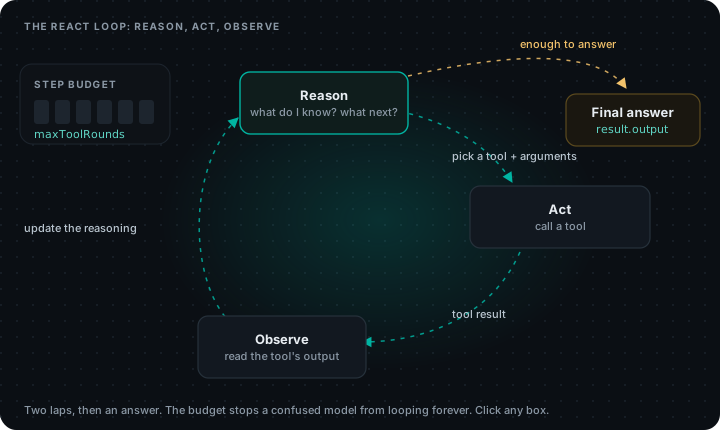
Here's the thing most explanations bury. A ReAct agent isn't a framework or a product. It's a loop with a budget. Once you see the loop, every agent framework starts to look familiar, because almost all of them run some version of it.
Where the name comes from
The pattern comes from a 2022 research paper, ReAct: Synergizing Reasoning and Acting in Language Models (Yao et al.). Before it, people tended to either ask a model to reason step by step (chain-of-thought) or let it take actions, but not both in the same transcript. The paper showed that interleaving the two worked better on question-answering and decision-making tasks: the reasoning keeps the plan on track, and the actions pull in facts the model doesn't have.
In the paper, every step was written out as text:
Question: Where is order A-1042? It was due Monday.
Thought: I need the current status of order A-1042.
Action: orders.lookup[A-1042]
Observation: status=shipped, carrier=DHL, eta=2026-11-06
Thought: It's late. I should check the late-delivery policy.
Action: policy.search[late delivery]
Observation: Refunds can be requested 5 days after the original date.
Thought: I have what I need.
Answer: Your order shipped with DHL and should arrive on 6 November...
That format is what people mean by ReAct prompting: you show the model this Thought / Action / Observation pattern in the prompt, parse the Action: line yourself, run the tool, paste the result back as an Observation:, and ask for the next step.
How a ReAct agent works today
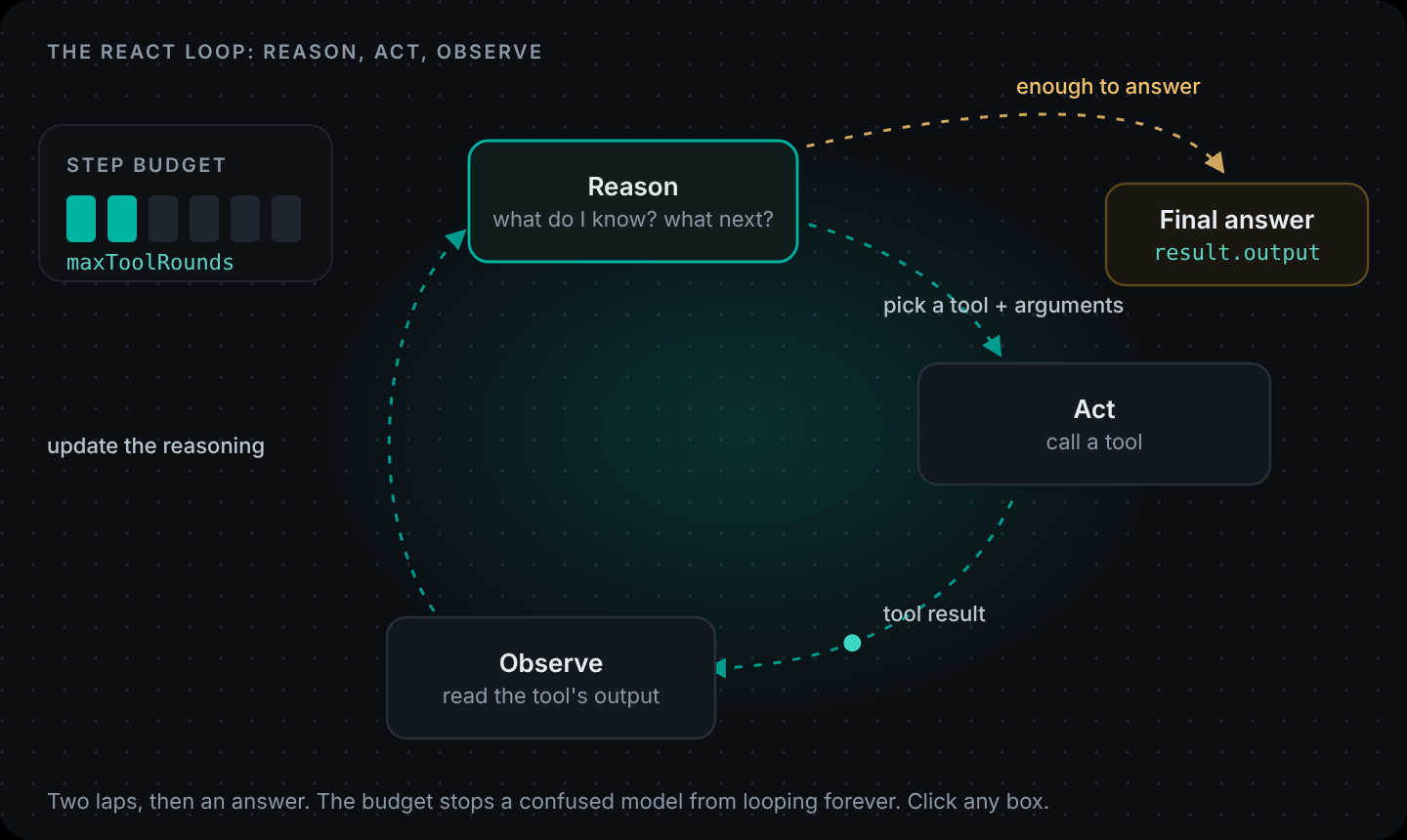
Most current models support tool calling natively, so you no longer parse Action: lines out of text. You send a list of tools with JSON schemas, and the model replies with a structured tool call. The loop is the same, just with cleaner plumbing:
- Reason. The model reads the goal and everything it has seen so far, and decides the next move.
- Act. It asks for a tool with specific arguments.
- Observe. Your code runs the tool and sends back the result.
- Repeat or answer. If it knows enough, it answers. If not, back to step 1.
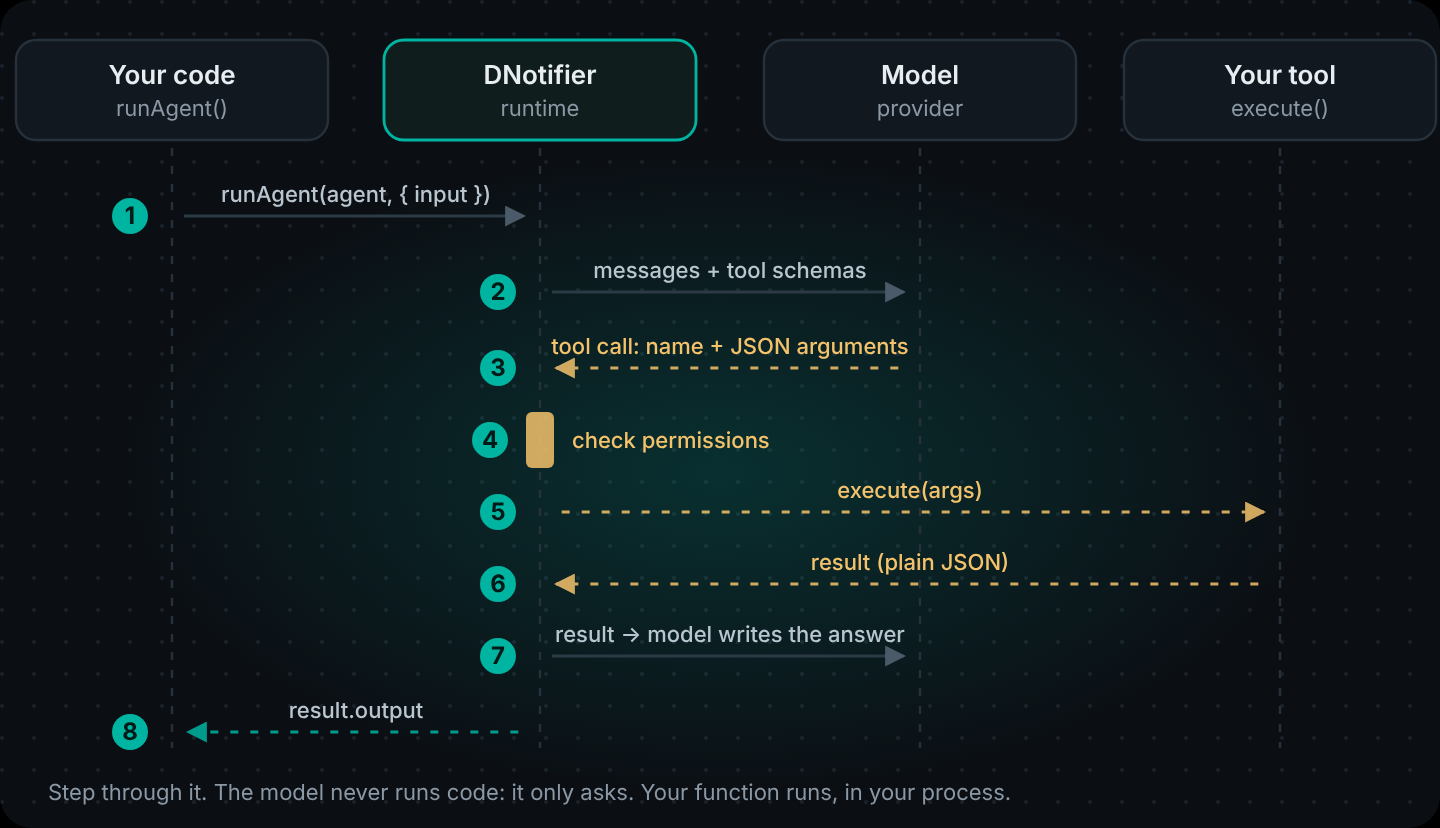
Here's that loop on a real support question, one step at a time:
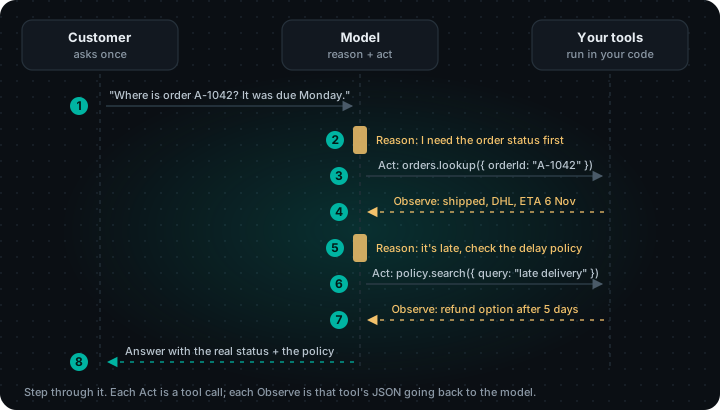
Notice what the model didn't do: it didn't guess the delivery date or invent a refund rule. Every fact in the final answer came from an observation. That's the whole value of a reason and act agent over a bare chatbot.
A ReAct agent example in JavaScript, by hand
The best way to understand agent loops is to write one once. Here is a complete ReAct agent with no framework, using the OpenAI Node SDK directly. It has one tool and a hard step limit.
// react-by-hand.mjs: a ReAct agent loop with no framework.
import OpenAI from "openai";

const openai = new OpenAI(); // reads OPENAI_API_KEY

const tools = {
  "orders_lookup": async ({ orderId }) =>
    orderId === "A-1042"
      ? { status: "shipped", carrier: "DHL", eta: "2026-11-06" }
      : { error: `No order ${orderId}` },
};

const toolSchemas = [{
  type: "function",
  function: {
    name: "orders_lookup",
    description: "Look up an order by id, like A-1042.",
    parameters: { type: "object", properties: { orderId: { type: "string" } }, required: ["orderId"] },
  },
}];

const messages = [
  { role: "system", content: "You help customers with orders. Use tools for facts; never guess." },
  { role: "user", content: "Where is order A-1042? It was due Monday." },
];

for (let step = 1; step <= 6; step++) {               // the budget
  const res = await openai.chat.completions.create({ model: "gpt-4o", messages, tools: toolSchemas });
  const msg = res.choices[0].message;
  messages.push(msg);

  if (!msg.tool_calls?.length) {                      // reason → answer
    console.log(msg.content);
    break;
  }
  for (const call of msg.tool_calls) {                // reason → act
    const args = JSON.parse(call.function.arguments);
    const result = await tools[call.function.name](args);
    console.log(`step ${step}: ${call.function.name}`, args, "→", result);
    messages.push({ role: "tool", tool_call_id: call.id, content: JSON.stringify(result) }); // observe
  }
}
That's the entire pattern in about 40 lines. Run it and you'll see one tool call, one observation, then an answer.
It's also not something you want to ship. Look at what's missing:
- Permissions. Any tool in the
toolsobject can be called with any arguments. - Identity. Nothing stops the model from looking up someone else's order.
- Error handling. A thrown error in a tool kills the whole run.
- Tracing. When it answers wrong on Tuesday, you have nothing to look at.
- Provider lock-in. The message format is OpenAI's. Switching to Claude or Gemini means rewriting the loop.
Every team that ships agents ends up writing these pieces. That's the part a runtime is for.
The same ReAct agent with DNotifier
With DNotifier you describe the tools and the agent, and the runtime runs the loop: model calls, tool calls, permission checks, the step limit and the trace.
// react-dnotifier.mjs
import { DNotifier } from "@dnotifier-realtime/dnotifier";

const notifier = new DNotifier({
  appId: process.env.DNOTIFIER_APP_ID,
  secret: process.env.DNOTIFIER_SECRET,
  transport: "http",
  userId: "react-demo",
  permissionEnforcement: "disabled", // local demo only; use "backend" in production
  // Print each step of the loop as it happens
  onAgentEvent: (event) => console.log("  ·", event.type, event.toolId ?? ""),
});
await notifier.connect();

const lookupOrder = notifier.tools.register({
  name: "orders.lookup",
  description: "Look up an order by id, like A-1042. Returns status, carrier and ETA.",
  inputSchema: {
    type: "object",
    properties: { orderId: { type: "string" } },
    required: ["orderId"],
  },
  async execute({ orderId }) {
    if (orderId !== "A-1042") return { error: `No order ${orderId}` };
    return { status: "shipped", carrier: "DHL", eta: "2026-11-06" };
  },
});

const agent = DNotifier.defineAgent({
  name: "order-react-agent",
  instructions: "You help customers with orders. Use tools for facts; never guess dates or policies.",
  provider: "open_ai",
  model: "gpt-4o",
  observability: true,
  tools: [lookupOrder],
  permissions: { "orders.lookup": ["execute"] },
});

const result = await notifier.runAgent(agent, {
  input: "Where is order A-1042? It was due Monday.",
  maxToolRounds: 4, // the step budget
});

console.log(result.output);
console.log("executionId:", result.executionId);
Same loop, different job split. maxToolRounds is the budget. permissions lists exactly which tools this agent may call. Because observability is on, every reason/act/observe step is recorded under the execution ID in your dashboard. And to try the agent on Claude instead, you change provider and model; the tool code stays as it is.
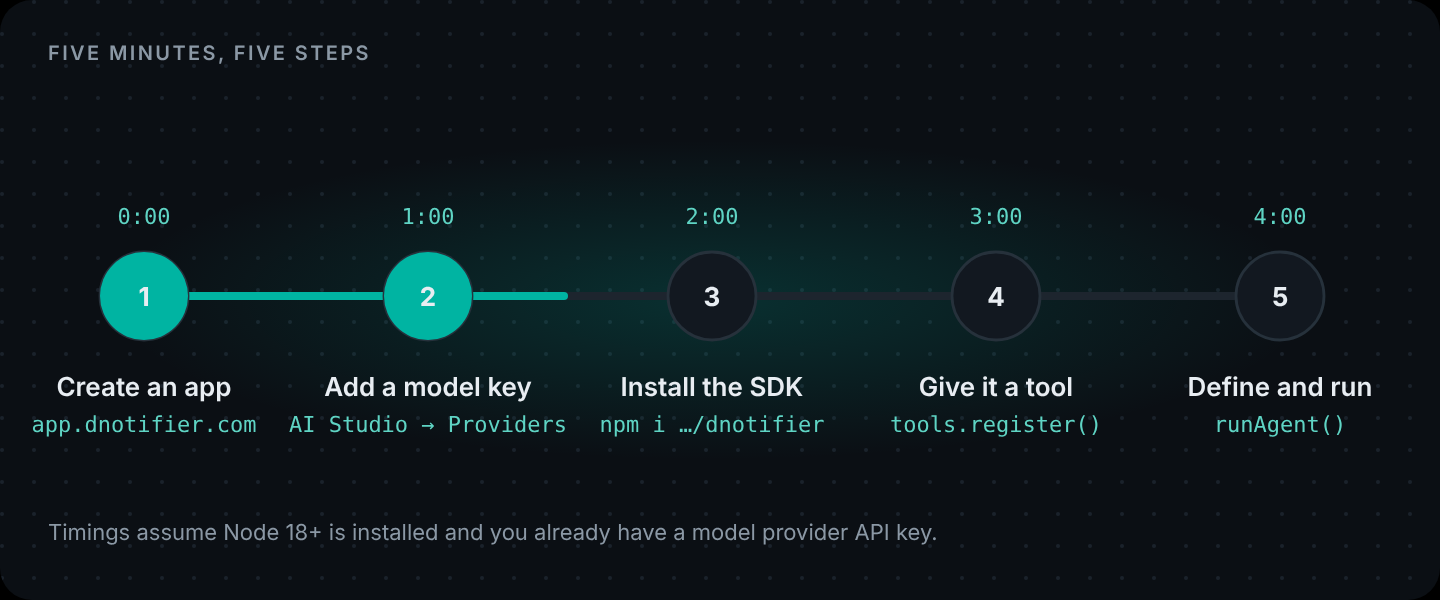
The shortest version of this loop, one tool in one file, is How to Create an AI Agent in 5 Minutes. The full version, with the signed-in customer attached to every tool call, a help-center search and a refund tool that waits for a person, is in How to Build an AI Agent: A Step-by-Step Guide.
ReAct agent in LangChain
If you're coming from LangChain: the ReAct agent LangChain ships today is create_agent, and it gives you this same pattern running on LangGraph's runtime. You pass a model and a list of tools, and it runs reason → act → observe until the model stops calling tools. So a "ReAct agent in LangChain" and the DNotifier agent above are the same idea. The differences are in what surrounds the loop: which languages you can write it in, where permissions are enforced, and what you have to host yourself.
How many steps should a ReAct agent take?
Fewer than you'd think. Every lap is a full model call, so a six-step answer costs roughly six times a one-step answer and takes six times as long. Some rules of thumb:
- Set the budget from the task, not from hope. An order question needs one or two tool calls. Give it 4, not 20.
- When the budget runs out, fail politely. Check
finishReasonand tell the user you couldn't finish, rather than showing a half-formed answer. - Make tools return everything the next step needs. If
orders.lookupalready returns the carrier and ETA, the model doesn't need a separateshipping.trackcall. Fewer laps, fewer chances to go wrong. - Write tool descriptions as instructions. "Use this before answering anything about an order" does more for an agent loop than any amount of prompt tuning. There's more on this in Tool Calling Explained.
When a ReAct agent is the wrong choice
ReAct is great when you don't know the steps in advance. If you do know them (classify the ticket, then draft a reply, then send it for review), a fixed workflow is cheaper, faster and easier to test. You don't need the model to decide something you already decided.
A rough guide:
| The task… | Use |
|---|---|
| has steps that depend on what the model finds | ReAct agent |
| always runs the same steps in the same order | AI workflow |
| has a few fixed steps, one of which is open-ended | Workflow with an agent inside one step |
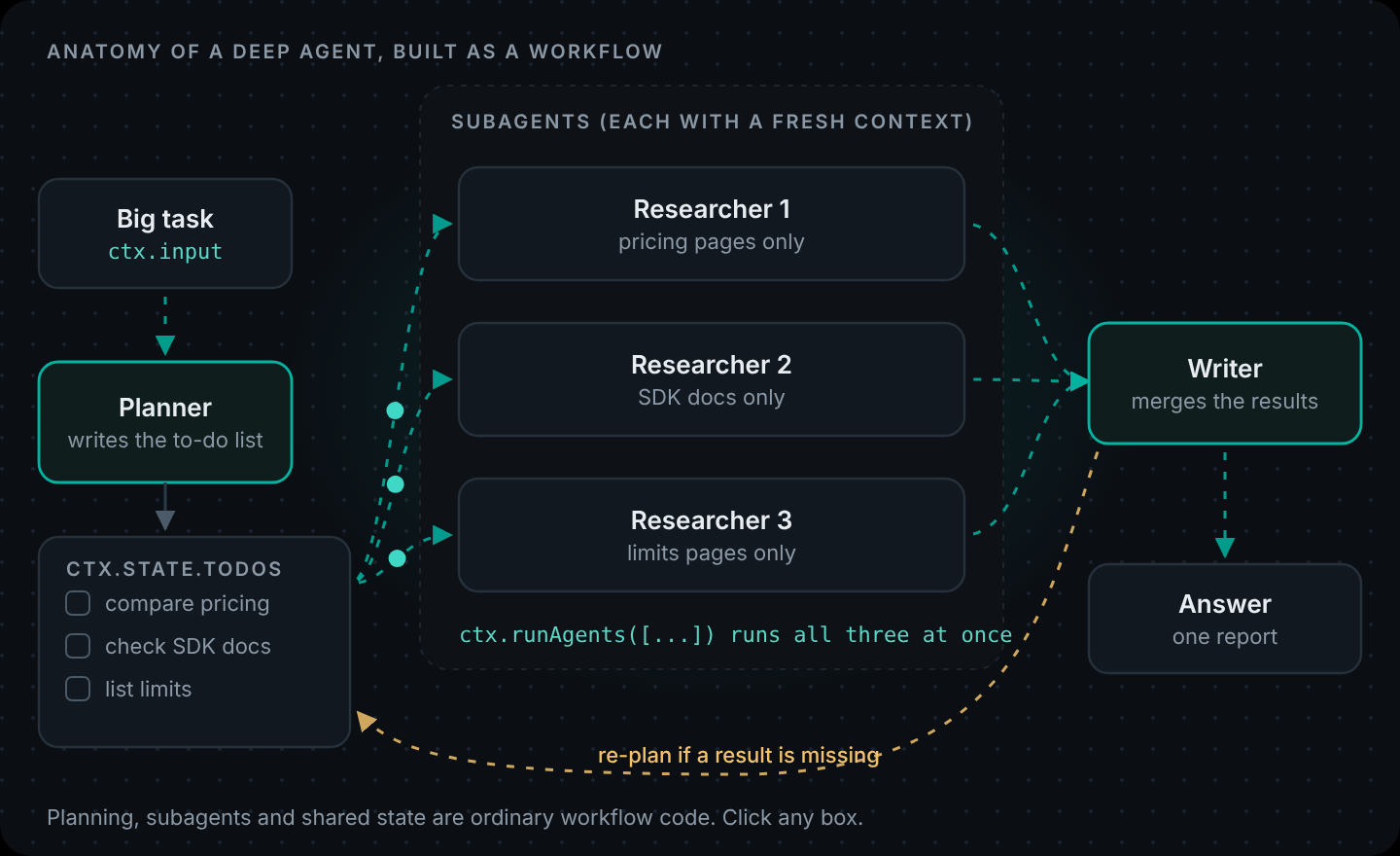
| is long enough that one conversation fills up | Deep agent |
ReAct with local models
Small local models can run a ReAct loop, but they're less reliable at choosing tools and formatting arguments. If you're running models through Ollama, keep the tool list short, keep schemas flat, and give the agent a smaller step budget. There's more on what to expect in Tool Calling on Local Models.
Using a ReAct agent from a React app
Different React, same question we get a lot. Your React.js front end should never run the agent itself, because the agent needs your secret and access to your data. The pattern is: the React component posts the message to an endpoint on your server, and the server runs the agent. AI Agent Architecture walks through it with a working chat component.
Run the agent loop without writing it. DNotifier runs reason → act → observe across 8 model providers, with tool permissions, a step budget and a trace for every run. Create your app · Agent docs
FAQ
What is a ReAct agent?
An AI agent that interleaves reasoning and acting: it decides what it needs, calls a tool, reads the result, and repeats until it can answer. The name comes from the 2022 paper "ReAct: Synergizing Reasoning and Acting in Language Models".
Is a ReAct agent related to React.js?
No. ReAct means reason + act. React.js is a front-end library. You can call a ReAct agent from a React app through your backend, but they're unrelated.
What is ReAct prompting?
The original way to build the pattern: a prompt that shows the model a Thought / Action / Observation format, with your code parsing each Action line and pasting back the Observation. Native tool calling has mostly replaced the text format, but the loop is the same.
What is an agent loop?
The cycle every tool-using agent runs: send the conversation and tool list to the model, run any tool it asks for, send the result back, and repeat until it answers or hits a step limit.
Does LangChain use the ReAct pattern?
Yes. LangChain's create_agent implements a ReAct-style agent on top of LangGraph's runtime. Most agent frameworks, including DNotifier's runAgent, run some version of the same loop.
How do I stop a ReAct agent from looping forever?
Give it a budget. In DNotifier that's maxToolRounds on runAgent. Also make tools return clear errors as data so the model can change course instead of retrying the same call.