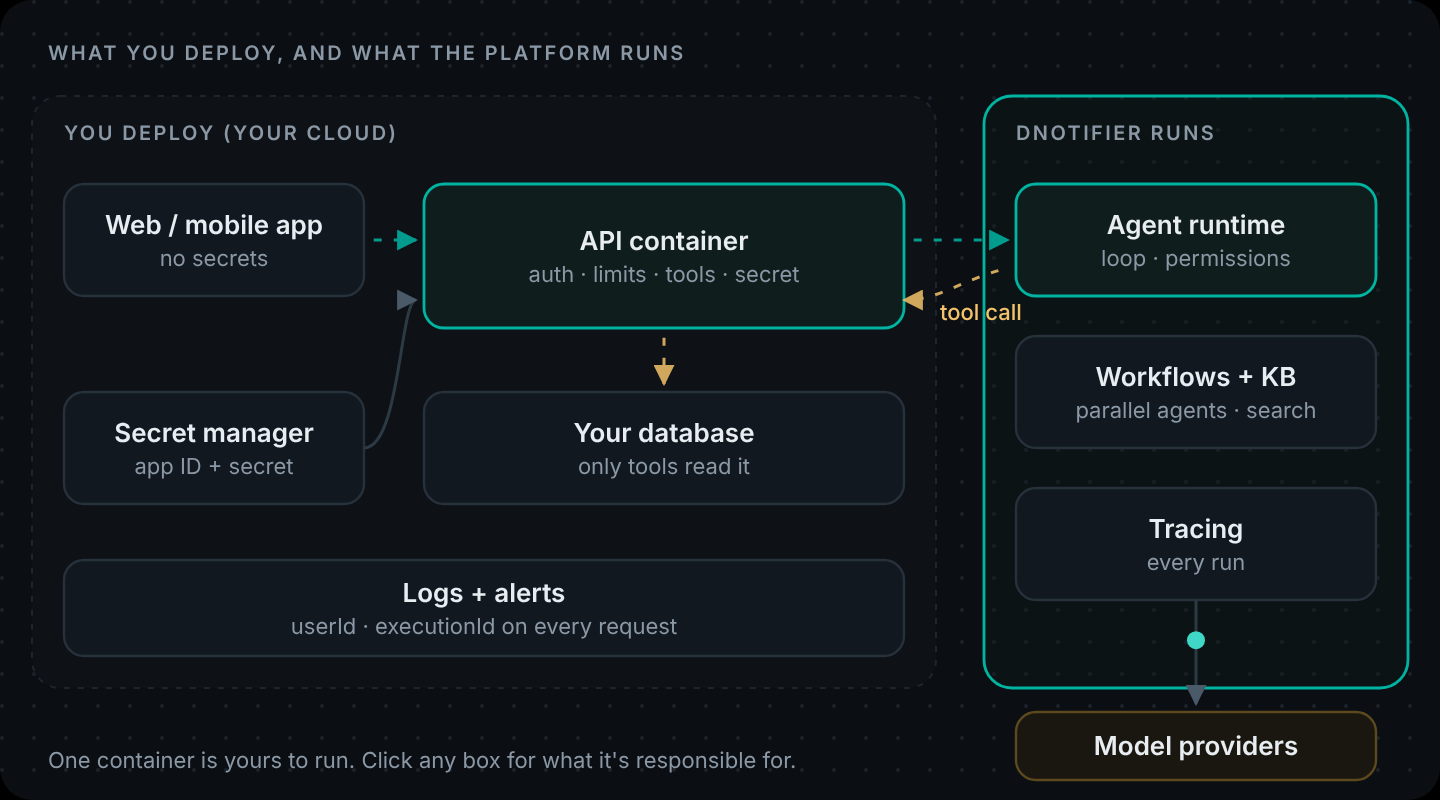
Short answer: split the agent into two parts. Let a managed agent runtime run the agent loop, model calls, tool permission checks and tracing. You deploy one small API container that authenticates users, holds the secret and runs your tools against your data. That container goes on a managed service you already know (Cloud Run, Amazon ECS or Azure Container Apps), with the secret in the cloud’s secret manager, limits on every run and the trace ID in your logs. You still deploy and run that container; you just don’t build an agent platform.
The proof of concept worked. The agent answers questions, calls the right tools, and the demo went well. Then someone asks when it can go live, and the list of unknowns gets long quickly: where does it run, who can call it, what happens when it’s slow, what does it cost at a thousand users, and how do we find out why it said that to a customer?
You don’t need a platform team to answer those questions for one agent. You need to know which parts to build, which parts to rent, and which six things usually break first.
The six things that break between a demo agent and production
1. The secret is in the wrong place
Demos often call the model or the agent platform straight from the frontend, with a key in an environment variable that ends up in the browser bundle. Anything shipped to a browser or a phone can be extracted.
Fix: the key lives only on your server, loaded from a secret manager at startup. The frontend calls your API with the user’s normal session.
2. Nobody checked who’s asking
In the demo, there was one user: you. In production, the agent’s tools read real customers’ data, and the model fills tool arguments from text that users type.
Fix: authenticate every request in your API, attach the user in code, and have every tool filter by that user. The model never supplies the user ID. AI Agent Architecture shows the AsyncLocalStorage pattern.
3. Requests take longer than the platform allows
Agent runs take seconds, sometimes tens of seconds. Load balancers, CDNs and serverless platforms all have request timeouts, and some are short.
Fix: keep agent runs short with a round limit and a timeout, stream progress to the client for anything over a few seconds, and move long work (research, multi-step workflows) to a background worker that reports back when it’s done.
4. Retries create duplicates
Networks fail, users double-click, clients retry. If a tool does something (opens a ticket, sends a message), a retry can do it twice.
Fix: make action tools idempotent. Use a database constraint and a single atomic insert-or-fetch operation so concurrent retries return the same pending request.
async execute({ orderId, reason }) {
  const { userId } = currentUser();
  // Application helper backed by a unique pending request per user and order.
  const ticket = await db.refunds.getOrCreatePending({ userId, orderId, reason });
  return { ok: true, ticketId: ticket.id, status: "pending_review" };
}
5. Costs nobody predicted
Every agent run is one or more model calls. A loop, a huge pasted input or a scripted abuser can multiply that quickly.
Fix: cap input length and tool rounds, rate-limit per user, and watch tokens per run. Check your plan’s limits from code with notifier.getPlanLimits() if you want to show a friendly message before you hit them.
6. No way to answer “why did it say that?”
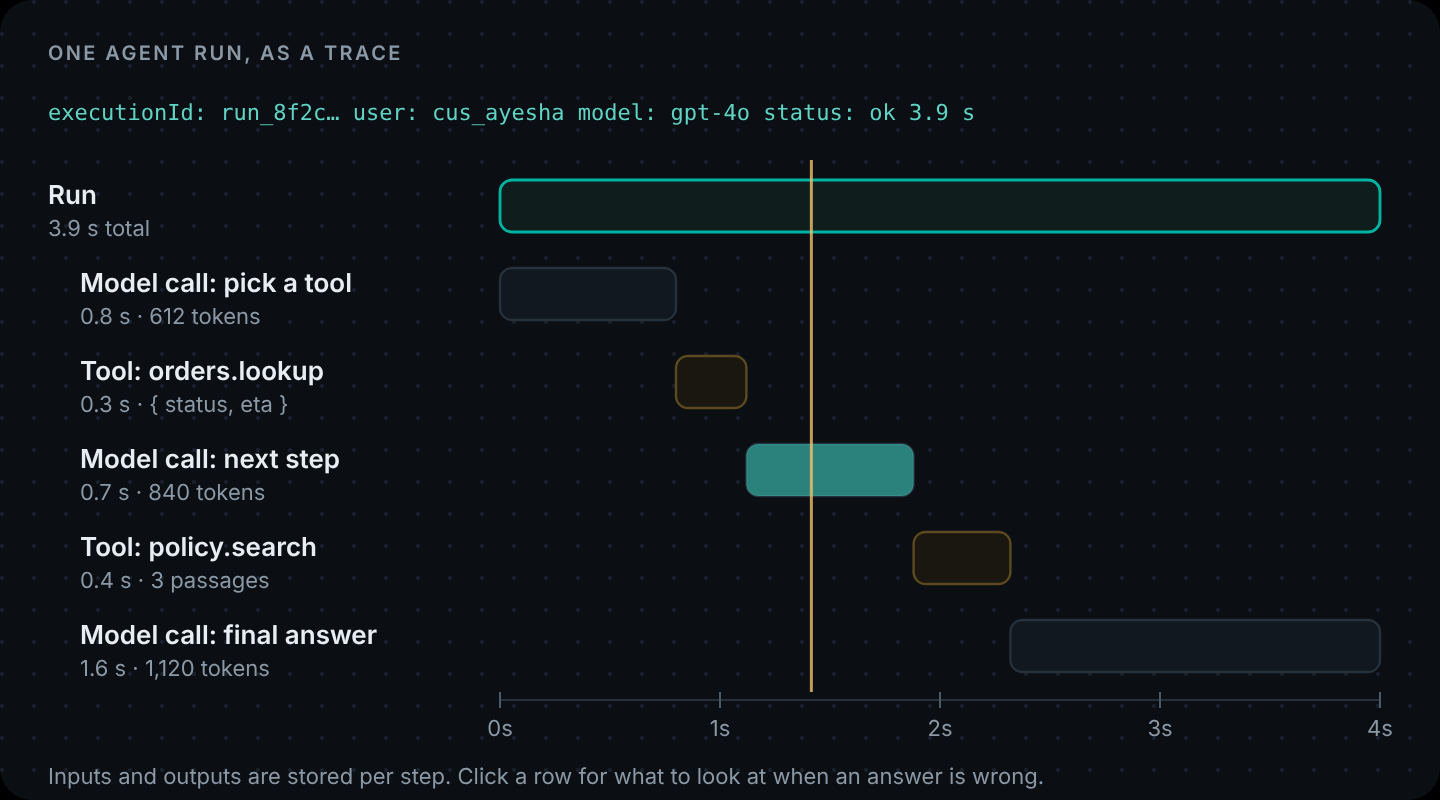
When support forwards a screenshot of a bad answer, you need to replay that exact run.
Fix: turn on tracing for every agent and workflow, and log the run’s executionId next to the request and user ID in your own logs. See AI observability platforms compared for the options.
What you deploy, and what the platform runs
With DNotifier, the work splits like this:
| You deploy and run | DNotifier runs |
|---|---|
| Your web or mobile app | The agent loop and tool-call orchestration |
| One API container: auth, rate limits, your tools, the secret | Model calls through 8 providers, with your own provider keys |
| Your database and existing services | Permission checks before each tool call (permissionEnforcement: "backend") |
| Logs and alerts in your cloud | Workflows, parallel agents, knowledge base and search |
| Tracing of every run, session logs and usage |
That’s the honest version of “without building custom infrastructure”. You still deploy one container. You don’t build or host an agent runtime, a vector database, a tracing system or a model gateway.
Deploy an AI agent to Google Cloud Run in about 10 minutes
We’ll use the order-help API from How to Build an AI Agent: a small Express server with the agent’s tools and an /api/agent route. Any Node API with the same shape works.
Before deploying to a reachable endpoint, replace the tutorial’s x-demo-user middleware with real session authentication. Configure the client to derive identity from that session and confirm the API rejects requests without it.
1. Add a health check
// index.js
app.get("/healthz", (req, res) => res.send("ok"));

const port = Number(process.env.PORT ?? 3001); // Cloud Run sets PORT
app.listen(port, () => console.log(`order-help API on port ${port}`));
2. The Dockerfile
FROM node:22-slim
WORKDIR /app
COPY package*.json ./
RUN npm install --omit=dev
COPY . .
ENV NODE_ENV=production
EXPOSE 3001
CMD ["node", "index.js"]
NODE_ENV=production matters here: the example’s client uses permissionEnforcement: "backend" in production, so the server checks tool permissions.
Exclude local credentials and dependencies from the container build context. Put these entries in .dockerignore and exclude the same files in .gcloudignore when deploying from source.
node_modules
.env
.env.*
.git
3. Store the secret
gcloud secrets create dnotifier-secret --data-file="$DNOTIFIER_SECRET_FILE"Set DNOTIFIER_SECRET_FILE to the path of a protected file containing the secret outside the source directory. Grant the Cloud Run service account Secret Manager Secret Accessor on that secret. Cloud Run secret configuration
4. Deploy
gcloud run deploy order-help-api --source . --region europe-west1 \
  --set-env-vars "DNOTIFIER_APP_ID=${DNOTIFIER_APP_ID},NODE_ENV=production" \
  --set-secrets DNOTIFIER_SECRET=dnotifier-secret:1 \
  --timeout 120 \
  --allow-unauthenticated
Set DNOTIFIER_APP_ID to your app ID. Substitute the secret version number if it differs from 1. --allow-unauthenticated makes the URL reachable from browsers; your app’s own auth middleware still decides who can use the agent. --timeout gives longer agent runs room; keep your own maxToolRounds and timeouts well under it.
5. Test it
curl -s https://order-help-api-xxxxx.a.run.app/healthz
curl -s -X POST https://order-help-api-xxxxx.a.run.app/api/agent \
  -H "Content-Type: application/json" \
  -H "Cookie: session=${SESSION_TOKEN}" \
  -d '{"message":"Where is order A-1042?"}'
Use the deployed URL and a valid test session cookie from your application. Check that the agent endpoint rejects the same request without a valid session. The successful response includes an executionId you can look up in DNotifier.
Deploy an AI agent on AWS, Azure or Google Cloud
The same container runs on all three clouds. Here’s the reference architecture and the commands for each:
Deploy to AWS
| Piece | AWS service | Why |
|---|---|---|
| React build | S3 bucket behind CloudFront | Static files on a CDN. Add a second CloudFront behavior for /api/* pointing at the load balancer, so the browser calls the same domain. |
| Node container | Amazon ECS on Fargate, behind an Application Load Balancer | Fargate runs the API container. Set the load balancer idle timeout for your streaming traffic. |
| App ID + secret | AWS Secrets Manager | Injected into the task as environment variables through the task definition’s secrets block. Never baked into the image. |
| Your data | Amazon RDS or DynamoDB | Only your tool code talks to it, from inside the VPC. |
| Logs | CloudWatch Logs | Log the DNotifier executionId next to each request, so you can jump from a CloudWatch line to the run trace. |
| Models (optional) | Amazon Bedrock via the aws_bedrock provider | Add Bedrock in AI Studio → Providers if you want inference billed to your AWS account. Any other provider works too. |
AWS closed App Runner to new customers in 2026 and recommends ECS Express Mode for a similar managed deployment. AWS App Runner availability change
# Set AWS_ACCOUNT_ID and AWS_REGION for your target account and region.
registry="${AWS_ACCOUNT_ID}.dkr.ecr.${AWS_REGION}.amazonaws.com"

# Store a JSON file with DNOTIFIER_APP_ID and DNOTIFIER_SECRET from outside the build context.
aws secretsmanager create-secret --region "$AWS_REGION" --name dnotifier/prod \
  --secret-string "file://${DNOTIFIER_CREDENTIALS_FILE}"

# Create the repository once, then build and push the image.
aws ecr create-repository --region "$AWS_REGION" --repository-name order-help-api
aws ecr get-login-password --region "$AWS_REGION" | docker login --username AWS --password-stdin "$registry"
docker build -t "$registry/order-help-api:1" .
docker push "$registry/order-help-api:1"

# 3. In the ECS task definition, pull the values from Secrets Manager:
#   "secrets": [
#     { "name": "DNOTIFIER_APP_ID", "valueFrom": "<secret-arn>:DNOTIFIER_APP_ID::" },
#     { "name": "DNOTIFIER_SECRET", "valueFrom": "<secret-arn>:DNOTIFIER_SECRET::" }
#   ],
#   "portMappings": [{ "containerPort": 3001 }]
Create the Fargate service with the image you pushed, route HTTPS traffic through the load balancer, and use /healthz for its target health check. Grant the task execution role access to the secret. ECS secret injection
Watch out: Set the load balancer’s idle timeout above your longest agent run if you use the streaming endpoint.
Deploy to Azure
| Piece | Azure service | Why |
|---|---|---|
| React build | Azure Static Web Apps | Link the Container App as the site’s backend (Standard plan) so /api calls stay on the same domain, or call the API’s own URL with CORS. |
| Node container | Azure Container Apps | Managed containers with HTTPS ingress, scale rules and long-lived connections. |
| App ID + secret | Container Apps secrets, backed by Key Vault | Store the secret in Key Vault and reference it from the app with a managed identity; expose it as an env var with secretref:. |
| Your data | Azure Database for PostgreSQL or Cosmos DB | Reachable only from your app’s environment. |
| Logs | Azure Monitor / Application Insights | Log the DNotifier executionId with each request. |
| Models (optional) | Azure OpenAI via the azure_ai provider | Keeps model usage on your Azure bill and in your chosen region. Any other provider works too. |
Assign the app a managed identity and grant it access to the Key Vault secret before setting the secret reference. Set KEY_VAULT_SECRET_URI, MANAGED_IDENTITY_ID (the user-assigned identity resource ID), and DNOTIFIER_APP_ID before running the relevant commands. Azure Container Apps secrets
# 1. Build from source and deploy (creates the environment if needed)
az containerapp up --name order-help-api --resource-group dnotifier-rg \
  --location westeurope --source . --ingress internal --target-port 3001

# 2. Attach a managed identity that already has access to the Key Vault secret
az containerapp identity assign -n order-help-api -g dnotifier-rg \
  --user-assigned "$MANAGED_IDENTITY_ID"
az containerapp secret set -n order-help-api -g dnotifier-rg \
  --secrets "dnotifier-secret=keyvaultref:${KEY_VAULT_SECRET_URI},identityref:${MANAGED_IDENTITY_ID}"
az containerapp update -n order-help-api -g dnotifier-rg \
  --set-env-vars "DNOTIFIER_APP_ID=${DNOTIFIER_APP_ID}" DNOTIFIER_SECRET=secretref:dnotifier-secret NODE_ENV=production
Enable external ingress after verifying app authentication if your frontend needs to reach the API. Linking Azure Static Web Apps configures the backend to accept proxied traffic from the linked site by default. Azure Static Web Apps linked backends
Deploy to Google Cloud
| Piece | Google Cloud service | Why |
|---|---|---|
| React build | Firebase Hosting | Rewrite /api/** to the Cloud Run service so the browser calls the same domain. Hosting-to-Cloud Run requests time out after 60 seconds, so keep agent runs short or call Cloud Run’s URL directly for long streams. |
| Node container | Cloud Run | Deploy straight from source. Cloud Run sets PORT, which the example server already reads. |
| App ID + secret | Cloud Run environment and Secret Manager | Set the app ID as an environment variable and use --set-secrets to inject the secret from Secret Manager. |
| Your data | Cloud SQL or Firestore | Only your tool code reads it. |
| Logs | Cloud Logging | Log the DNotifier executionId with each request. |
| Models (optional) | Gemini via the google_gemini provider | Add your Gemini key in AI Studio → Providers. Any other provider works too. |
gcloud run deploy order-help-api --source . --region europe-west1 \
  --set-env-vars "DNOTIFIER_APP_ID=${DNOTIFIER_APP_ID},NODE_ENV=production" \
  --set-secrets DNOTIFIER_SECRET=dnotifier-secret:1 \
  --timeout 120 \
  --allow-unauthenticated
Watch out: Cloud Run scales to zero by default. The first request after a quiet period pays a cold start; set --min-instances 1 if that matters.
Long-running agents and workflows
Not every agent fits in a request. Research agents, lead workflows and anything that waits for a person approving something should run in a worker: a container that stays up (minimum one instance, no scale-to-zero), starts runs from a queue or webhook, and notifies the user when the result is ready. How to Build an AI Workflow in Code has the worker version, with deployment notes for each cloud.
Production settings worth setting on day one
- Minimum instances. Scale-to-zero saves money but adds a cold start to the first request after a quiet period. One warm instance is usually worth it for a customer-facing agent.
- Concurrency and timeouts. Agent requests spend most of their time waiting on the model, so one instance can serve many at once. Set the platform timeout above your longest expected run.
- One region, close to your data. Your tools query your database; put the container next to it.
- Structured logs with
userId,executionIdand route on every agent request. - Alerts on error rate, p95 latency and runs that hit the round limit.
A pre-launch checklist
- The secret is only in the secret manager and the running container
- Every request is authenticated, and tools read the user from the session
permissionEnforcement: "backend"is on in production- Input length caps, per-user rate limits,
maxToolRoundsand timeouts are set - Action tools are idempotent, and irreversible actions need a person’s approval
- Tracing is on, and
executionIdis in your logs - A health check endpoint exists and the platform uses it
- You’ve run twenty real questions against the deployed version and read the traces
What it costs to run
Three things show up on the bill: your DNotifier plan (AI features start on the Starter plan, $49 a month), your model provider’s tokens (billed directly to you, with your own key) and your cloud’s cost for the API container. For a single agent the container is usually the smallest part. Tokens grow with traffic, prompt length and tool rounds, which is why the limits above matter. DNotifier pricing
Create your app, then deploy the order-help API with the Dockerfile above.
FAQ
How do I deploy AI agents to production without building custom infrastructure?
Use a managed agent runtime for the agent loop, model calls, permissions and tracing, and deploy one small API container that handles auth, holds the secret and runs your tools. Put that container on a managed service such as Cloud Run, Amazon ECS or Azure Container Apps, with the secret in the cloud’s secret manager.
How do I deploy an AI agent on AWS, Azure or Google Cloud?
Package your agent API as a container. On AWS, run it on Amazon ECS with Fargate behind a load balancer and keep the secret in Secrets Manager. On Azure, use Azure Container Apps with Key Vault-backed secrets. On Google Cloud, deploy to Cloud Run and mount the secret from Secret Manager.
What do I need to run AI agents in production?
Server-side secrets, authentication with tools scoped to the signed-in user, server-side permission checks, limits on input, tool rounds and time, idempotent action tools, human approval for irreversible actions, tracing for every run, and a deployment with health checks and logs.
Do I still need DevOps to deploy an AI agent?
A little. You deploy and monitor one container, like any small web service. A managed agent platform removes the need to build and host the agent runtime, vector database, tracing and model gateway yourself.
Where should an AI agent run: in the browser or on a server?
On a server. The agent needs secrets and access to your data, and anything in a browser or mobile app can be extracted. The app calls your API, and your API runs the agent.
How do I handle long-running AI agents in production?
Run them in an always-on worker rather than inside an HTTP request. Start runs from a queue or webhook, return a job ID, and notify the user when the result is ready. Make each step safe to retry.